

Reliable tracking powers campaign bidding, attribution, budget decisions, and revenue measurement. However, collecting accurate marketing data has become harder as browsers, privacy controls, and ad-blocking tools restrict traditional tracking methods.
Traditional client-side tracking depends on a user’s browser successfully loading code and sending marketing signals. Ad blockers, privacy controls, connectivity failures, and shorter identifier lifespans can easily disrupt it.
Server-side tracking gives you more control over how those signals are collected and shared. Your organization can send selected events from a controlled server environment to the platforms used for advertising, analytics, and measurement.
If you’re a paid media team leader, this guide will walk you through everything you need to know about server-side tracking. It explains how the architecture works, where it fits within your stack, and which platforms and tools you should consider.
What Is Server-Side Tracking?
Server-side tracking collects, processes, and sends marketing data through a server environment your organization controls. This reduces the need to send every event directly from a visitor’s browser to external platforms.
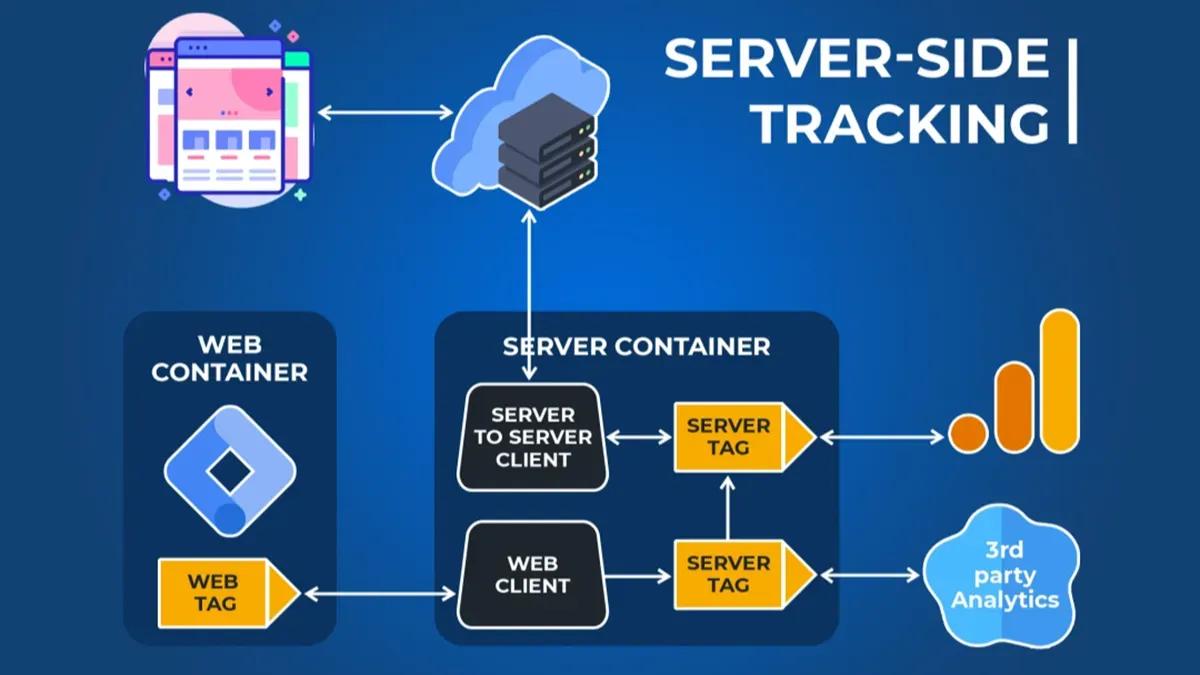
In a typical server-side tagging setup, your website sends an event to a controlled endpoint. A server container then validates, modifies, removes, or enriches the event before forwarding approved fields to platforms, like Google Analytics 4, Google Ads, or the Meta Conversions API.
Server-side tracking does not necessarily eliminate browser tracking. Most paid media teams begin with a hybrid model in which client-side tags still capture page interactions, while the server handles processing and onward transmission.
A pure implementation can instead generate events directly from a backend, CRM, payment system, or ecommerce platform.
How Does Server-Side Tracking Work?
In server-side tracking, data collected from the user’s browser is sent to a server for cleaning and processing rather than going directly to a platform.
Here’s a Google Tag Manager (GTM) implementation that shows exactly how server-side tracking happens:
- An interaction creates an event: A visitor submits a lead form, completes a purchase, or performs another action. The website may place information such as the event name, transaction value, currency, order ID, and consent state in the data layer.
- The website sends the event to your tagging endpoint: Your web container or Google tag sends the request to a tagging server your organization controls. Teams commonly configure this through a path on the main domain or a dedicated subdomain.
- A client receives and interprets the request: Inside the GTM server container, a client claims the incoming request and converts its data into an event the container can process.
- The container applies your data rules: Variables retrieve the required values, while triggers determine which tags should run. Transformations can remove sensitive fields, rename parameters, exclude unnecessary information, or restrict the data available to particular tags.
- Approved data is forwarded to each platform: The container can send different versions of the same event to different destinations. For example, a confirmed ecommerce purchase might be forwarded to Google Analytics through the Google Analytics 4 Measurement Protocol or to Meta through its Conversions API.
Now, here’s how it works in light of a specific event.
Consider a customer who clicks a paid social ad and completes an order. The browser may send an initial purchase event to your tagging endpoint. Your backend can then confirm the transaction using the actual order record and provide the final revenue value.
When browser and backend events describe the same purchase, your implementation must include a shared event or transaction ID. This allows advertising platforms to identify duplicate records instead of counting the order twice.
The server can then remove fields that are not required, apply the customer’s consent choices, and prepare an approved payload for each destination.
Insider tip: Treat the server as a controlled routing and validation layer, rather than a system that automatically forwards every available field. Each destination should receive only the information required for an approved measurement purpose. This can reduce unnecessary requests, limit infrastructure usage, and make ongoing governance easier.
Why Server Tracking Matters in 2026: Cookie Limitations, Ad Blockers, and Privacy Regulations
Paid media signal loss is not the result of one policy change. It develops across several parts of the measurement environment:
- Browser restrictions that limit cross-site tracking
- Ad blockers that prevent scripts and network requests from loading
- Shorter lifespans for browser identifiers
- Consent choices that reduce the data available to advertising platforms
- Privacy laws that govern how personal data can be collected, processed, and shared
- Breaks between website activity, CRM records, and final revenue outcomes
These limitations create inconsistent attribution records. Two customers may follow a similar path and complete the same conversion, yet one journey may contain far fewer measurable touchpoints.
The situation is also more nuanced than the widely predicted ‘cookieless future.’
Google Chrome hasn’t yet phased out third-party cookies, as many feared. But it’s not guaranteed that it won’t in the future.
For paid media teams, this means cookie deprecation is not a single deadline you can plan around. It’s an ongoing fragmentation of browser behavior, platform APIs, consent signals, and identity availability.
Other browsers already apply stronger restrictions. For instance, Apple’s Intelligent Tracking Prevention blocks all third-party cookies by default in Safari.
These differences matter when a campaign has a long consideration cycle.
Consider a prospect who clicks a search ad on Safari, returns eight days later through an email, submits a demo request, and becomes a qualified opportunity after another three weeks. A browser identifier may no longer reliably connect those stages.
On the other hand, a controlled server integration can instead use the CRM record to send the qualified lead or closed revenue outcome back to the relevant platform. However, your team still needs:
- The required campaign identifiers
- An appropriate legal basis
- Valid consent where required
- A reliable connection between the ad interaction and CRM record
Privacy regulation adds an equally important constraint.
For example, under the General Data Protection Regulation (GDPR), regulators in the European Union (EU) can impose fines of up to €20 million or 4% of a company’s total annual worldwide turnover, depending on which amount is higher and the nature of the violation.
Moving collection to a server doesn’t remove the transparency, purpose limitation, security, or lawful basis requirements.
What Are the Benefits of Server-Side Tracking?
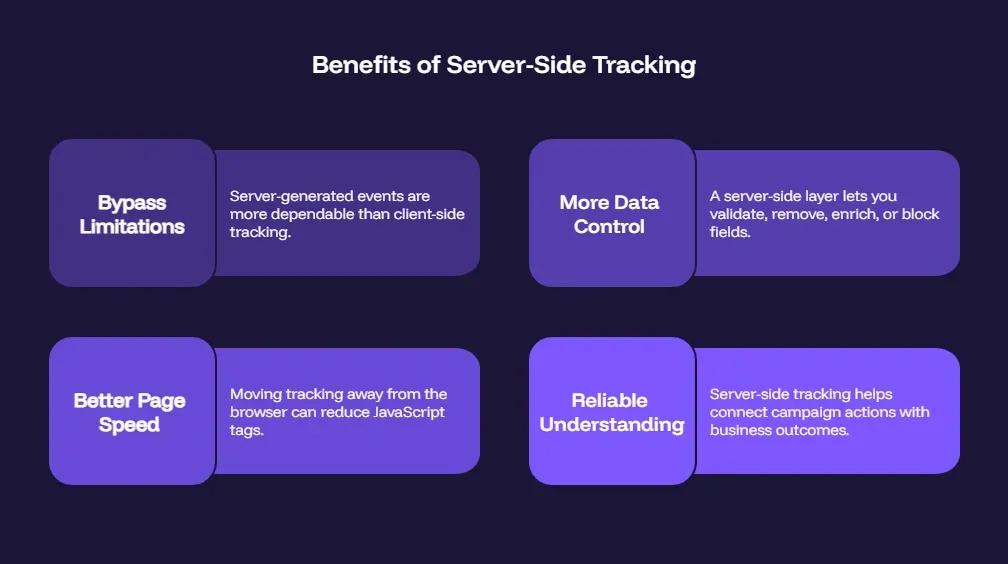
The main value of server-side tracking is that it provides paid media teams with a more reliable and controlled way to integrate website activity, backend systems, and advertising platforms. It also addresses the limitations of client-side tracking, like browser cookie restrictions.
Let’s discuss these benefits in more detail:
1. Bypass Limitations of Client-Side Tracking
Client-side tracking can fail when scripts are blocked, browsers restrict identifiers, or users leave before a request completes.
Server-generated events are more dependable for confirmed outcomes such as purchases, qualified leads, renewals, and booked appointments. These events can come directly from your CRM, ecommerce platform, booking system, or payment processor.
Pro tip: A hybrid setup is usually the most practical approach. Use browser events for immediate customer behavior and server events for verified business results. Shared event IDs are essential to prevent browser and server records from being counted twice.
2. More Data Control
A server-side layer lets you validate, remove, enrich, or block fields before sending data to Google Analytics, Meta, or other ad platforms.
This gives your team more control over:
- Personal data
- Consent status
- Event quality
- Parameters shared with each platform
- The destinations that receive each event
For example, you can send order value and currency to an advertising platform while excluding internal margin data or unnecessary customer fields. This supports stronger data governance, but it also requires clear access controls, retention rules, and technical ownership.
3. Better Page Speed
Moving some tracking and vendor communication away from the browser can reduce the number of JavaScript tags. It may also limit duplicate network requests.
This can improve page performance and user experience on landing pages with large or poorly managed tag setups.
For instance, in a Flowhub study, Cumulative Layout Shift decreased from 0.635 to 0.154 after server-side tracking was introduced. Cumulative Layout Shift is a Core Web Vitals metric that measures visual stability.
The improvement is not automatic. You may still need client-side tags for clicks, form interactions, and page navigation, so teams should compare request counts, Core Web Vitals, conversion rate, and revenue before and after implementation.
Pro Tip: Use our landing page alignment guide to improve conversions.
4. More Reliable Understanding of Conversions and Lifecycle Data
Server-side tracking helps connect early campaign actions with later business outcomes. Instead of optimizing only for form submissions or first purchases, you can send qualified leads, repeat orders, retained subscriptions, refunds, and closed revenue back to analytics and advertising systems.
This can improve marketing attribution, value-based bidding, and ROAS targets by helping platforms distinguish high-value customers from low-quality conversions.
However, ad-platform attribution should still be checked against CRM, analytics, finance, and incrementality data rather than treated as the definitive source of truth.
Where Does Server-Side Tracking Fit in the Paid Media Stack?
Server-side tracking sits between your website, CRM, ecommerce platform, and advertising channels. Its role is to standardize approved events, enrich them with verified business data, and send the right information to each destination. But at a higher level, it can provide the right intelligence to scale paid media.
Let’s explore how it can work for different marketing channels and events:
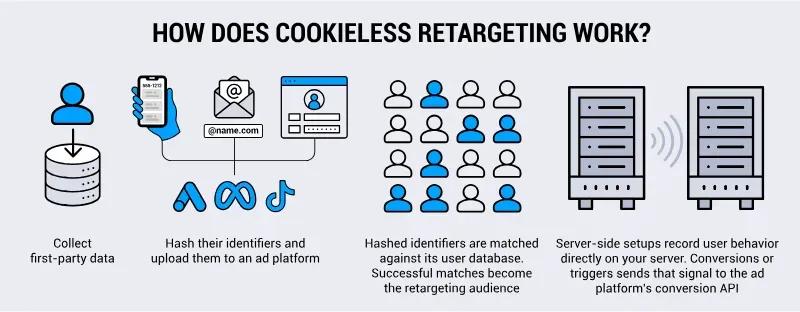
- Meta Conversions API: Sends website, CRM, and offline events directly to Meta. It is usually most effective when used alongside the Meta Pixel, with matching event IDs to prevent duplicate conversions.
- Google Ads enhanced conversions: Uses hashed first-party customer information to improve conversion matching. It is especially useful when leads become qualified opportunities or sales after the initial website visit.
- Google Tag Manager server-side: Provides a central routing layer for validating, modifying, and distributing events. It is a practical choice for teams that already use Google Tag Manager and need more control over data flows.
- GA4 server-side tagging: Routes analytics events through a controlled server endpoint before they reach Google Analytics 4. This can improve governance, but it will not fix inconsistent event names or poor analytics design.
- TikTok Events API: Sends website, app, CRM, and offline outcomes directly to TikTok. Most advertisers should combine it with the TikTok Pixel and use consistent event IDs for deduplication.
- LinkedIn Conversions API: Connects B2B campaign activity with later outcomes such as qualified leads, sales meetings, opportunities, and closed revenue. It’s best for long sales cycles.
- CRM and CDP integrations: Systems such as Salesforce, HubSpot, Segment, and Klaviyo provide lifecycle and customer-value data that browser tracking cannot capture. The server-side layer then formats and distributes those outcomes to analytics and ad platforms.
The strongest setup combines browser behavior with verified backend outcomes. Client-side tags capture immediate interactions, while server-side connections provide the conversion and lifecycle data needed for better measurement and optimization.
Client-Side vs. Server-Side Tracking
The key difference is where event processing occurs. Client-side tagging runs in the visitor’s browser, while server-side tracking processes and distributes data through infrastructure controlled by your business.
It’s important to note that consent is important for both types of tracking. Consent state must travel with the event so the server does not continue prohibited data collection after a user opts out. Server-side processing does not remove privacy-law obligations.
Below, we have shared a simple differentiation between client- and server-side tracking:
Client-Side vs Server-Side Tracking
| Area | Client-Side Tracking | Server-Side Tracking |
|---|---|---|
| Data source | Browser | Server or cloud container |
| Reliability | More exposed to blockers | More durable |
| Setup complexity | Lower | Higher |
| Consent control | Often fragmented | More centralized |
| Page speed impact | Can be heavier | Can reduce browser scripts |
| Best for | Basic pixels and remarketing | Conversion quality, first-party data, and platform APIs |
Again, in most cases, you’d want to use both. A hybrid setup combines the behavioral detail of browser tags with the reliability of server-generated business outcomes.
For example, Meta recommends using its Pixel and Conversions API together. When both connections send the same conversion, matching event names and IDs allow Meta to deduplicate the records rather than count two purchases.
At 9AM we usually use the browser to capture the initial interaction and the backend as the source of truth for the final outcome.
A checkout page might record that a customer clicked “Place order,” while the server sends the purchase only after the payment processor confirms the transaction. This prevents declined payments or abandoned requests from being treated as revenue.
Server-Side Tracking Implementation Roadmap for Paid Media Teams
Server-side tracking is usually more complex than client-side tracking. Paid media teams may need support from developers, analytics specialists, or an external partner when those skills are not available in-house.
This roadmap explains how paid search and paid social teams can plan and implement a server-side tracking setup.
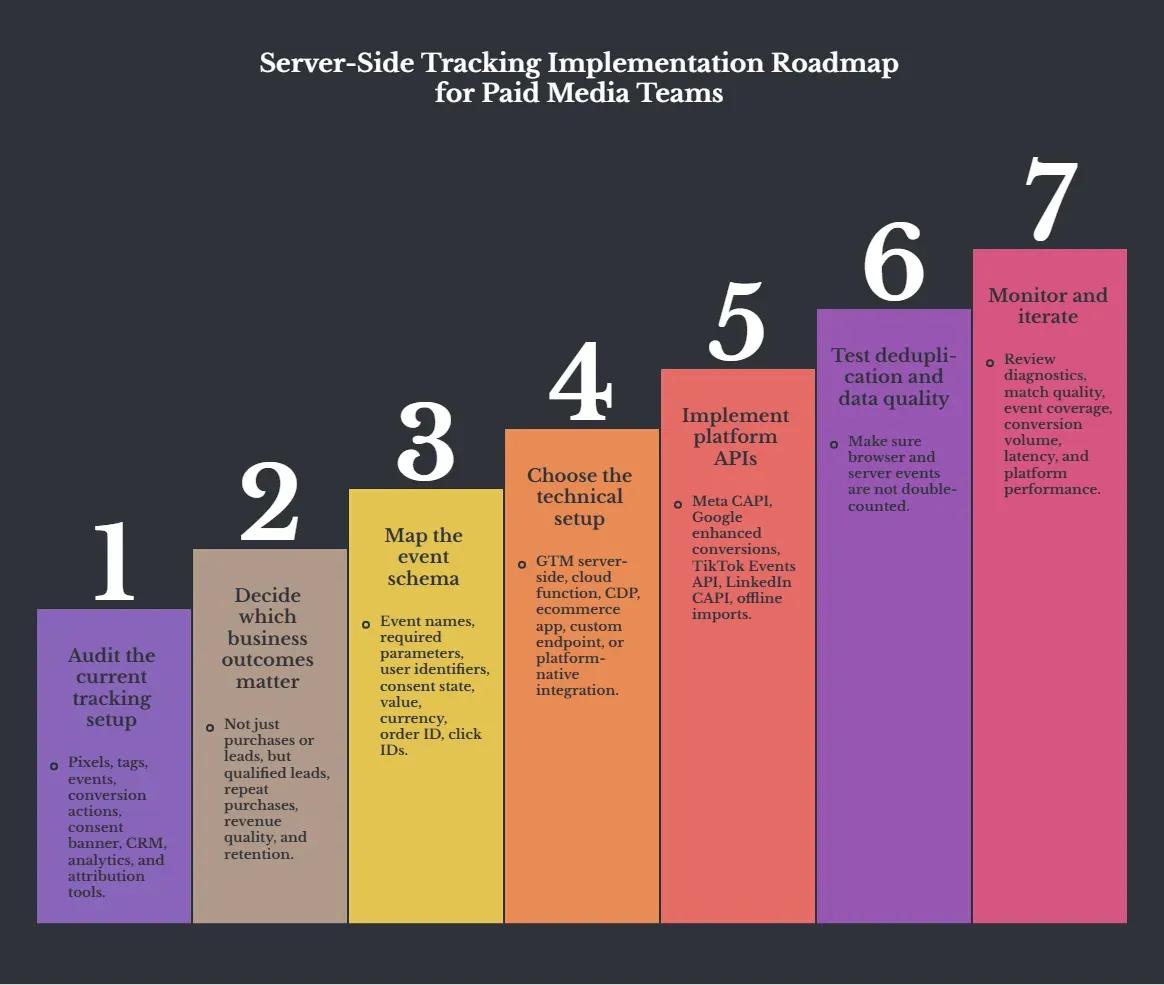
Step 1: Audit the Current Tracking Setup
Start by documenting every pixel, tag, event, conversion action, consent banner, CRM connection, analytics property, and attribution tool.
Use Google Tag Assistant, GA4 DebugView, Meta Events Manager, TikTok Events Manager, and your browser’s developer tools to identify duplicate tags, missing parameters, inconsistent values, and requests that ignore the user’s consent state.
GA4 DebugView displays collected events and user properties in real time when debug mode is enabled.
Your audit should produce a simple data collection framework showing:
- Where each event originates
- Which systems receive it
- Which fields are shared
- Who owns the event
- How long the data is retained
Also document your consent management platform, CRM field mappings, cookie policies, and any conversions imported from offline systems.
Step 2: Decide Which Business Outcomes Matter
Choose outcomes that represent genuine commercial progress, even when they are harder to track than clicks or form submissions.
For example, for an e-commerce team, confirmed purchases, repeat orders, margin, and refunds are more important. On the other hand, a B2B team might use qualified leads, sales meetings, accepted opportunities, and closed revenue.
Your tracking plan should reflect the outcomes your paid media campaigns are expected to influence.
Also, assign each outcome a clear owner, definition, value, and source of truth.
Step 3: Map the Event Schema
Create an event-naming taxonomy covering:
- Event names
- Required parameters
- Identifiers
- Consent state
- Value and currency
- Order ID
- Advertising click IDs
Specify which system is the source of truth for every field. For example, the browser may provide page context, the payment system may confirm revenue, and the CRM may provide lead or opportunity status.
Use one unique event ID when the browser and server send copies of the same conversion. Pass the same ID with both copies so the platform can identify and remove duplicates.
Meta uses the event name and event ID to deduplicate matching Pixel and Conversions API events. TikTok also requires the same event ID across Pixel and Events API events for deduplication.
Step 4: Choose the Technical Setup
Select the simplest architecture that satisfies your traffic, governance, and integration requirements.
Your options may include:
- A GTM server container hosted on Google Cloud Run or App Engine
- A custom server-to-server integration
- A customer data platform such as Segment or Tealium
- A native ecommerce platform integration
- A managed server-side hosting provider
We will examine these options in more detail later in the guide.
For GTM server-side, configure a first-party endpoint and move the container into production mode before sending live traffic.
Google recommends at least three instances per container for redundancy. Its App Engine guidance indicates that autoscaling between three and six servers may handle approximately 50-200 requests per second, depending on the tags being executed.
Do not treat the preview or test deployment as production infrastructure. Plan for monitoring and load balancing rather than treating the test deployment as production infrastructure.
Step 5: Implement Platform APIs
Prioritize platforms with sufficient spend and conversion volume to benefit from better signals.
As far as we’ve seen in the paid media space, common connections include:
- Meta Conversions API
- Google enhanced conversions
- TikTok Events API
- LinkedIn Conversions API
- Google Ads offline conversion imports
- CRM and ecommerce platform integrations
Pro tip: Always check current API requirements before launch. As of June 15, 2026, Google has moved relevant enhanced-conversion-for-leads and offline-conversion uploads toward the Data Manager API, with Google Ads API uploads blocked for developer tokens without approved legacy access.
Step 6: Test Deduplication and Data Quality
Run controlled test conversions and compare the browser request, server request, platform diagnostics, CRM record, and analytics result.
Confirm that matching event IDs prevent double-counting and that value, currency, timestamps, consent status, and customer identifiers remain consistent.
Test failure scenarios as well, like declined payments, duplicate form submissions, refunds, missing click IDs, rejected consent, and server timeouts.
All of this is important for data quality. That’s the main intention behind server-side tracking in many cases, so it makes sense to ensure there's no duplication in the data.
Step 7: Monitor and Iterate
Create a recurring dashboard that tracks:
- Event coverage
- Browser and server event volume
- Deduplication rates
- Processing latency
- Match quality
- Rejected events
- Hosting and API errors
- Downstream conversion data
Compare these technical metrics with campaign performance, CRM revenue, and finance records before changing budgets or bidding strategies.
Review the implementation after major website releases, CRM changes, consent updates, and platform API migrations. Keep in mind, this is more of an operating system than a project, so it has to be maintained properly.
Best Server-Side Tracking Tools
The best server-side tracking platform depends on your traffic volume, technical resources, privacy requirements, and whether you need only server-side hosting or a broader customer-data system.
Google Tag Manager is the entry point for most marketers, but there are other dedicated platforms as well that are better if you want even more data and tech consolidation.
Google Tag Manager (Server-Side)
Google Tag Manager is the most flexible starting point for teams already using GTM, GA4, and Google Ads. Its server container uses familiar tags, triggers, and variables, while supporting custom templates and deployment through Google Cloud Run, App Engine, Docker, or other infrastructure.
Google recommends multiple instances for redundancy, so the real cost also includes cloud administration and monitoring. It’s best for teams with technical support that want control without purchasing a full CDP.
Stape
Stape simplifies GTM server-container deployment by providing managed infrastructure, logs, custom domain configuration, autoscaling, and paid media integrations. Its plans also include a free option, with limited capabilities and 10K requests.
Requests above that will need a paid plan. It’s a practical choice for agencies and mid-sized advertisers that want server-side GTM without managing Google Cloud directly. That said, relying on a managed provider adds another vendor to your measurement chain.
TAGGRS
TAGGRS combines managed server-side GTM hosting with implementation tools designed for marketers and agencies. The company offers a free allowance of up to 10,000 requests per month. Also, the setup is largely smooth, with easy integration with CRM, CMP, and other MarTech platforms.
Since it’s based in Europe, it takes data sovereignty and GDPR seriously. It’s also ISO27001 certified. Still, you should independently review hosting locations, subprocessors, contracts, and consent handling rather than treating vendor claims as automatic compliance.
Piwik PRO
Piwik PRO Analytics Suite and Tag Manager are worth considering when privacy, controlled hosting, and analytics ownership are central requirements. Its Google Tag Manager server-side integration uses dedicated client and tag templates to send events to Piwik PRO in real time, while its enterprise offering combines analytics, consent management, tag manager, and data activation in one product.
Piwik PRO states that its enterprise capacity ranges from 1 million to 4 billion monthly actions and that it offers EU-operated or private cloud hosting. We recommend it for regulated or data-sensitive organizations rather than for small teams seeking only low-cost ad-platform conversion forwarding.
Where Server-Side Tracking May be an Overkill
Server-side tracking is good, but it can be too complex and expensive in some instances, like:
- Very small budgets
For a business spending only a few hundred dollars per month on paid media, the hosting and maintenance costs may exceed the likely measurement benefit.
- Teams without enough conversion volume
Improved data quality cannot compensate for an insufficient number of meaningful events. Dividing a small number of conversions among several server-generated lifecycle events may create more noise than insight.
- Companies that cannot maintain the setup
Server-side tracking requires someone to monitor hosting, API changes, failed requests, consent rules, deduplication, and conversion accuracy. When no internal employee or dependable agency partner owns those tasks, a simpler Google Ads or analytics implementation is safer than an advanced system that silently distributes incorrect data.
Improve Tracking Accuracy and Attribution with 9AM
Server-side tracking gives paid media teams a stronger measurement capability. However, it should never be used to bypass consent choices or privacy controls.
Adoption also remains relatively limited. According to the JENTIS Server-Side Tracking Report 2026, adoption stands at 5% in the US, 8% in the UK, and 10% across the EU.
So, there’s your opportunity to connect well-governed first-party data with verified conversion data to give ad platforms stronger signals, improve marketing attribution, and optimize toward revenue quality rather than superficial activity.
It can also empower CMOs to justify increasing paid media spend by demonstrating the properly attributed performance of search, display, and paid social channels.
However, the technology alone will not produce reliable measurement. Success depends on the expertise of your paid media and analytics teams, along with clear technical ownership and ongoing maintenance.
9AM can help when your internal team is already focused on media planning, campaign management, and performance. Our analytics specialists can support the planning, implementation, testing, and monitoring of your server-side tracking setup.
Schedule a server-side tracking consultation now!
FAQs
How to set up server-side tracking?
Set up server-side tracking by deploying a server-side tagging platform such as Google Tag Manager Server-Side, creating a server container, routing website or app events to the server endpoint, and forwarding validated data to analytics and advertising platforms. Configure first-party domains, consent management, and event validation to improve data quality, privacy, and measurement accuracy.
What is an example of server-side tracking?
An example of server-side tracking could be sending purchase events from a website to a Google Tag Manager Server-Side container, which validates the data before forwarding it to Google Analytics 4 for measurement. This process improves attribution accuracy, reduces browser data loss, and supports more reliable campaign measurement.
Where is server-side tracking data stored?
Server-side tracking data is stored on a secure server or cloud infrastructure that processes user events before sending them to analytics and advertising platforms. Storage location depends on the tracking architecture and provider, so it’s up to you where exactly you want the server to be (in case there are regulations on where data can be stored).
Is server-side tracking GDPR compliant?
Server-side tracking can be GDPR compliant if you obtain valid user consent, process personal data lawfully, honor user rights, and implement appropriate security measures. This kind of tracking isn’t compliant automatically. It still requires active consent management and security.
How does 9AM support paid media teams?
9AM can support paid media teams with media planning, buying, and measurement, which is where server-side tracking comes into play. Our experts help enterprises consistently improve campaign measurement and, by extension, performance, through accurate attribution.