

Google Shopping budgets have quietly moved. In Optmyzr's study of 9,199 accounts, 51% of advertisers put more than half their budget into Performance Max, and Google keeps adding controls that make PMax easier to steer.
So the question most ecommerce teams face in 2026 is less "which campaign type?" and more "how much of the catalog and budget goes where?"
That split got harder to get right in late 2024, when PMax lost its automatic priority over Standard Shopping. Overlap between the two now has a cost.
This guide covers the key differences, a catalog-first method for splitting budget, the PMax controls worth using, and how to spot cannibalization before it eats margin.
P.S. If you'd like a second opinion on your structure, our Google Ads team audits and runs Shopping and PMax for ecommerce brands.
TL;DR
- Split the catalog first, then the budget. Give every product exactly one campaign, and the budget split follows from what each segment needs.
- When PMax and Standard Shopping target the same product, the higher Ad Rank wins. Overlap makes serving and reporting unpredictable.
- Most accounts with steady conversion data land somewhere around 70-85% PMax, with Standard Shopping kept for products that need tight control.
- PMax now has real control levers: 10,000 negative keywords per campaign, search terms insights, a channel performance report, and brand, device, and age controls.
- Test cannibalization with an experiment or a geo split. Platform-reported ROAS won't tell you.
Pro tip: in Shopping, the product feed does the work creative does on social. Titles, images, and prices decide who sees the ad, so the feed is both the creative and the targeting. Media buying is the lab where that feed proves itself, and every campaign in the account should have one clear job. A budget split copied from a blog post skips the part where the account earns its structure. We'd rather assign products on purpose and let the numbers move the budget.
Performance Max vs Standard Shopping: What's the Difference in 2026?
The key differences come down to control and reach. Standard Shopping shows product ads on Google Shopping inventory with bids, search terms, and priorities you set. Performance Max serves the same product feed across Shopping, Search, YouTube, Display, Discover, Gmail, and Maps, and Google's automation decides where each dollar goes.
Does Performance Max include Shopping? Yes, and Shopping is most of it. Smarter Ecommerce found that the median feed-based share of PMax retail spend is 90%, with a range of 74-97% across 500+ accounts.
| Attribute | Standard Shopping | Feed-only PMax | Full-asset PMax |
|---|---|---|---|
| Inventory | Shopping ads on Google Search and Shopping tab | Mostly Shopping placements from the feed | Shopping, Search, YouTube, Display, Discover, Gmail, Maps |
| Bidding | Manual CPC, Max clicks, tROAS, Max conversion value | Max conversion value or tROAS only | Max conversion value or tROAS only |
| Search term visibility | Search terms report, subject to privacy thresholds | Search terms report plus grouped search terms insights | Search terms report plus grouped search terms insights |
| Negative keywords | Yes, per campaign and lists | Up to 10,000 per campaign | Up to 10,000 per campaign |
| Reporting depth | Product, query, device | Channel performance report, product | Channel, asset group, asset, product |
| Learning period | Short, mostly bid-driven | At least 6 weeks | At least 6 weeks |
| Best fit | Products that need tight cost control | Large catalogs where Shopping is the goal | Brands with strong video and image assets |
If you want ROAS benchmarks for each campaign type by category, our Performance Max benchmarks for ecommerce cover them. This article focuses on structure and control.
Which Campaign Wins When PMax and Standard Shopping Target the Same Product?
The campaign with the higher Ad Rank wins. Google's help documentation states that when several campaigns could serve, "Google Ads prioritizes the campaign with the highest Ad Rank".
That's a recent change for Shopping. When PMax replaced Smart Shopping in 2022, it automatically took priority over Standard Shopping on shared products. That rule was retired in October 2024, as reported by PPC Land, and Ad Rank has decided the winner since.
Two other rules still apply:
- Shopping priority settings only work between Standard Shopping campaigns. Google's campaign priority setting (low, medium, high) decides which Standard Shopping campaign bids, with lower-priority campaigns stepping in when a higher one runs out of budget. It has no say over PMax.
- Exact-match Search keywords beat PMax. A Search campaign with an exact or spell-corrected match to the query is preferred over Performance Max (according to Google’s help documentation cited above), which matters for brand terms.
What this means in practice: if the same product sits in both campaign types, whichever has the higher Ad Rank at that moment serves. Small changes to bids, budgets, or feed quality can flip the winner, and both campaigns' reports get harder to read.
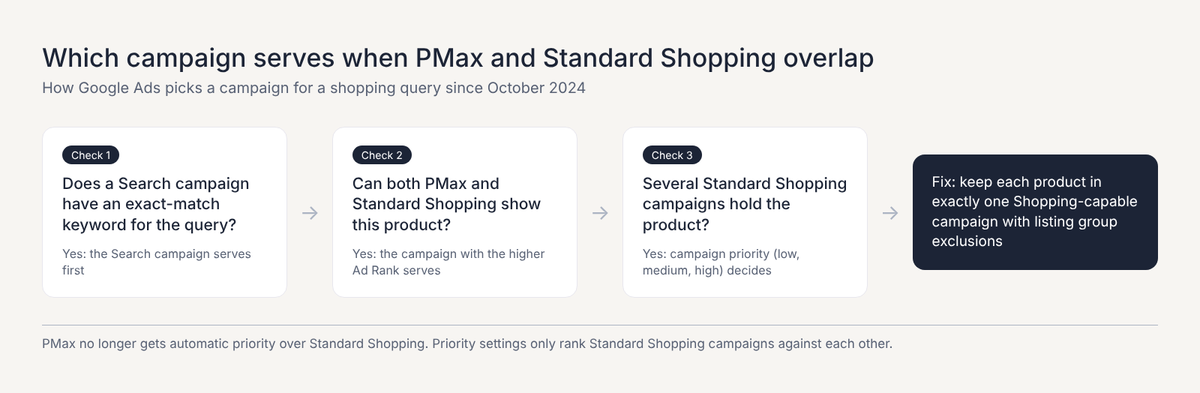
What to do: treat overlap as a mistake to fix. Use listing group exclusions so each product appears in exactly one Shopping-capable campaign.
How to Split Budget Between Performance Max and Standard Shopping
Split the catalog first, and let the budget follow. Every Google Shopping product goes into exactly one campaign based on its job, and each campaign's budget comes from the revenue its products need to deliver at their target ROAS. A fixed percentage chosen up front skips that logic.
Here's the method we use, in five steps:
- Label the catalog with custom labels. In Merchant Center, add custom labels for margin tier, sales velocity, and role (bestseller, new, clearance). These labels become the building blocks for every listing group.
- Assign every catalog segment to exactly one campaign. Use the table below as a starting map, and exclude each segment from every other campaign.
- Set each campaign's budget from its segment's revenue target and ROAS. Budget equals the segment's revenue target divided by its target ROAS.
- Check the starting split against your account's situation. Compare the result with the ranges in the second table, and investigate if you're far outside them.
- Rebalance monthly against blended MER. Move products and budget based on marketing efficiency ratio (MER) and total contribution margin, so a single campaign's platform ROAS can't drive the split on its own.
| Catalog segment | Campaign | Bid strategy | Why |
|---|---|---|---|
| Bestsellers with steady conversions | PMax (feed-only or full-asset) | tROAS | Enough data for automation to find extra demand |
| Low-margin products with a hard ROAS floor | Standard Shopping | tROAS with negatives | Search-term and bid control protect margin |
| Low-traffic "zombie" products (under 10 clicks a month) | Standard Shopping | Max clicks with a CPC cap | Buys data that PMax rarely spends on |
| New products | Standard Shopping, then graduate | Manual CPC or Max clicks | Collects clicks and conversions before automation takes over |
| Clearance stock | Dedicated Standard Shopping | Manual CPC | Spend tied to sell-through |
The 10-click "zombie" threshold comes from Smarter Ecommerce's hybrid guidance, which also puts PMax at 70-80% of a typical hybrid budget.
Here's a worked example. A brand wants $400,000 in monthly Shopping revenue:
- Bestsellers: $240,000 at a 5x target in PMax = $48,000
- Long-tail catalog: $100,000 at 4x in feed-only PMax = $25,000
- Low-margin products: $40,000 at 6x in Standard Shopping = about $6,700
- New and zombie products: $20,000 at 2x in Standard Shopping = $10,000
Total spend is about $89,700, at a blended 4.5x. PMax ends up with roughly 81% of the budget, without anyone picking that number in advance.
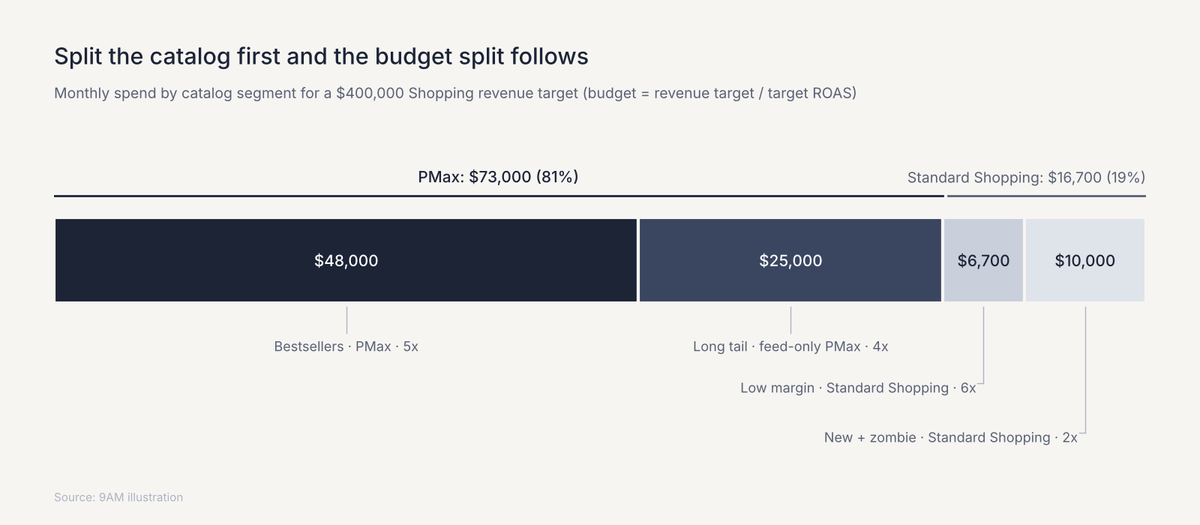
These are our working ranges, and they're a sanity check. If step 3 produces a split far outside them, look at the labels and targets before forcing the budget to fit.
| Account situation | Starting PMax / Standard Shopping split | Reason |
|---|---|---|
| Under ~30 Shopping conversions a month | Roughly 30/70, one feed-only PMax on bestsellers | Too little data for PMax to learn across the catalog |
| 30-100 conversions a month | Roughly 60/40 to 70/30 | PMax can learn on top sellers; Standard Shopping keeps the rest controllable |
| 1,000+ products with steady data | Roughly 70/30 to 85/15 | Automation covers the long tail better than manual bids |
| Thin-margin catalog | Closer to 50/50 | More products need hard ROAS floors and search-term control |
Insider tip: keep Standard Shopping where you need manual bids, CPC caps, or campaign priorities. PMax now has its own search terms report, including a Shopping ads breakdown, so query visibility alone is no longer a reason to keep a separate campaign.
Feed-Only Performance Max vs Standard Shopping
Feed-only PMax is a Performance Max campaign with a product feed and no text, image, or video assets. Without assets, it serves almost entirely on Shopping placements, which makes it the closest automated equivalent to Standard Shopping.
The performance gap between feed-only and full-asset PMax can be large. Optmyzr's 2024 study of 7,100 accounts found a median ROAS of 502% for feed-only PMax against 102% for all-asset PMax.
That data is from 2023 and mixes lead-gen with ecommerce accounts, so treat it as directional, but it matches what we see when weak video and display assets soak up spend.
Choose feed-only PMax over Standard Shopping when:
- the catalog is too large to manage bids product by product
- conversion volume is steady enough for automated bidding
- the goal is Shopping revenue, and you don't have strong video assets
Keep Standard Shopping when:
- you need manual bid control or CPC caps to protect margin
- products need individual bids or a hard CPC cap
- you're collecting data on new or low-traffic products
The two work well together.
A common structure in our accounts is feed-only PMax for the bulk of the catalog, plus Standard Shopping campaigns for the segments that need control. Our media buying team sets up this kind of split as part of managing Google Ads alongside paid social, so budget moves across channels from one view.
Performance Max Controls to Use in 2026
PMax has become much more controllable since 2025. The levers that matter most for a Shopping-heavy account are negative keywords, search terms insights, the channel performance report, brand exclusions, and device, age, and listing group controls.
Negative Keywords at the Campaign Level
Google raised the PMax negative keyword limit from 100 to 10,000 per campaign in March 2025, after campaign-level negatives became available to all advertisers that January. Use them for:
- Irrelevant queries
- Competitor terms you don't want to pay for
- Queries that convert at a loss
Search Terms Insights
Search terms insights group the queries PMax matched, and Google added a source column in January 2025 showing where each match came from.
Review them weekly as part of a weekly marketing cadence, and feed what you find into negatives and product titles.
Channel Performance Report
The channel performance report shows how PMax spend and conversions split across Shopping, Search, YouTube, Display, and other channels. Google announced it in April 2025, the report holds data from June 6, 2025 onward, and a September 2025 update added cost and ROI columns.
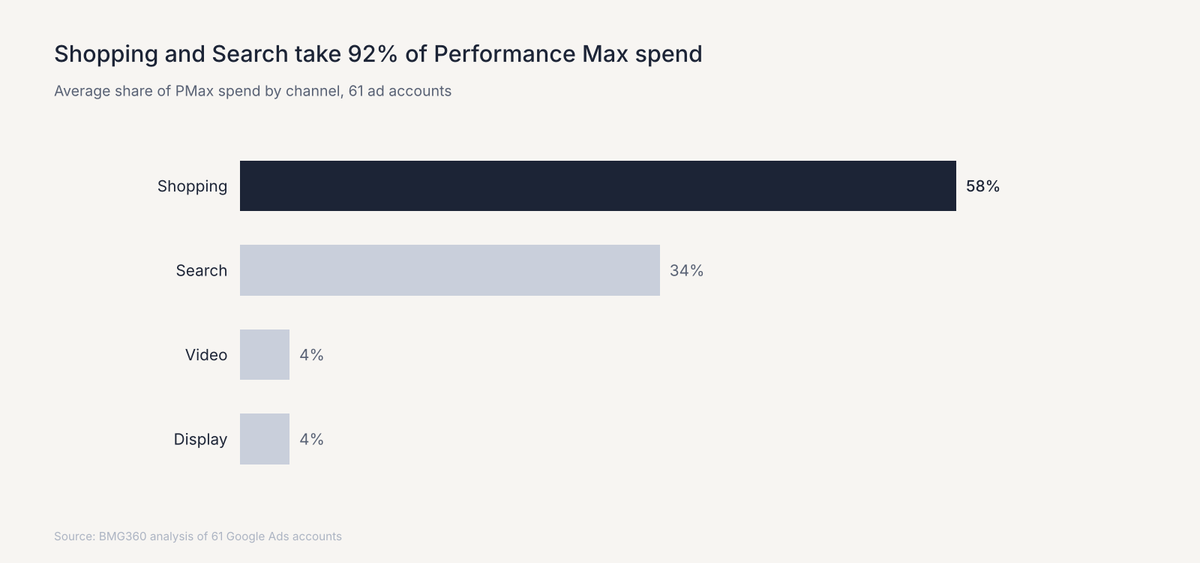
For context on a typical mix, one agency's analysis of 61 accounts found PMax spend split 58% Shopping, 34% Search, 4% Video, and 4% Display.
Brand Exclusions
Brand exclusions keep PMax off your brand queries on Search, Shopping, and YouTube search inventory, and Google blocks Shopping ads on excluded-brand searches by default, with an opt-in to allow them. Setup and troubleshooting are covered in our PMax brand exclusions guide.
Device, Age, and Listing Group Controls
Device and age controls became fully available in August 2025, when Google also raised search themes from 25 to 50 per asset group. Listing group exclusions remain the most important control for this split, because they keep each product in exactly one campaign.
| What you see in the channel performance report | What it likely means | What to do |
|---|---|---|
| Shopping share falling, Video and Display rising, flat conversions | Weak assets are absorbing spend | Test a feed-only version or cut low-performing assets |
| Search share high, mostly brand queries | PMax is picking up existing demand | Add brand exclusions and run an exact-match brand Search campaign |
| Video spend with almost no conversions | Video assets aren't earning their place | Replace or remove video assets in that asset group |
| Shopping spend steady but conversion value dropping | Feed or price competitiveness issue | Check feed titles, images, and price against competitors |
How to Tell if PMax Is Cannibalizing Standard Shopping
PMax can shift traffic and attributed conversions away from Standard Shopping when both campaigns target the same products. That shift alone does not prove incremental sales or higher total costs. Use an attribution model audit to check how conversion credit is allocated, and a controlled test to measure whether PMax adds sales.
Overlap is common: in a related Optmyzr study of Search campaigns, 91.45% of 503 accounts had exact keyword overlap with PMax.
Check for it in four steps:
- Check product overlap. Export the listing groups from both campaign types and look for any product that appears in both. Fix those first.
- Compare lost impression share by cause. Smarter Ecommerce found that PMax loses impression share almost entirely to rank, while Standard Shopping splits its losses between budget and rank. A sudden rise in Standard Shopping's rank-lost share after a PMax launch is a warning sign.
- Read auction insights for both campaigns to check whether external competition changed during the same period. The report does not show whether PMax is taking traffic from your Standard Shopping campaign; assess that through product overlap and a controlled test.
- Run a controlled test. Use a Google Ads campaign experiment, or a geo-lift test, to measure what PMax adds when Standard Shopping covers the same products.
Platform-reported ROAS can't answer this question, because both campaigns can claim credit for overlapping demand. A test with a holdout is the only clean read on what each campaign adds.
Bid Strategies and Learning Periods for Each Campaign
Start Standard Shopping campaigns on simpler bid strategies that let you control cost, and start PMax on Maximize conversion value without a target for its first six weeks. Google recommends letting a PMax campaign run at least 6 weeks before judging it, and suggests basing any ROAS target on your other campaigns' targets.
| Campaign | Starting bid strategy | When to add a ROAS target | How often to change |
|---|---|---|---|
| Standard Shopping (new and zombie products) | Max clicks with a CPC cap, or manual CPC | Once products have consistent conversions; then graduate them to PMax | Weekly bid reviews |
| Standard Shopping (low-margin) | tROAS if history exists, otherwise manual CPC | From the start, set at the margin floor | Every two weeks, in small steps |
| PMax (feed-only or full-asset) | Maximize conversion value | After about 6 weeks of stable data | Monthly, unless performance breaks |
Budget changes need the same discipline. Large swings can push automated bidding back into learning, so move budgets in steps and on a schedule, as our guide to budget pacing explains.
This article is about the Shopping split only. Search, Demand Gen, and YouTube campaigns sit outside it and need their own budget logic.
Split Budget and Keep Control of Google Shopping with 9AM
Performance Max and Standard Shopping work best as a team, with each product assigned to the campaign that suits its job. Labels decide the segments, the segments decide the budget, and tests decide when a product moves.
That's how we run Google Shopping at 9AM.
Media buying, creative, and measurement sit in one team, so feed changes, asset decisions, and budget shifts get made together. A product feed that improves gets more budget the same week the data shows it.
If you'd like us to look at your setup, book a strategy call. We'll check for overlap between your campaigns, map your catalog into segments, and propose a budget split built from your own revenue targets.
FAQs
Should Standard Shopping and Performance Max share the same ROAS target?
Usually not. Each campaign holds different products with different margins, so each target should come from its segment's margin and goals. A shared target either starves low-margin products or overspends on high-margin ones.
Is Standard Shopping worth running on a small Google Ads budget?
Yes, often more than PMax. On a lower budget with fewer than about 30 Shopping conversions a month, PMax has little data to learn from, while Standard Shopping gives you direct bid control and full search terms. Add a feed-only PMax on bestsellers once conversion volume grows.
Do PMax brand exclusions stop Shopping ads on brand searches?
Yes, by default. Google blocks Shopping ads on excluded-brand searches unless you tick the opt-in to allow them. If brand queries matter for Shopping, run a Standard Shopping campaign for them so you keep visibility into brand query costs.
How long should a product stay in Standard Shopping before it graduates to PMax?
Until it converts consistently and its search terms look stable. In our accounts that's usually a few weeks to a couple of months, depending on traffic. Move products in batches, so PMax relearns once and not every week.