

Growth teams are being asked to do more with the same money, in more places at once. Marketing budgets crept to just 7.8% of company revenue in 2026, yet digital channels now absorb more than two-thirds of total media investment. The pie isn’t growing, but it’s being cut into more slices, so every new channel competes for dollars that already have a job.
That squeeze exposes the weak spot in channel-by-channel planning. Each platform reports its own wins, the plan as a whole has no scoreboard, and budget drifts toward whichever dashboard looks best that week.
You’re on the right page to solve that problem
This guide gives you a cross-channel media planning template, the reasoning behind each field, and a worked example you can copy.
P.S. If you'd like a team that plans and runs this across every channel, 9AM's media buying practice builds the plan with you before a dollar moves.
What is a cross-channel media plan?
A cross-channel media plan is one document that sets the budget, role, forecast, schedule, and success measure for every paid channel a brand runs, judged against a single business target. It replaces separate platform plans with one view finance, the agency, and the growth team can all work from.
- Channel-by-channel plans tell you what each platform will spend.
- A cross-channel plan tells you which channel earns the next dollar, what job each one does, and how you'll know it worked.
Side note: If you’re interested in measuring success in cross-channel marketing, here’s a good starting point:
Media plan, media mix, and media budget: how they differ
The three terms describe different layers of the same decision:
- Media budget: the total amount available for paid media in a period.
- Media mix: how that budget splits across channels.
- Media plan: the mix plus everything needed to run it, including roles, forecasts, flight dates, creative, measurement, and owners.
A media planning template is the reusable structure for the third layer.
What a cross-channel template adds to channel-by-channel plans
A cross-channel template adds the comparisons a single-platform plan can't make. It forces every channel onto the same target, the same reporting source, and the same calendar, so a dollar in TikTok and a dollar in Google Shopping get judged on the same scale.
It also exposes overlap: two platforms claiming the same customer show up as a forecast that doesn't add up.
Cross-channel media planning template: the fields to include
A complete cross-channel media planning template has ten fields, from the plan summary to owners and approvals. Each field below matches a tab or block in 9AM's free template, so you can build the plan from just this section.
| Download the template: Copy the free cross-channel media plan template as a Google Sheet. It includes a channel plan with a learning-phase spend check, a forecast with three scenarios, a flighting calendar, a measurement plan, and a test agenda. |
Plan summary: goal, north-star KPI, budget, and dates
The plan summary states one goal, one north-star KPI, the revenue target, and the plan dates. Pick a KPI that judges the whole plan, such as marketing efficiency ratio, so no single channel's dashboard decides success. In the template, the summary also calculates the budget the target implies and the break-even CAC on first-order margin.
Audience and offer
This field names who the plan is for and what it sells to them. Keep it to the primary audience segments, the hero offer or product, and any seasonal promotion with dates. Channel-level targeting lives in the platforms; the plan only needs enough to brief creative and judge fit.
Channel roles by funnel stage
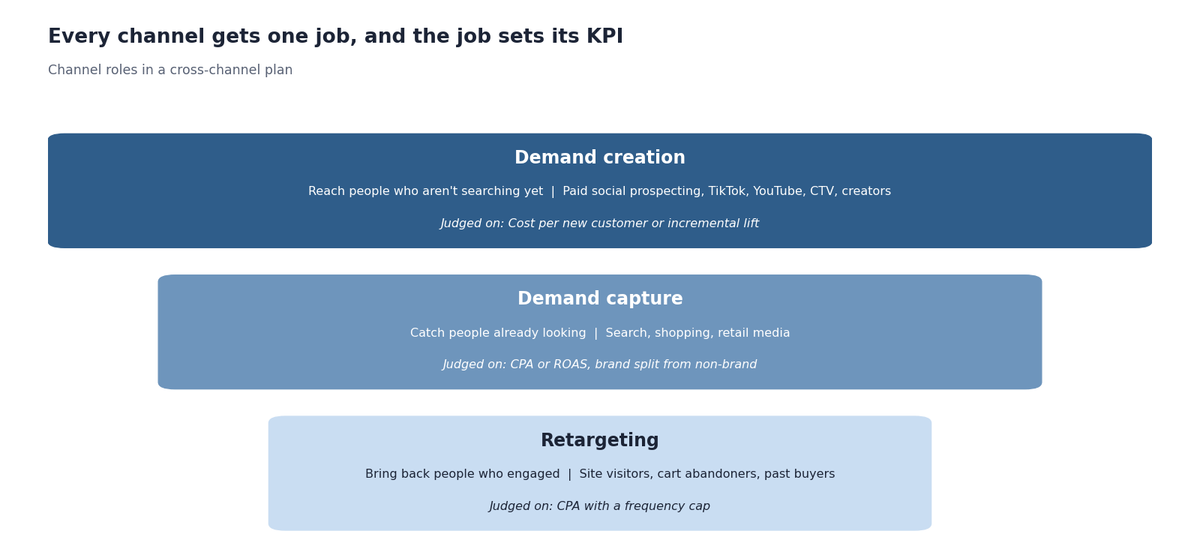
Every channel gets one role: demand creation, demand capture, or retargeting. The role decides which KPI the channel answers to. A single row per channel holds the role, the primary KPI, and the planned CPA where one applies.
Budget allocation by channel and month
Budget allocation lists each channel's monthly spend and tags it as scale, test, or reserve. Monthly columns let you flight budget around launches and seasonality. The template totals each type, so you can see at a glance how much of the plan is proven spend and how much is learning.
Forecast: spend, CAC, revenue, and MER
The forecast converts each channel's budget into expected conversions and revenue at its planned CPA, then rolls them into a blended MER. Three scenarios, conservative, base, and aggressive, show how sensitive the plan is to CPA moving. Channels judged on lift sit outside this math and show up in the measurement field.
Flighting and pacing calendar
The flighting calendar marks which weeks each channel is live, plus launch dates, promotions, and creative drops. It's where you see that a new channel test can't start until week five because creative and tracking need setup. Weekly budget pacing is then checked against this calendar.
Creative plan by channel
The creative plan lists the formats, concepts, and volume each channel needs per month. Creative carries more weight than most plans give it: an NCSolutions and Nielsen analysis of roughly 500 campaigns found creative drove 47% of sales contribution from advertising. Plan refresh dates here too, since a channel without fresh creative can't hold its forecast.
Measurement plan and source of truth
The measurement plan names one reporting source of truth and, for each channel, its primary KPI, attribution setting, and how incrementality gets checked. Writing the attribution settings down stops the monthly argument over whose numbers count, a gap an attribution model audit usually surfaces.
Test plan and learning agenda
The learning agenda lists the questions the plan is paying to answer, each with a budget, success metric, read date, and the decision a win triggers. A test without a pre-agreed decision tends to get extended indefinitely.
Owners and approval rules
The last field names who owns each part of the plan and who approves changes, especially budget moves above an agreed threshold. Settle ownership before the plan goes live, so mid-quarter changes don't stall waiting for a decision maker.
How to create a media plan with the template
Creating a media plan takes six steps, from the business target to the review dates. Each step fills a part of the template; the sections that follow cover the decisions in depth.
- Set the business target. Write the revenue or customer target for the period and the north-star KPI that judges it.
- Back into a target CAC and total budget. Divide the revenue target by your target MER to get the budget it implies, and check the break-even CAC against first-order margin. Contribution margin is the honest ceiling on what a customer can cost.
- Assign a role to every channel. Give each channel one job and one primary KPI, using the roles in the channel roles section below.
- Allocate the budget by channel. Split the budget across channels and tag each dollar as scale, test, or reserve, following the allocation rules below.
- Forecast each channel and the blend. Enter planned CPAs, read the three scenarios, and adjust until the base case meets the target.
- Set flighting, measurement, and review dates. Mark live weeks, fill in the measurement plan and learning agenda, and book the weekly, monthly, and quarterly reviews.
How to allocate media budget across channels
Allocate media budget to the channel where the next dollar buys a customer most cheaply, then protect a share for tests and in-quarter moves. Four rules turn that into numbers.
Allocate on marginal CAC
Fund channels by the cost of the next customer they can buy. A channel with a strong average CAC can already be saturated, so its next $10,000 buys far fewer customers than its history suggests. Watch the CPA on the most recent budget increase in each channel, and read it alongside blended CAC and paid CAC so platform efficiency doesn't hide a weak business result.
Set a minimum viable spend per channel
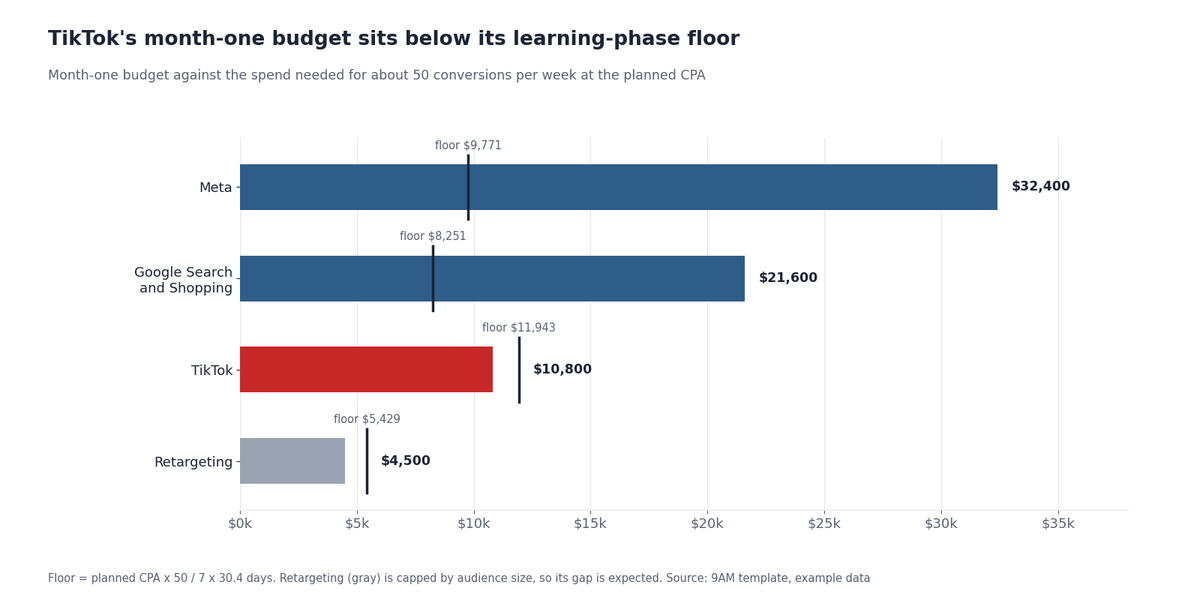
Give every channel enough budget to exit the platform's learning phase, or don't fund it yet. Meta generally needs about 50 optimization events per ad set within seven days to stabilize delivery, and Google says Smart Bidding calibration can take up to about 50 conversion events or three conversion cycles. At a $45 CPA, that's roughly $9,800 a month for a single Meta ad set. The template calculates this floor per channel and flags anything below it.
Reserve budget for tests and reallocation
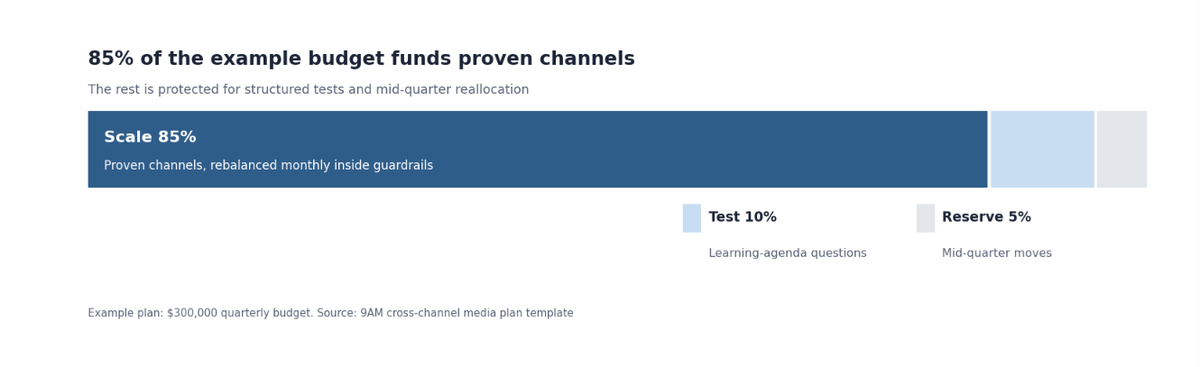
Hold back a fixed share of the plan before allocating the rest. The example plan keeps 10% for structured tests and 5% as an unassigned reserve. The test budget answers questions on the learning agenda; the reserve funds whichever channel earns it mid-quarter.
Rebalance monthly inside guardrails
Move budget once a month based on marginal CAC and test reads, within limits agreed in advance. A common guardrail caps any single move at 15% of a channel's monthly budget without sign-off, with the approver named in a paid media RACI matrix. Moving more often resets learning phases; moving less often leaves money in channels that have already peaked.
How to assign channel roles in a cross-channel plan
Assign each channel one role based on where it meets the buyer: creating demand, capturing demand that already exists, or bringing back people who engaged. The role sets the KPI the channel is judged on, which stops awareness channels from being cut for failing a last-click CPA test.
Platform roles can overlap, so assign the role at the campaign level. Meta prospecting creates demand while Meta retargeting brings people back.
Demand creation channels
Paid social prospecting, TikTok, YouTube, CTV, and creator content reach people who aren't searching yet. Judge them on cost per new customer where conversion volume allows, and on incremental lift where it doesn't. The two main social platforms play different parts here, a split covered in our TikTok ads vs Meta ads comparison.
Demand capture channels
Search, shopping, and retail media catch people already looking for the category or the brand. Judge them on CPA or ROAS, and split branded from non-branded search so brand demand created elsewhere doesn't get credited here.
Retargeting and retention channels
Retargeting reaches site visitors, cart abandoners, and past buyers. Cap its budget and frequency, because it's the easiest channel to over-credit: many of its conversions would happen anyway.
| Channel | Role | Primary KPI | Creative need |
|---|---|---|---|
| Meta prospecting | Demand creation | Cost per new customer | High volume, refreshed monthly |
| TikTok | Demand creation | Cost per new customer | Native, creator-led, high volume |
| YouTube and CTV | Demand creation | Incremental lift | Longer video, fewer variants |
| Google Search and Shopping | Demand capture | CPA, split by brand and non-brand | Ad copy, product feed quality |
| Retail media | Demand capture | ROAS | Product listings, retailer assets |
| Retargeting | Retargeting | CPA with frequency cap | Offer and reminder variants |
How to forecast results in a media plan
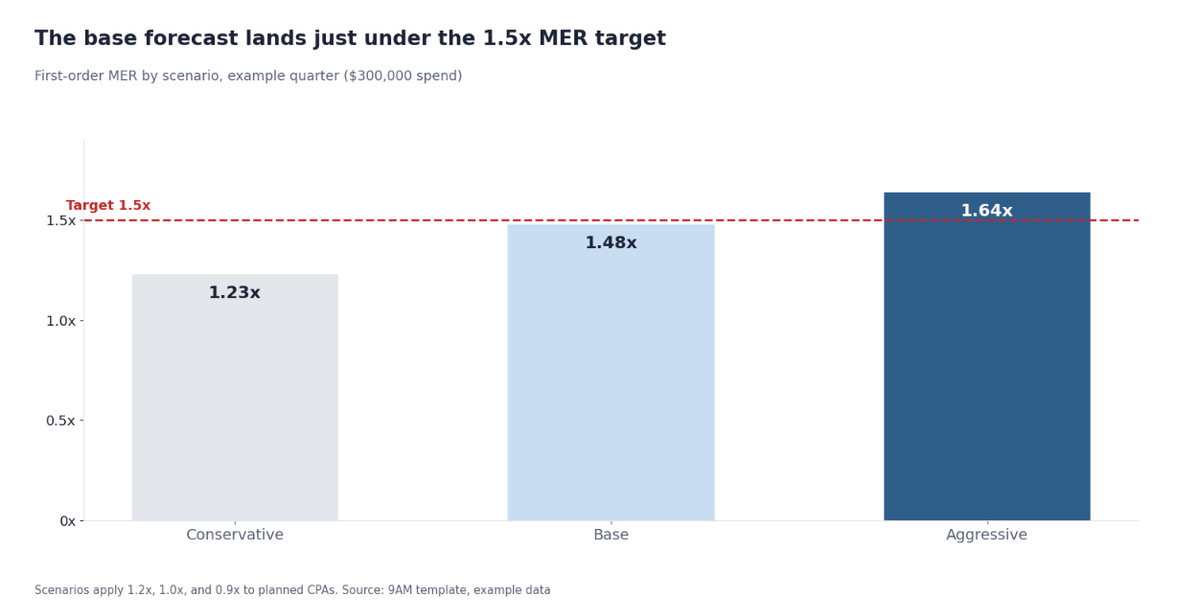
Forecast a media plan by dividing each channel's budget by its planned CPA to get conversions, multiplying by order value to get revenue, and dividing total revenue by total spend to get MER. Run it at three CPA levels so the plan shows a realistic range.
Base planned CPAs on the last 60 to 90 days at a similar spend level. If a channel is scaling, add a margin to its CPA, since marginal costs rise with spend. A finance-ready paid media revenue forecast adds monthly phasing and confidence ranges on top of this.
Treat the forecast as a test of the plan. If the base scenario misses the target, change the plan now: shift budget, cut a channel, or reset the target with finance.
How to measure a cross-channel media plan
Measure a cross-channel plan at two levels: channel KPIs that run day-to-day optimization, and business KPIs that judge whether the plan worked. Both are needed, and they answer different questions.
Channel KPIs and business KPIs
Channel KPIs tell the buyer what to change this week. Business KPIs tell the growth lead whether the plan is paying off. A channel can hit its CPA while the business misses its target, which usually means channels are claiming the same customers.
| Level | KPI | Who uses it | Review rhythm |
|---|---|---|---|
| Channel | CPA, ROAS, hook rate, impression share | Media buyer | Daily to weekly |
| Plan | Blended CAC, first-order MER | Growth lead and agency lead | Weekly |
| Business | Contribution margin, payback period | Growth lead and finance | Monthly to quarterly |
Incrementality tests inside the plan
Build at least one incrementality test into each quarter's learning agenda, aimed at the channel whose credit is most disputed. Geo holdouts and platform lift studies cover single channels. For the full mix, marketing mix models have become easier to run since Google made its open-source Meridian model available to all marketers. The 9AM analytics team uses lift results to set each channel's planned CPA for the next quarter.
Cross-channel media plan example
Below is the example plan included in the template: a DTC brand with an $80 first-order AOV, 60% gross margin, a $450,000 first-order revenue target, and a $300,000 quarterly media budget. The numbers are illustrative.
| Channel | Role | Budget type | Month 1 | Month 2 | Month 3 | Planned CPA |
|---|---|---|---|---|---|---|
| Meta | Creation and capture | Scale | $32,400 | $36,000 | $39,600 | $45 |
| Google Search and Shopping | Capture | Scale | $21,600 | $24,000 | $26,400 | $38 |
| TikTok | Creation | Scale | $10,800 | $12,000 | $13,200 | $55 |
| YouTube and CTV | Creation | Scale | $7,200 | $8,000 | $8,800 | Judged on lift |
| Retargeting | Retargeting | Scale | $4,500 | $5,000 | $5,500 | $25 |
| New channel test | Creation | Test | $9,000 | $10,000 | $11,000 | Test-specific |
| Reallocation reserve | - | Reserve | $4,500 | $5,000 | $5,500 | - |
The target implies a 1.5x first-order MER and 5,625 new customers. The base forecast lands at about 5,550 customers and a 1.48x MER, just short. The aggressive case reaches 1.64x; the conservative case drops to 1.23x.
A plan built this way also gives every channel a defined job across the funnel. 9AM built a similar awareness-to-conversion structure for Hurom, where the full-funnel program delivered 4x revenue growth and a 70% reduction in cost per acquisition.
Two flags show up before launch. TikTok's month-one budget of $10,800 sits below its learning-phase floor of about $11,900 at a $55 CPA, so it should either consolidate into fewer ad sets or take budget from the reserve. Retargeting is flagged too, which is acceptable here because its audience caps how much it can spend.
How to review and update a media plan
Review the plan on three clocks: weekly for pacing and anomalies, monthly for reallocation, and quarterly for a full re-plan. The weekly review checks spend against the flighting calendar, the monthly one moves budget inside guardrails, and the quarterly one rebuilds the forecast from fresh CPAs and test results. A weekly marketing cadence keeps each review tied to a decision.
Common cross-channel media planning mistakes
Most cross-channel plans fail in one of four ways:
- Copying last quarter's split. The previous allocation reflects last quarter's marginal costs and creative, which have already changed.
- Spreading budget too thin. Funding seven channels below their learning-phase floor buys seven sets of unstable data.
- Judging every channel on last-click CPA. Demand creation channels lose that test by design and get cut, and capture channels then slow down.
- Leaving the forecast untouched. A plan that misses its own base case on day one needs changes before launch.
Spreadsheet template or media planning software?
A spreadsheet template works for most growth teams running up to about ten channels in one market. Dedicated media planning software starts to pay off when several markets, agencies, or business units need to plan in one system with approvals, version history, and live spend data. Until then, a shared sheet with clear owners does the job.
Build your cross-channel media plan with 9AM
A cross-channel media plan gives every channel a role, a budget it can learn on, a forecast, and a way to prove it worked. Built well, it turns allocation from a negotiation into a decision the whole team can check.
9AM plans and runs paid media across social, search, CTV, and retail media, and builds this plan with clients before launch. A media plan review looks at your current allocation and returns a filled-in cross-channel plan with forecast scenarios.
Book a strategy call to walk through your current mix, your targets, and where the next dollar should go.
Frequently asked questions
How much of your media budget should go to testing new channels?
Many growth teams keep 5% to 15% of paid media for tests, depending on how dependent they are on one channel. Size each test to clear the channel's learning-phase floor for at least a month. A test budget too small to exit learning produces data you can't act on.
How do you plan around channels that claim the same conversions?
Plan to one reporting source of truth and treat platform-reported conversions as directional. Forecast new customers at the plan level, then use lift tests to set each channel's share. When platform totals add up to more than the backend, the gap is overlap.
How far ahead should a growth team plan media?
Plan a quarter in detail and the year in outline. A quarter is long enough to run a test cycle and short enough that CPAs stay predictable. Re-plan the next quarter in the last month of the current one.
Where do retail media and marketplace ads fit in a cross-channel plan?
Retail media, such as Walmart Connect for CPG brands, usually belongs in demand capture, with its own ROAS target and a separate line in the forecast. Keep it in the same plan, because it competes for the same budget and usually captures demand that paid social created.
Should brand awareness spend be included in the same media plan as performance?
Yes, as long as it's judged on its own KPIs. Binet and Field's IPA research found the most effective long-term balance was about 60% brand building to 40% activation, though the right split varies by category and brand maturity. Keeping both in one plan makes the trade-off visible.
How many creatives does each channel need per month?
High-volume social channels need new concepts every month to avoid fatigue, while CTV and YouTube can run fewer, longer assets for a full flight. Put the monthly count per channel in the creative plan and check it against production capacity before launch.