Google Search Partners: A Lead-Quality Framework for Keeping or Excluding the Network
Search partners in Google Ads can add profitable volume or flood your CRM with junk. Score the network on cost per qualified lead, then keep or exclude it.

Every new Search campaign in Google Ads starts with Search Partners switched on. That one checkbox sends your ads to third-party search boxes, portals and YouTube, and the results swing hard between accounts. Adalysis has documented accounts where partner traffic came in at a lower CPA than Google Search, and others where its CPA ran 17 times higher.
For lead generation, the harder question sits downstream.
A Search Partners lead can look cheap inside Google Ads and still cost far more once sales has worked it. It can also add qualified volume the campaign would otherwise miss.
This guide gives you a framework to tell those two outcomes apart, campaign by campaign, using CRM data.
P.S. If you'd like a second set of eyes on your network settings, our Google Ads management team can run this audit on your account.
TL;DR
Google Search Partners are third-party sites, apps and YouTube surfaces that show your Search and Shopping ads. The setting lives at campaign level and is on by default.
Since March 2024 you can exclude individual partner domains at account level, and since August 2025 you can see which partner sites served your ads, by impressions.
Google Ads can't tell a junk form fill from a real one. Unless you import qualified leads from your CRM, Smart Bidding treats both the same.
Decide on cost per qualified lead against the maximum you can afford, qualified-lead volume and matured cohorts. The partner-to-Google ratio is a supporting signal.
Performance Max has no Search Partners checkbox. Control there runs through account-level placement exclusions.
Before we begin, know this: media buying is where claims meet numbers, and the CRM keeps score. A conversion in Google Ads is the platform's account of what happened. A qualified lead or a closed deal is the business's. We run search, paid social and analytics as one system for that reason, so a network setting gets judged on what reaches sales, with customer acquisition cost as the scoreboard. Search Partners is a clean test of that discipline, because cheap clicks only stay cheap if they turn into pipeline.
What Are Google Search Partners in Google Ads?
Google Search Partners are websites and apps outside Google Search that show your search ads and product listings next to their own search results. Google describes the network as hundreds of non-Google websites, plus YouTube, and you pay only when someone clicks.
On partner properties, your ad can appear in several places:
Search results pages on third-party search engines and portals
Site-search boxes on publisher and retailer websites
Directory pages and product detail pages
YouTube search results and watch pages
The setting is a single campaign-level checkbox, "Include Google search partners," found under Networks in Search and Shopping campaign settings. New campaigns have it ticked by default, so many accounts are opted in without anyone deciding to be.
Two details matter before you judge it:
A partner impression still fires on a search query, which puts the network closer to Google Search than to the Google Display Network.
And partner click-through rate doesn't affect your Quality Score on Google.
Google's own data says about 90% of partner impressions come from its top 100 sites and apps, YouTube included. Read that as Google's framing of its own inventory. Your account's mix can look very different.
Google Search | Google Search Partners | Google Display Network | |
|---|---|---|---|
Where ads show | Google results pages, Maps, Shopping tab | Third-party search pages, site search, YouTube search | Websites, apps and video content |
What triggers the ad | A search query | A search query on a partner property | Audience or content targeting |
Main control | Keywords, campaign settings | Campaign checkbox plus account-level domain exclusions | Placement, topic and audience exclusions |
Placement visibility | Search terms report | Placement report, impressions only | Full placement report |
Affects Quality Score | Yes | No | No |
What Changed in the Search Partner Network Since 2024
The Search Partner Network went from a black box to an auditable inventory in under two years. The push followed a late-2023 Adalytics report on ads appearing beside sensitive content; Google disputed its conclusions and then shipped a run of controls.
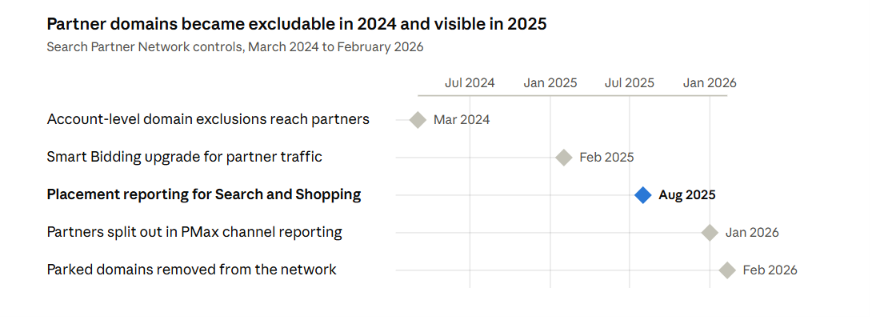
Google extended account-level placement exclusions to Search Partners in March 2024. In August 2025, it added site-level placement reporting for Search, Shopping and App campaigns, letting advertisers see which partner sites served their ads and how many impressions each received.
The new placement report still has a hard limit.
It lists domains and impressions only, with no clicks, cost or conversions per site. Some guides published as recently as September 2026 still tell advertisers no Search Partners placement report exists.
That advice is out of date, and it matters: the decision is no longer "trust the network or don't." You can now inspect the inventory, prune it and measure what's left.
Why Search Partners Can Produce Different Lead Quality
Search Partners can produce leads that look identical to Google Search leads inside Google Ads and close at a very different rate in the CRM. The causes below are hypotheses to test in your own account. Each one has a documented mechanism, but none explains every gap on its own.
Lower-Intent Search Surfaces
A query typed into Google and a query typed into a site-search box mid-article carry different intent. Partner inventory also includes related-search clicks and directory navigation, where the searcher may be browsing more than buying. If your offer needs a high-intent buyer, that mix can dilute lead quality even when the cost per click looks attractive.
Invalid and Bot Traffic on Partner Inventory
Google builds invalid traffic protections into partner inventory and credits advertisers when it catches bad clicks. Lead generation carries a cost those credits never cover: a bot or spam form fill that gets through still eats sales time.
Check partner leads for disposable emails, fake phone numbers and submissions seconds after the click before assuming the problem is intent.
Smart Bidding Optimizes to the Conversion You Feed It
If your conversion action is "form submitted," Smart Bidding sees a junk lead and a real one as the same win. Adalysis notes that Smart Bidding doesn't always hit its targets on partner traffic, even in accounts running fully automated bidding. Importing qualified leads (Step 3 below) is what gives the bidder a signal that separates the two.
Blended Reporting Hides the Network Gap
Partner traffic is typically a small slice of a campaign, so a bad partner CPA barely moves the blended number. In a 2015 analysis covering Shopping's first 10 months on Search Partners, partners drove about 1% of total Shopping conversions. Sales teams feel junk leads long before a blended dashboard shows them, which is one reason platform-reported conversions deserve an audit of their own.
Published account data shows how wide the range runs:
Source | Dataset | Finding | Caveat |
|---|---|---|---|
AI Max campaigns | One account sent 500,000 monthly impressions to partners at a 0.07% conversion rate, against 3.04% on Google Search | One account; shows the gap without its cause | |
Adalysis | Client accounts on Smart Bidding | Partner CPA of $185 against $11 on Google Search in one account; lower partner CPA in others | Selected examples, vendor data |
PPC Hero | Shopping accounts, 10 months, published July 2015 | Roughly half the accounts had better partner CPA and conversion rate | Shopping data; lead gen may differ |
About 10,000 accounts | Median partner CPA about 7% above Google Search | Around five years old; predates current controls |
None of these is a benchmark for your account. Together they say one thing: the network's value varies enough that only your own qualified-lead data can settle it.
Google Search Partners On or Off: When Each Setting Makes Sense
Turn Search Partners off on lead-gen campaigns that can't import qualified leads, and test it on everything else. Without a quality signal from the CRM, you're judging the network on form fills, and form fills are exactly where it can mislead.
Account type | Starting setting | Why | What would change the call |
|---|---|---|---|
Lead gen without qualified-lead import | Off | Neither you nor Smart Bidding can see lead quality by network | Qualified leads start flowing back from the CRM |
B2B or high-ticket lead gen with qualified-lead import | On, scored with the framework below | You can measure cost per qualified lead by network | Partner CPQL stays above your maximum across matured cohorts |
Ecommerce Shopping on value-based bidding | On, monitored | Purchase value gives you a direct signal to judge partner ROAS against your target | Partner ROAS stays below target on a material share of spend |
Low-volume niche campaigns | On, with placement pruning | Extra conversions can help Smart Bidding learn | Partner leads qualify at a clearly lower rate |
Regulated or brand-sensitive categories | Off until placements are audited | Suitability risk on third-party sites | A clean placement audit and an exclusion list in place |
Campaigns still in a learning period | Leave as is | A network change mid-learning muddies both readings | Performance stabilizes |
Regulated advertisers in health and finance have extra reasons to audit placements before opting in; our guide to healthcare PPC compliance covers the policy side. If a campaign exists mainly for brand awareness reach, the bar shifts again, since cheap partner impressions may be acceptable there.
Some reasons don't justify flipping the switch either way:
A single bad week
A blended campaign CPA that was never segmented by network
A blog post's verdict on the whole network
A competitor's setting
The same discipline applies to Microsoft Advertising's syndicated search partners, which carry their own lead-quality history and their own controls.
Pro tip: Our media buying team runs this kind of network review across Google, Microsoft and paid social, so each platform's partner inventory gets judged on the same qualified-lead scoreboard.
How to Evaluate Search Partners Lead Quality Step by Step
Judge Search Partners on cost per qualified lead (CPQL) by network, pulled from your CRM and read only on lead cohorts old enough to have been qualified. The seven steps below get you there, and the first three are plumbing most accounts skip.
Step 1: Segment Campaign Performance by Network
Start in Google Ads with the Segment menu set to "Network (with search partners)." Every Search and Shopping campaign then splits into Google Search and Search Partners rows.
Pull 90 days per campaign as a starting point, longer for low-volume campaigns.
Drop the most recent days, matching your real time from click to qualified lead. A fast sales team might need 7 to 14 days; a B2B team with a 60-day qualification process needs far more.
Split brand and non-brand campaigns where you can, so a difference in query mix doesn't pass for a network effect.
Record clicks, cost, conversions and each network's share of spend and conversions.
Size matters before judgment. In one account Adalysis reviewed, partners had 57 clicks against 134,488 on Google Search. At that scale there's nothing to decide yet, and the honest label is "insufficient evidence."
Step 2: Pass the Network Into Your CRM
Add the ValueTrack parameter network={network} to your final URL suffix. Google fills it with "g" for Google Search and "s" for a search partner, among other values. Capture it in a hidden form field and store it on the lead record next to the GCLID, which auto-tagging adds to every click.
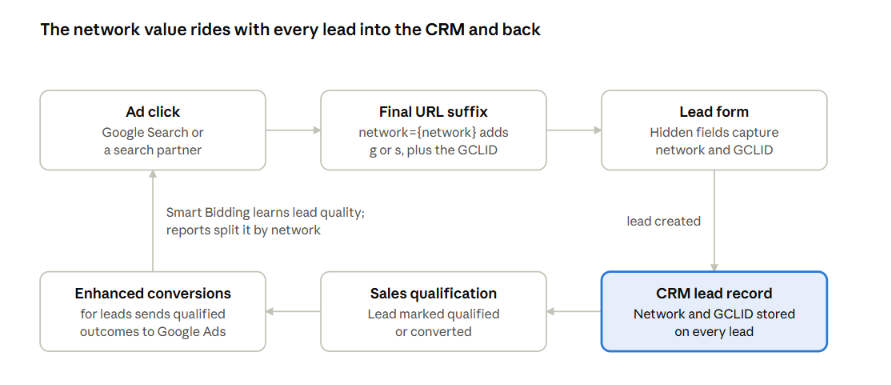
The network field has to survive every hop; if it drops at the form or the CRM, partner and Google Search leads become impossible to separate.
Forms that strip URL parameters, redirects and consent banners are the usual leaks. If your tracking already runs through a server container, our guide to server-side tracking for paid media covers how to keep click identifiers intact.
Step 3: Import Qualified and Closed Leads With Enhanced Conversions for Leads
Send CRM outcomes back to Google Ads with enhanced conversions for leads, Google's upgraded version of offline conversion import. Set the goal to "Qualified lead" or "Converted lead," which Google defines as leads further qualified in your CRM.
This step does two jobs.
It gives you network-level quality reporting inside Google Ads.
It gives Smart Bidding a signal that can tell a junk form fill from a real one.
One technical note: since June 15, 2026, new offline conversion import integrations must use the Data Manager API. Integrations that were already importing can keep using the Google Ads API while they migrate.
Step 4: Score Each Network on Cost per Qualified Lead
Calculate CPQL per network: network spend divided by the CRM-qualified leads that network produced.
Then calculate the CPQL ratio: partner CPQL divided by Google Search CPQL.
The ratio shows relative partner performance; your maximum acceptable CPQL tells you whether either network is worth paying for at all.
Metric | Formula | Where the data lives | Warning sign on partners |
|---|---|---|---|
Cost per lead | Spend ÷ leads | Google Ads, segmented by network | Far below Google Search alongside weak qualification |
Lead-to-qualified rate | Qualified leads ÷ leads | CRM, filtered by network field | Well below the Google Search rate |
Cost per qualified lead | Spend ÷ qualified leads | Google Ads spend + CRM counts | Above your maximum acceptable CPQL |
Spam or invalid lead share | Rejected leads ÷ leads | CRM rejection reasons | Fake contact details, instant submissions |
Pipeline per qualified lead | Pipeline value ÷ qualified leads | CRM opportunities | Lower deal sizes than Google Search |
Share of qualified leads | Partner qualified ÷ total qualified | CRM | High enough that exclusion would hurt volume |
Group leads into monthly cohorts by creation date, and score a cohort only once it has had time to qualify.
For long sales cycles, decide on the qualified-lead stage first and confirm with closed-won data as it matures. Waiting a full 90-day cycle for revenue on every decision is usually too slow.
Further reading: Our funnel leak analysis guide shows how to measure the lead-gen steps between form fill and opportunity.
Step 5: Audit the Search Partner Placement Report
Open the placement report through the Content suitability view in the Campaigns menu, or the API, and sort partner domains by impressions. Look for concentration in a few unrelated domains, sites that don't fit your brand, and anything that looks like a made-for-ads property.
Exclusions happen at account level and reach every campaign that serves on partners, including Performance Max. Google's documentation sets three constraints:
Exclusions work on top-level domains; subdomains, subsites and subpages don't work on the partner network.
Each country domain needs its own exclusion.
New exclusions typically take effect within 12 hours.
Know what this audit can't prove. The report shows impressions per domain, with no clicks, cost or leads, and the {network} parameter only tells you a lead came from "a partner." So you can exclude domains on relevance and brand-suitability grounds. You can't identify which partner site produced your weakest leads.
Step 6: Apply the Keep, Restrict, or Exclude Decision Rule
Decide with three inputs together: partner CPQL against your maximum acceptable CPQL, the volume of qualified leads partners add, and whether the cohorts you're reading have matured. The CPQL ratio supports the call.
The thresholds below are illustrative starting points to tune against your margins.
Evidence state | Partner CPQL against your maximum | CPQL ratio | Decision |
|---|---|---|---|
Fewer than about 30 qualified partner leads in matured cohorts | Any | Any | Insufficient evidence: keep collecting, or keep partners on in one capped test campaign |
Matured cohorts | At or below | Up to about 1.2 | Keep |
Matured cohorts | At or below | Above about 1.5 | Restrict: prune domains on suitability grounds, keep if the extra leads stay profitable, re-score the next cohort |
Matured cohorts | Above | Up to about 1.2 | Check each network against your maximum separately. Fix the campaign if both miss it; if only partners miss, restrict or exclude them once the evidence is strong enough |
Two non-overlapping matured cohorts | Above | Above about 1.5 | Exclude |
Restrict means domain exclusions plus a network-level re-score, because placement data can't show per-site lead quality. Requiring two non-overlapping cohorts keeps you from reading the same unqualified leads twice.
Pro tip: score every exclusion on qualified leads lost against money saved. A lower CPQL that removes 15% of your qualified pipeline is, in many cases, a worse result for a growing business.
Step 7: Re-Test the Network Every Quarter
Re-score Search Partners each quarter, because the partner mix and Google's controls keep changing. If you excluded the network, re-enable it on one campaign with matured CRM tracking before touching the rest of the account. Compare like-for-like periods, and note budget or seasonality changes that could explain the difference.
How to Manage Search Partners in Performance Max and AI Max
Performance Max campaigns have no Search Partners checkbox, so control runs through account-level placement exclusions and channel reporting. Unticking partners on your Search campaigns does nothing to Performance Max.
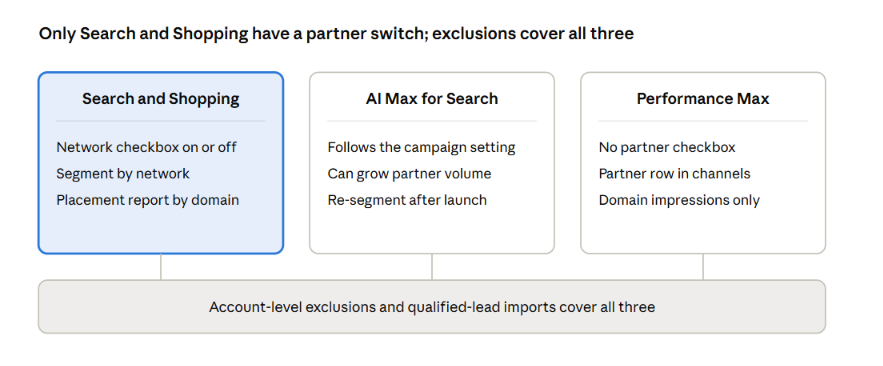
The network checkbox only exists on Search and Shopping; account-level exclusions and qualified-lead imports are the controls every campaign type shares.
For Performance Max, work with what's available:
Channel performance report: partners now appear as their own line, so you can compare partner conversions with Search inside the campaign. Cost arrives as a single line item, with no per-domain split, and Google positions the placement view as a brand-safety tool.
Account-level exclusions: the same domain list you build in Step 5 applies to Performance Max automatically.
Lead-quality import: enhanced conversions for leads matters even more here, because you can't switch the network off and have to steer the bidder with better signals.
AI Max for Search is the other place partner volume can grow without anyone touching a setting. On Search campaigns that already include partners, its broader matching can send far more traffic to partner inventory, as the Smarter Ecommerce account in the table above showed. Re-run the network segmentation from Step 1 within a few weeks of switching AI Max on.
Pro tip: Performance Max has its own exclusion controls for brands and placements. Our guide to Performance Max brand exclusions covers the brand side.
How to Measure the Impact After Excluding Search Partners
Measure an exclusion on total qualified leads and total CPQL over the next 60 to 90 days. Campaign CPA the week after the change tells you very little.
A better average can hide a worse business result.
If excluding partners lifts CPQL efficiency but removes qualified leads that were still profitable, the account is smaller and only looks healthier. Track the account-wide numbers, and check them against blended and paid CAC so the decision holds up beyond the platform.
Metric | Expected direction | Red flag | Action |
|---|---|---|---|
Clicks and leads | Down | Down far more than the partner share you removed | Check that nothing else changed in the same window |
Total qualified leads | Flat or slightly down | Down by more than the partner share of qualified leads | Re-test partners on one campaign |
Total CPQL | Down | Flat or up | Revisit targeting and offer; the network wasn't the main cost driver |
Impression share lost to budget | Down, freeing budget for Google Search | Budget left unspent | Raise targets or expand keywords to use it |
Smart Bidding stability | Short wobble, then steady | Volatility past two to three weeks | Re-baseline target CPA if partners were a material share of conversions |
Read any before-and-after comparison with care. Budget shifts, seasonality and other campaign changes can move these numbers in the same window. When the stakes justify it, keep partners on in one comparable campaign as a holdout and compare matured cohorts side by side.
Build a Cleaner Google Ads Lead Pipeline With 9AM
Search Partners is one checkbox, but deciding it well takes the whole measurement chain: network data on every lead, qualified outcomes flowing back from the CRM, and a decision rule tied to what a customer is worth. That chain is where most accounts break.
Our analytics team connects ad clicks to CRM outcomes and builds the reporting that shows cost per qualified lead by network, campaign and market. Our media buyers then use that data to set network, bidding and exclusion choices across Google, Microsoft and paid social.
If you want a second opinion on your network settings, book a strategy call.
We'll review your Search and Performance Max campaigns segmented by network, check how lead quality flows back into Google Ads, and show you where partner spend is earning its place.
FAQs
Does excluding Search Partners change how Smart Bidding prices Google Search traffic?
It can. The bidder re-learns on a smaller pool of auctions, and the budget that used to reach partners competes in Google Search auctions, where clicks tend to cost more. Expect a short adjustment period, and re-baseline your target CPA if partners drove a material share of conversions.
Can you run Search Partners in a separate campaign and bid on it differently?
Not in Google Ads. A Search campaign can include partners alongside Google Search, but it can't target partners by itself, so you can't give the network its own budget or bid. Microsoft Advertising handles this differently, letting advertisers manage syndicated partners apart from Bing and Yahoo.
Do Search Partner placement exclusions also apply to Display, YouTube and Performance Max?
Yes. Account-level placement exclusions apply across the Display Network, YouTube and the Search Partner Network, and Google states they reach every campaign type that serves on partners, Performance Max included. That reach is useful, but it means a domain you exclude for partner reasons also stops serving your Display ads there.
How do you score Search Partners when most leads arrive by phone?
Use Google forwarding numbers for call extensions and call-only ads, so calls carry network data, then import call outcomes with an "Import from calls" conversion action. Score qualified calls by network the same way as form leads. Calls without Google tracking can't be split by network, so treat that share as unattributed.
Keep exploring.
Insights
Offline Conversion Tracking: How to Feed Qualified Leads and Closed Sales Back Into Paid Search
October 19, 2026

Insights
Google Ads Auction Insights: How to Diagnose Competitive Pressure Before Raising Bids
October 19, 2026

Insights
How to Prioritize Markets for International Paid Media Expansion
October 16, 2026