Offline Conversion Tracking: How to Feed Qualified Leads and Closed Sales Back Into Paid Search
Offline conversion tracking step by step: send qualified leads and closed sales from your CRM to Google Ads, fix failed uploads and reconcile weekly.
Most lead-gen search accounts bid toward the form fill, because the form fill is the last thing Google Ads can see. The deal that pays for the campaign closes three, six or ten weeks later inside a CRM, out of the platform's view.
Google's own data shows what closing that gap is worth: advertisers who sent first-party data alongside click IDs in offline imports saw a median 10% increase in conversions over standard imports.
The plumbing changed in 2026, too. Since June 15, the Google Ads API no longer accepts new adopters of offline conversion imports, and new builds go through the Data Manager API.
This guide walks through the full setup in ten steps, with labeled examples for lead stages, identifiers, timing, failed uploads, reconciliation and ownership.
P.S. If you'd rather hand the plumbing and the bidding to one team, our media buying group runs paid search on CRM outcomes for lead-gen brands.
TL;DR
Offline conversion tracking sends qualified leads and closed sales from your CRM back to Google Ads, matched to the original click.
Bid on the deepest lead stage that usually happens within 63 days of the click. Keep later stages as secondary actions that carry value.
Capture GCLID, GBRAID, WBRAID, MSCLKID and hashed email or phone on every lead, then copy them to the opportunity.
Upload daily, check offline data diagnostics after every change, and reconcile CRM counts against Google Ads every week.
Give each part of the pipeline a named owner, especially the CRM fields that sales ops can rename without warning.
Before we begin: bidding algorithms are only as good as the outcome you let them see. We build media, analytics and the client's sales operations side by side, because a qualified-lead signal is a contract between three teams. Sales decides what qualified means, RevOps keeps the fields clean, and paid search decides what the bid optimizes toward. Media buying is the lab where that contract gets tested every day, and a conversion import is how the lab gets its results. When one of the three changes a definition alone, the algorithm learns the wrong lesson quietly, and it keeps learning it until someone checks.
What Is Offline Conversion Tracking?
Offline conversion tracking sends outcomes recorded outside your website back to an ad platform, matched to the ad click that started them. Those outcomes are usually a qualified lead, an opportunity or a closed sale. Google Ads calls its version "offline conversion import." In this guide, "CRM conversion import" means the pipeline that moves those outcomes from your CRM into the platform.
Two kinds of match keys make the connection:
Click identifiers. Google adds a GCLID to the landing page URL when auto-tagging is on, and Microsoft Advertising adds an MSCLKID. You store the ID with the lead and return it with the outcome.
Hashed user data. Enhanced conversions for leads matches SHA-256 hashed email addresses and phone numbers to the same data captured at form submit and to signed-in Google accounts. Google now recommends that new adopters start with enhanced conversions for leads over GCLID-only imports.
Offline conversion tracking sits next to server-side tracking without replacing it.
Server-side tagging recovers web events that browsers block.
CRM conversion imports add events that never happen on the web at all, like a sales call that moves a deal forward.
Our guide to server-side tracking for paid media teams covers the first job. This one covers the second, for Google Ads and Microsoft Advertising search campaigns.
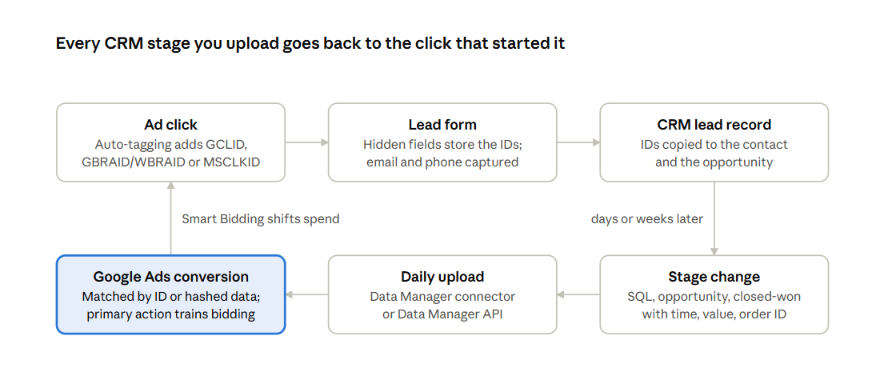
The loop closes when the stage your sales team records travels back to the click, so the next auction bids on what closed.
Why Paid Search Needs Qualified Lead and Closed Sale Data
Paid search needs CRM outcomes because bidding toward form fills gives Google no signal about which leads turn into customers. Maximize Conversions and Target CPA chase conversion volume; Maximize Conversion Value and Target ROAS use the values you send.
When the only primary conversion is a form fill, the algorithm buys the cheapest form fills it can find, and it has no way to see that some of them never answer a phone call.
The measurement gap is getting wider. In IAB's 2024 State of Data survey of 500+ ad and data leaders, 95% expected continued legislation and signal loss, and more than half expected trouble tracking and attributing conversions. CRM data is first-party, so signal loss doesn't erode it the way it erodes browser data.
Let’s take this example, with hypothetical numbers. Two search campaigns each spend $5,400 in a month. Here's what each system records:
Metric | Campaign 1: broad match, generic terms | Campaign 2: exact match, solution terms |
|---|---|---|
Form fills (what Google Ads sees) | 120 | 49 |
Cost per form fill | $45 | $110 |
Sales-qualified leads (CRM) | 9 | 22 |
Closed-won deals (CRM) | 3 | 9 |
Cost per closed deal | $1,800 | $600 |
With form fills as the goal, Smart Bidding shifts budget toward Campaign 1. With SQLs or closed deals as the goal, it shifts budget toward Campaign 2, which produces three times the revenue per dollar. Platform-reported conversions overstating weak traffic is the same pattern we cover in why last-click attribution over-credits the wrong campaigns.
How to Set Up Offline Conversion Tracking for Google Ads, Step by Step
Setting up offline conversion tracking takes ten steps: assign owners, map lead stages, pick one stage to bid on, value each stage, capture identifiers, create conversion actions, connect the CRM, set timing rules, test the first upload and reconcile every week. Steps 1 to 4 are decisions on paper. Steps 5 to 10 are build and maintenance work.
Step 1: Assign Owners Across Sales, RevOps, and Paid Search
Assign one named owner per task before anyone touches a setting, because offline imports cross three teams and fail at the handoffs. In the accounts we audit, the most common break is a CRM field renamed by sales ops for an unrelated reason, which silently empties the identifier column.
Task | Responsible | Accountable | Consulted |
|---|---|---|---|
Lead stage definitions | RevOps | Head of sales | Paid search lead |
Identifier fields on forms and CRM objects | Web developer | RevOps | Analytics |
Data source connection and field mapping | Analytics or marketing ops | Head of marketing | RevOps |
Conversion action settings and values | Paid search lead | Head of marketing | Analytics |
Daily upload monitoring | Analytics or marketing ops | Paid search lead | RevOps |
Weekly reconciliation | Analytics | Head of marketing | Sales, paid search |
Conversion adjustments | Analytics | Paid search lead | Sales |
Consent and customer data review | Legal or privacy | Head of marketing | Analytics |
Add one change-control rule to the table: no CRM stage, field name or picklist value changes until the paid search lead signs off. Our paid media RACI guide has the full tracking and measurement rows if you need the wider version.
Step 2: Map Lead Stages to Offline Conversion Actions
Write each lead stage as a CRM trigger, a typical lag and a send rule, and create one offline conversion action per stage. A stage name that sales and marketing read differently produces a conversion action sales won't trust.
Stage | CRM trigger (example) | Typical lag from click | Send as | Primary or secondary |
|---|---|---|---|---|
Form submit | Web form completed | Same session | Google tag | Secondary once imports run |
Marketing-qualified lead | Lead score ≥ threshold | 0 to 3 days | Offline conversion | Secondary |
Sales-qualified lead | Lead status = Sales accepted | 3 to 21 days | Offline conversion | Primary for most B2B accounts |
Opportunity created | Opportunity record opened | 14 to 45 days | Offline conversion | Secondary |
Closed-won | Opportunity stage = Closed won | 30 to 180 days | Offline conversion with revenue | Secondary |
Closed-lost or disqualified | Status = Disqualified | Any | No upload; triggers retraction rules | Not uploaded |
The lags above are typical ranges from B2B and high-ticket service accounts, so replace them with medians from your own CRM.
If several Google Ads accounts import the same stage without cross-account conversion tracking, Google requires the exact same spelling and capitalization of each conversion name in every account.
For mapping where leads drop between these stages on the site itself, see our funnel leak analysis.
Step 3: Choose One Primary Conversion Action for Bidding
Choose the deepest stage that most deals reach within 63 days of the click and that still produces steady weekly volume, then mark it primary. Primary actions feed bidding, while secondary actions are observation only, so the choice decides what Smart Bidding and Performance Max chase.
The 63-day mark matters because enhanced conversions for leads only imports conversions uploaded up to 63 days after the click. A closed-won stage that lands at day 110 can't train the bid for most deals, however valuable it is.
Your situation | Primary action | Secondary actions |
|---|---|---|
Short cycle (under 30 days), low lead volume | Closed-won with revenue | MQL, SQL |
Mid cycle (30 to 90 days), healthy SQL volume | SQL with expected value | Opportunity, closed-won |
Long cycle (90+ days), enterprise deals | SQL or opportunity with expected value | Closed-won, kept for reporting |
Very low volume at every stage | MQL with expected value | SQL, closed-won |
Pro tip: keep the form-fill action live as secondary for at least one full sales cycle after you switch. It gives you a clean before-and-after view of cost per SQL when someone asks whether the change worked.
Step 4: Assign an Expected Value to Each Lead Stage
Give each stage a value equal to your average closed-won deal value multiplied by that stage's close rate. Values let value-based bidding tell a promising SQL apart from a weak one, and they keep upper-stage actions from looking as valuable as revenue.
Stage value = Average closed-won value × Stage-to-close rate
Now let’s take another example. Say a software company closes deals at an average of $12,000 in first-year revenue. Its CRM shows these close rates:
SQL to closed-won: 25%, so each SQL is worth $3,000.
Opportunity to closed-won: 40%, so each opportunity is worth $4,800.
Closed-won: 100%, sent with the actual deal value.
Refresh close rates every quarter from at least two quarters of CRM data, and restate closed-won values when the signed amount changes (Step 10 covers adjustments). If retention varies a lot by segment, use first-year revenue for the bid and track lifetime value separately, as we outline in using LTV data for customer acquisition.
Step 5: Capture Click Identifiers and Hashed User Data in the CRM
Capture every available identifier at form submit, store it on the lead and copy it to the contact and opportunity, because the stage you upload often lives on a different CRM object than the form. A missing identifier at capture can't be recovered later.
Turn on auto-tagging in Google Ads and Microsoft Advertising.
Add hidden form fields for GCLID, GBRAID, WBRAID and MSCLKID, filled by a script or a Google Tag Manager tag that reads the URL and a first-party cookie.
Create matching custom fields on the lead, contact and opportunity objects, plus a mapping rule that copies them on conversion.
Write the first identifier the lead arrived with, and don't overwrite it when the same person submits a second form.
Store a unique order ID for each stage event, such as the opportunity ID plus the stage name.
Each identifier fails in its own way, so it's worth knowing all of them:
Identifier | Platform | Captured where | Upload limit | Breaks when |
|---|---|---|---|---|
GCLID | Google Ads | Landing page URL | 90 days after click | Auto-tagging off, redirects strip the parameter, or casing changes (it's case sensitive) |
GBRAID / WBRAID | Google Ads, iOS traffic | Landing page URL | 90 days after click | Form only has a GCLID field |
Hashed email or phone | Google Ads enhanced conversions for leads | Form fields, hashed in the tag or at upload | 63 days after click | Normalization differs between tag and upload |
MSCLKID | Microsoft Advertising | Landing page URL | 90 days | Auto-tagging off; optional when hashed email or phone is sent |
Order ID | Google Ads; internal CRM tracking for both platforms | CRM stage-event ID | Subject to the conversion's upload window | Reused for separate events within the same conversion action |
Hashing has one rule that catches most teams. Google asks you to trim whitespace, lowercase and format phone numbers to E.164 before SHA-256 hashing, and for gmail.com and googlemail.com addresses it also asks you to remove periods and plus suffixes from the username.
Skip that step and Gmail leads hash to values Google never matches. On Microsoft, the MSCLKID becomes optional when you send a hashed email or phone for enhanced conversions.
Collect consent before any of this runs, and pass the user's consent choice through to the upload.
Pro tip: Regulated categories carry extra limits on what user data may leave the site, which we cover in our healthcare PPC compliance questions.
Step 6: Create Offline Conversion Actions and Turn On Enhanced Conversions
Create one offline conversion action per stage from Step 2, set primary or secondary from Step 3, and add the value rule from Step 4.
Use "One" for lead-stage actions where the import method supports it
"Every" for closed-won when one click can produce several deals.
For Google Ads API uploads containing GBRAID or WBRAID, use an action configured as "Every"; "One" isn't supported.
Deduplicate stage events with stable order IDs.
Then turn on enhanced conversions. Google merged enhanced conversions for web and for leads into a single on/off setting, and since April 2026 the account accepts user-provided data from the tag, Data Manager and API connections at once. You'll confirm the Google Ads customer data terms when you switch it on.
Wait before the first upload. Google advises waiting 4 to 6 hours after creating a conversion action, and conversions uploaded earlier can take 2 days to appear in reports.
Step 7: Connect the CRM Through Google Ads Data Manager
Connect the CRM in Google Ads Data Manager (Tools, then Data manager) when a native connector exists, and use the Data Manager API for custom builds. The old routes are closing: Google ended support for the legacy Salesforce integration on May 31, 2025, and the Data Manager connector now imports from Salesforce's Lead, Opportunity and Order objects.
HubSpot users can also sync lifecycle stages from HubSpot's own ads tool. HubSpot sends a separate conversion for each lifecycle stage a contact passes, so a contact who moves from lead to customer triggers two events.
Import method | Best for | Refresh | Main watch-out |
|---|---|---|---|
Data Manager CRM connector (Salesforce, HubSpot) | Teams on a supported CRM | Scheduled, at least daily | 14-day lookback on the first run, then changes only |
Scheduled file (Google Sheets, SFTP, CSV in cloud storage) | Lower volume or custom CRMs | Daily schedule | Manual exports go stale on weekends and holidays |
Data Manager API | High volume, custom stack, several platforms | Near real time | Engineering time to build and maintain |
Middleware (Zapier, Make) | Small teams with no developer | Per trigger | Silent failures when a step errors or hits a rate limit |
Map six fields whatever the method: identifiers, conversion action name, conversion time, value, currency and order ID. If you want the conversion action design and the bidding handled together, our Google Ads management team builds this setup as part of onboarding.
Then mirror the same stages in Microsoft Advertising as offline conversion goals. Set each goal's conversion window to the maximum of 90 days, and keep the stage names identical so reports line up.
Step 8: Set Conversion Times and a Daily Upload Schedule
Set the conversion time to the moment the CRM stage changed, with an explicit timezone, and upload at least once a day. Google asks advertisers to upload conversions at least daily, and every day of delay is a day the bid learns from stale data.
Three timing limits shape the whole setup:
Click identifier window. Google won't import offline conversions uploaded more than 90 days after the last click, and the limit is 63 days for enhanced conversions for leads. Microsoft's offline goals cap at 90 days.
Connector lookback. Data Manager imports the last 14 days on the first Salesforce or HubSpot run and only changes after that, while warehouse connectors import the last 14 days on every run, per Google's setup guide. A stage change older than the lookback never gets picked up.
Reporting lag. Imported conversions take about 3 hours to appear, and they're reported against the date of the click. Monday's numbers keep climbing all week as Monday's leads progress.
For example, an IT services firm has a 110-day median from click to closed-won. Its SQLs land at a median of day 21 and opportunities at day 38, so both fit inside the 63-day window. Closed-won at day 110 misses even the 90-day GCLID limit for most deals. The firm bids on SQL with a $3,000 expected value, sends opportunities as secondary, and uses closed-won for quarterly reporting in the CRM.
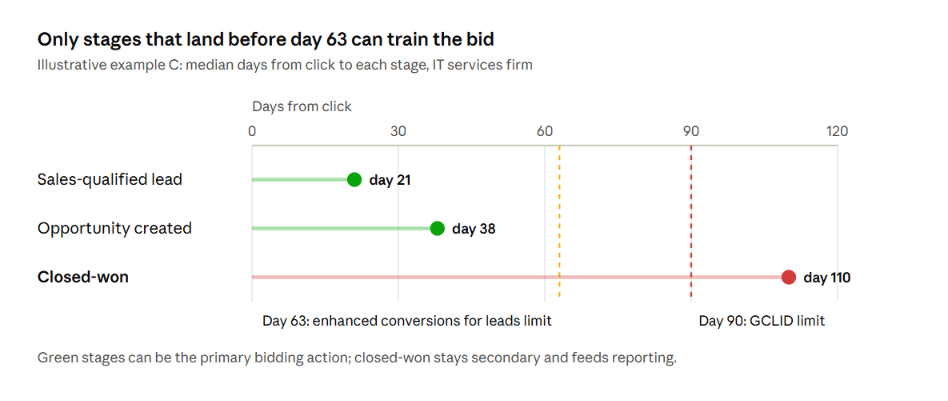
The timeline shows why the primary action is a timing decision as much as a value decision.
Step 9: Test the First Upload and Fix Failed Conversions
Upload a small test batch first, then open the offline data diagnostics page in Google Ads before you schedule anything. Google lists upload errors there, and file imports also show row-level detail on the Uploads page, as Google's troubleshooting guide explains.
Most failures fall into a short list. Google's API reference covers the full set of conversion upload errors, including a limit of 2,000 events per request:
Error | What it means | Usual cause | Fix |
|---|---|---|---|
Identifiers too old | Click is past the import window | Uploading a late stage, or a backlog | Upload daily; bid on an earlier stage |
Click too recent | Click is still processing | Real-time sends right after the click | Delay uploads by at least six hours |
Conversion action just created | Action is under 4 to 6 hours old | Upload ran right after setup | Wait, then re-upload |
Conversion action not active | Action is removed or not an import action | Renamed or deleted action | Re-map to an active "Import from clicks" action |
Duplicate conversion | Same click and conversion time already exist | Re-running a file | Use order IDs; skip rows already accepted |
Invalid conversion time | Time is before the click or unparseable | Wrong timezone or date format | Send ISO dates with an explicit timezone |
User data not hashed | Email or phone arrived in plain text | Upload skipped hashing | Normalize and hash before sending |
Tracking not enabled at click | No conversion tracking when the click happened | New account or new conversion account | Upload only clicks after tracking began |
The more dangerous failures are silent. An upload can succeed and still attribute nothing. Google reports an email or phone it can’t match to a click as a warning that’s often safe to ignore, because the lead may not have come from Google Ads, so a rising share of those warnings is easy to miss. Only Step 10 catches these.
For instance, imagine that a CRM admin renames the field "GCLID" to "Google Click ID" during a cleanup. The connector keeps running, and for nine days it sends SQLs with an empty identifier and no hashed data. Google rejects those rows, but the scheduled job still shows as completed and nobody opens diagnostics. The weekly reconciliation shows 31 SQLs in the CRM and 4 attributed in Google Ads.
The fix is to re-map the field, then re-upload the nine days of SQLs with their order IDs while they’re still inside the 63-day window.
Step 10: Reconcile Imported Conversions Against the CRM Every Week
Reconcile weekly by comparing CRM stage counts with what Google Ads accepted and attributed for the same week, and write the result in a shared ledger. A reconciliation is the only check that catches silent failures, field renames and connector lookback gaps.
Put it on the agenda of the performance review you already run, the way our weekly marketing cadence guide suggests, so a dropped rate gets an owner within days.
Pull the count of records that reached each uploaded stage last week, by stage-change date.
Count how many of those records carry at least one identifier or hashed email.
Count rows uploaded and rows accepted, from the Uploads page or diagnostics.
Count conversions attributed in Google Ads for each action, using the "All conversions" column by conversion time.
Log the three rates below and flag any that moved more than 10 points week over week.
The three rates each point to a different owner:
Identifier coverage = records with an identifier ÷ CRM records at that stage. Low coverage points to forms and field mapping.
Acceptance rate = rows accepted ÷ rows uploaded. A drop points to formatting or timing errors.
Attribution rate = conversions attributed ÷ rows accepted. A drop points to hashing or identifier quality.
Let’s use this example of one week in a B2B account:
Stage | CRM records | With identifier | Uploaded | Accepted | Attributed in Google Ads |
|---|---|---|---|---|---|
SQL | 64 | 52 | 52 | 50 | 41 |
Opportunity | 28 | 22 | 22 | 22 | 17 |
Closed-won | 9 | 7 | 7 | 7 | 5 |
Identifier coverage for SQLs is 81% (52 ÷ 64). The 12 missing records came mostly from a partner referral form with no hidden fields, which explains the gap without any Google Ads change. Leads from organic or direct traffic also lack identifiers, so 100% coverage isn't the goal; a stable rate is.
Pro tip: When a team can't staff this review every week, our analytics team builds the ledger and runs it.
Use conversion adjustments to keep the bid honest after the fact:
Retract an SQL that sales later disqualifies.
Restate a closed-won value when the signed amount changes.
Google counts adjustments for automated bidding only within 7 days of the original conversion, and you must wait at least 24 hours after the conversion before adjusting it. Batch adjustments into the daily upload and use the order ID as the key, falling back to the identifier plus the original conversion time only when no order ID exists.
Warning: Expect platform and CRM totals to differ every week, even with clean data.
Google Ads counts conversions by click date and its own attribution model, while the CRM counts by stage-change date. The reasons overlap with the self-attribution gaps in our attribution model audit, so read the three rates as trends over several weeks.
Build a Closed-Loop Paid Search Program with 9AM
Offline conversion tracking works when the stage definitions, the identifiers, the uploads and the weekly reconciliation all have an owner and a schedule. The setup itself takes a few weeks. Keeping it accurate is a permanent job, because CRMs, forms and Google's own APIs keep changing, as the 2026 Data Manager move showed.
9AM runs paid search and analytics as one team. We map lead stages with your sales ops, rebuild identifier capture, connect the CRM through Data Manager, set values that reflect real close rates, and then manage bidding against those outcomes with a reconciliation ledger reviewed every week.
Book a strategy call and we'll review your current conversion actions, your CRM fields and your last 90 days of imports, and show where the signal Google Ads learns from is leaking.
FAQs
Should the form-fill conversion stay primary while qualified-lead data builds up?
Keep it primary only until the qualified stage has a few weeks of accepted uploads, then switch the form fill to secondary. With Maximize Conversions or Target CPA, both actions count toward the conversion total. With value-based bidding, the values you assign tell Google which outcome matters more. If you need a transition, give the form fill a low value and the SQL its expected value, so bidding already prefers the deeper stage.
Can you upload offline conversions for leads that didn't come from Google Ads?
Yes. For enhanced conversions for leads through the API, Google asks you to upload all available offline conversions, including ones that may not have come from Google Ads, because matching happens on Google's side. Leads with no Google touchpoint simply won't attribute. Keep this in mind when reading acceptance and attribution rates in your ledger.
How do you count a lead that reaches the same stage twice?
Count it once by giving each stage event a stable order ID, such as the opportunity ID plus the stage name. Then set lead-stage actions to count "One" conversion per click. A recycled lead that requalifies months later should get a new order ID only if sales treats it as a new opportunity in the CRM.
What changes when several Google Ads accounts share one CRM?
Either create the import conversion actions once in the manager account with cross-account conversion tracking, or create them in every account with identical names and capitalization. Uploads for accounts not linked to the manager fail with a "not authorized" error. HubSpot's form-submission enhanced conversions can't sync through a manager account, so check your CRM's limits before choosing.
Keep exploring.

Insights
Google Ads Auction Insights: How to Diagnose Competitive Pressure Before Raising Bids
October 19, 2026

Insights
Google Search Partners: A Lead-Quality Framework for Keeping or Excluding the Network
October 19, 2026

Insights
How to Prioritize Markets for International Paid Media Expansion
October 16, 2026