Google Ads Auction Insights: How to Diagnose Competitive Pressure Before Raising Bids
Read Google Ads auction insights with your change history and CPA to tell real competitive pressure from self-inflicted drops before raising bids.

CPA climbs for three weeks, someone opens auction insights, a competitor's row looks bigger than last month, and the bids go up. It's one of the most common reflexes in paid search, and it's frequently aimed at the wrong problem.
Clicks aren't getting cheaper, which makes the reflex expensive.
WordStream by LocaliQ's latest benchmarks, as reported by Search Engine Journal, put the average search CPC at $5.42, with real estate CPCs up 27% in a year. The same data shows conversion rates up more than 30% in beauty and personal care, so higher click prices and worse results don't always travel together.
Auction insights by themselves can't tell you which one you have.
You’re on the right page, though. This guide shows how to read the report alongside your account's change history and your commercial numbers, in nine steps, with one illustrative scenario carried through all of them.
P.S. If you'd rather have a specialist read the auctions and run the bidding, our media buying group manages search with this diagnosis built into the weekly review.
TL;DR
Auction insights shows who entered the same auctions as you and how often they ranked above you. It doesn't show bids, budgets, quality or profit.
Before raising bids, split lost impression share between budget and rank, and line the report up against a timeline of your own account changes.
Many "competitive pressure" stories turn out to be self-inflicted: broader match types, a tighter Target CPA, a new Performance Max campaign.
Check CPC, conversion rate, CPA or ROAS and conversion volume for the same weeks before you touch bids.
Under Smart Bidding, "raising bids" means loosening a target, so test it as an experiment with a success metric written in advance.
Pro tip: Before we recommend raising bids, we want to know what changed in the auction and whether paying more makes commercial sense. A report showing two metrics moving together gives us something to investigate. We check the account’s change history against what happened to lead quality, revenue, and margin before recommending more spend. That means working across the ad platform and the CRM: auction data can help explain the pressure on costs, while business results tell us whether those costs are worth carrying.
What Is the Auction Insights Report in Google Ads?
The auction insights report compares your ads with other advertisers in the same auctions. It shows how often you met each one and who ranked higher. Google makes it available for Search, Shopping and Performance Max campaigns that meet a minimum activity threshold.
What you get depends on the campaign type:
Search campaigns show six metrics, and you can run the report for campaigns, ad groups or keywords.
Shopping campaigns show three metrics: impression share, overlap rate and outranking share.
Performance Max shows Search and Shopping data in separate segments, at account and campaign level.
To open it, select campaigns, ad groups or keywords in the Campaigns menu and choose Auction insights. You can segment by time and device. Two limits shape every read: the report shows nothing when your impression share is under 10%, and search partner traffic is left out.
Metric | What it measures | Campaign types | How to read it in a diagnosis |
|---|---|---|---|
Impression share | Impressions received ÷ impressions you were eligible for | Search, Shopping, PMax | Your reach. For a competitor, their share of the auctions you were in |
Overlap rate | How often a competitor's ad showed when yours did | Search, Shopping, PMax | How much of your traffic they share. The closest thing to "impression overlap" in Google Ads |
Position above rate | How often their ad ranked above yours when both showed | Search | Whether they're winning the auctions you share |
Top of page rate | How often an ad showed above the organic results | Search | Prominence, for you and each competitor |
Absolute top of page rate | How often an ad was the very first ad | Search | The most contested spot on the page |
Outranking share | How often you ranked above them, or showed when they didn't | Search, Shopping, PMax | Your net win rate against one competitor |
Why Auction Insights Can't Justify a Bid Increase [by Itself]
Auction insights can't justify a bid increase on its own because it measures co-occurrence and relative rank, and neither one is cause or profit. It never shows a competitor's bids, budgets, Quality Score, keywords or conversions, and it can't tell you whether a competitor caused the change you're worried about.
Three properties of the data make it easy to misread:
A competitor's numbers are measured on your auctions. Google notes that the impression share you see for a competitor can differ from what that competitor sees in their own report, because their eligible auctions only partly overlap with yours.
Impression share is an estimate. Google says small fluctuations don't necessarily indicate that action is needed, and that changes to your own bids or quality change the set of auctions you're judged competitive in. Your edits move the denominator.
The page itself changed in 2025. Google runs separate auctions for each ad location. In April 2025, it confirmed that advertisers appearing among the top ads could also compete for bottom placements on the same page. On exact-match brand terms, Adthena's analysis found impressions rose and CTR fell while CPC held steady as double serving increased.
Question you're asking | Does auction insights answer it? | Where to look instead |
|---|---|---|
Who shows up in my auctions, and how often? | Yes | The report itself |
Is a competitor ranking above me more often? | Yes, for Search | Position above rate and outranking share by week |
What is the competitor bidding or spending? | No | Nowhere in Google Ads; infer cautiously |
Did the competitor cause my CPA to rise? | No | Change history, search terms, conversion data |
Would a higher bid be profitable? | No | Marginal CPA or ROAS, experiments |
Am I losing auctions to budget or to rank? | No | Search lost IS (budget) and (rank) columns |
How to Diagnose Competitive Pressure With Auction Insights, Step by Step
Diagnosing competitive pressure takes nine steps: define the commercial problem, pull the report at the right level, split lost impression share, build a change timeline, read competitor moves against it, check outcomes, choose a response, translate it into your bid strategy and test it. One illustrative scenario runs through every step so you can see the method applied end to end.
Step 1: Define the Commercial Problem Before Opening the Report
Write down the symptom in numbers and the rule that would justify acting, before you look at any competitor. Opening the report first invites you to find a villain and work backward.
Name the metric that moved: CPA, conversions, revenue, ROAS or brand CPC.
Fix the comparison window, such as the last four weeks against the four before.
Split brand from non-brand, because the two face different competitors and different economics.
Write the decision rule, for example: act only if non-brand CPA stays more than 15% above target for three straight weeks. Review it in a fixed slot of your weekly marketing cadence, so one noisy week doesn't trigger a bid change.
Hypothetical example (part 1).
A project-management software company sees non-brand Search CPA rise from $180 to $228 over four weeks, while conversions fall 9%. Its Target CPA is $190. The team's rule says act if CPA stays above $219 (15% over target) for three weeks, and it has.
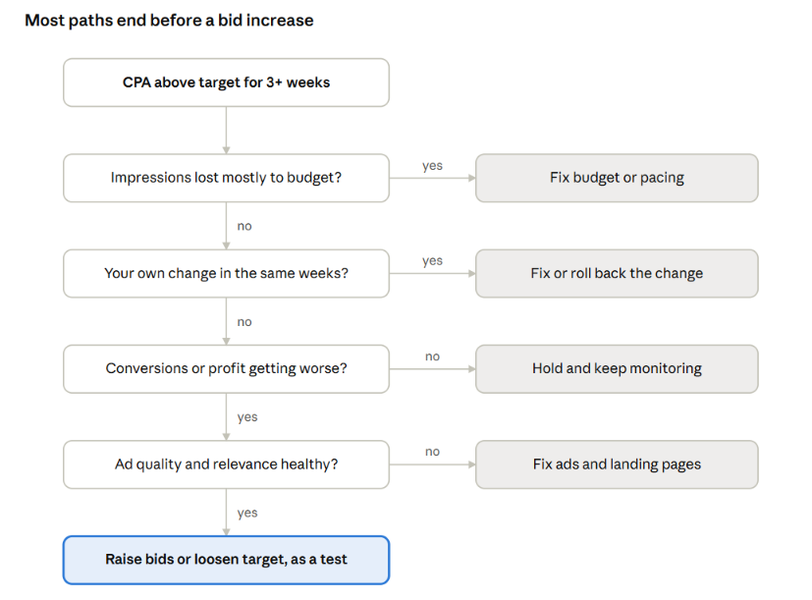
The rest of the steps follow the path below, and most branches end somewhere other than a higher bid.
Step 2: Pull Auction Insights at the Right Level and Date Range
Pull the report at campaign level to see direction and at ad group or keyword level to find the cause, segmented by week across 8 to 12 weeks. A single date range hides the week a pattern started, and that week is what you'll match against your change log.
Segment by week, then by device if mobile and desktop behave differently.
Compare equal-length windows before and after the symptom began.
For Performance Max, read the Search and Shopping segments separately, because they meet different competitors. If PMax and Standard Shopping share products, our guide to Performance Max vs Standard Shopping explains how they compete for the same queries.
Export the weekly rows to a sheet. You'll need them for the timeline in Step 4.
Example scenario (part 2).
Ten weeks of weekly data for the non-brand campaign show that overlap with Competitor X rose from 28% to 51%, and X's position above rate went from 22% to 38%. X's own impression share in the report barely moved, from 41% to 43%.
Step 3: Split Lost Impression Share Between Budget and Rank
Check whether the impressions you're missing were lost to budget or to rank, because only rank losses respond to a higher bid. Google defines Search lost IS (budget) as impressions missed because of insufficient budget, and Search lost IS (rank) as impressions missed because of Ad Rank, which combines your bid with ad quality.
Two reporting quirks matter here. Lost IS (budget) is reported at campaign level only, and lost IS (rank) disappears from the ad groups tab if the campaign ran out of budget at any point in the date range.
Pattern | What it means | Next move |
|---|---|---|
High lost IS (budget), low lost IS (rank) | Budget runs out before the day ends | Fix pacing or budget; bids aren't the lever |
Low lost IS (budget), high lost IS (rank) | Ad Rank is the constraint | Check quality and targets before bids |
Both high | Budget and rank both bind | Fix budget first, then reassess rank |
Both low, but results worse | Delivery isn't the problem | Look at conversion rate and query mix |
If budget is the binding constraint, our marketing budget pacing guide covers how to keep spend from running out early in the day or month.
Scenario, part 3. Lost IS (budget) sits at 2%. Lost IS (rank) rose from 30% to 44% over the same weeks. Budget isn't the problem, so something is weakening Ad Rank or shifting which auctions count.
Step 4: Build an Account-Change Timeline for the Same Weeks
List every change you made to the account over the same weeks, plus outside events, and put them on the same weekly axis as the auction insights rows. Google's change history keeps two years of edits and maps them against impressions, clicks, conversions and cost, which makes this step faster than it sounds.
Changes that most often create false "competitor" signals:
Bid strategy switches and target edits, including Target CPA cuts requested by finance.
Match type expansion, new broad match ad groups or AI-driven query expansion.
New campaigns entering the same auctions, especially Performance Max on brand terms. Our post on Performance Max brand exclusions covers how to keep PMax out of brand auctions.
Negative keyword removals, new ads, landing page changes and conversion tracking edits.
Outside events go on the same timeline: promotions, stockouts, seasonality, pricing changes, a competitor's product launch, and Google changes like the 2025 update that lets top ads also appear at the bottom of the page.
Scenario, part 4. Change history shows two edits. In week 6, the team added broad match keywords to three non-brand ad groups. In week 7, finance asked for a lower Target CPA, and it moved from $210 to $190.
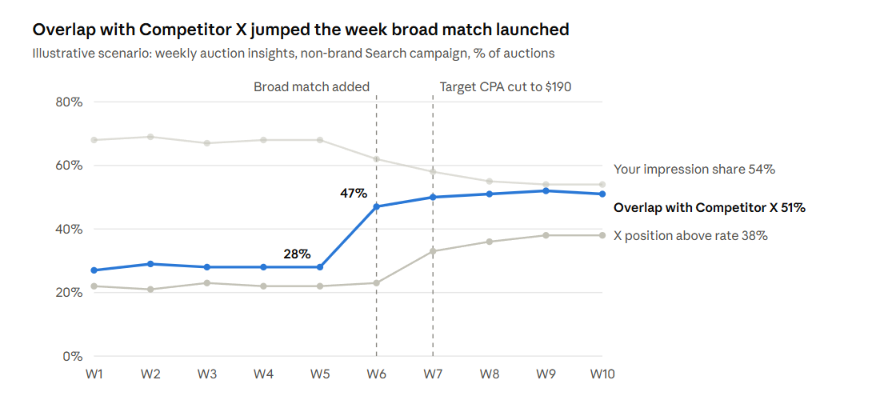
The overlap jump starts in week 6, the same week broad match went live, and the CPA climb steepens after the target cut in week 7.
Step 5: Read Competitor Movement Against the Timeline
Read each competitor change against your timeline and ask whether your own change could explain it, before you credit it to the competitor. Overlap and position above rate are relationships between two advertisers, so either side can move them.
Brand terms deserve their own read. When a competitor appears on searches for your name, check brand CPC, conversion volume and the cost of defending that traffic before raising bids.
Pattern in auction insights | Likely explanation | What to check next |
|---|---|---|
A new domain appears with high overlap | New entrant or a competitor's new campaign | Their ads in the Google Ads Transparency Center; your CPC on shared terms |
Overlap and position above rate both rise; your settings unchanged | A competitor bidding harder or improving quality | Lost IS (rank) trend and CPC on shared terms |
Overlap rises right after you broadened match types | Your targeting expansion may explain it | Search-term mix before and after the change |
Your top of page rate falls; no competitor row changed | Your own Ad Rank fell | Target edits, Quality Score, ad and landing page changes |
Your outranking share falls on brand terms | A competitor bidding on your brand | Brand CPC and brand conversion volume |
A long-time competitor disappears | Their budget, strategy or eligibility changed | Whether your CPC dropped; don't assume it's permanent |
Scenario, part 5. The overlap jump with Competitor X lines up with the broad match launch, so the targeting expansion may explain it. The search-term report shows that 38% of non-brand spend now goes to queries like "free project templates" that the exact-match ad groups never reached. The rise in X's position above rate starts a week later, alongside the Target CPA cut, which would lower the team's own bids. The competitive story is weakening.
Step 6: Check Commercial Outcomes Before Touching Bids
Put CPC, CTR, conversion rate, CPA or ROAS and conversion volume on the same weekly rows, because a bid decision is a profitability decision. Lower impression share alone doesn't justify intervention: check conversion volume and profitability before you decide to act or hold.
The number that matters for a bid increase is marginal: what the next block of spend returns. The account's average return says little about it. Average CPA can look fine while the extra conversions a higher bid buys cost twice as much. Our guide to reading a paid media saturation curve covers how to estimate that margin.
Scenario, part 6. CPC rose 4% over the period, which competition could explain. Conversion rate on the new broad-match queries is 3.3%, against 4.1% on the original exact-match terms. CPA on the exact-match ad groups held at $182, inside target. Most of the CPA rise comes from the new traffic, while the original traffic costs about what it did.
Step 7: Choose the Response: Hold, Raise Bids, Fix Rank, or Move Budget
Choose the response that matches the diagnosis, and raise bids only when rank is the constraint, quality is healthy and marginal returns have room. Every other diagnosis has a cheaper fix.
Diagnosis | Response | Why |
|---|---|---|
Budget-limited, CPA on target | Raise budget or move it from weaker campaigns | More auctions at the same efficiency |
Rank-limited, quality healthy, marginal CPA has room | Raise bids or loosen the target, as a test | Ad Rank is the binding constraint |
Rank-limited, quality weak | Fix ads, relevance and landing pages | A higher bid pays to cover a quality gap |
Your own change explains the shift | Fix or roll back the change | The competitor isn't the cause |
Impression share down, outcomes stable | Hold and keep monitoring | Visibility fell without costing results |
Competitor on brand terms, brand conversions falling | Defend brand with a capped test | Protect conversions you'd otherwise lose |
If you want a second read on which row your account sits in, our Google Ads management team runs this diagnosis before any bid change.
Scenario, part 7. The team chooses to fix its own change. It adds negatives for template and free-tool queries, keeps broad match only in the ad group where search terms stayed relevant, and leaves exact-match bids alone.
Step 8: Translate the Response Into Your Bid Strategy
Translate "raise bids" into the lever your bid strategy actually exposes, because under Smart Bidding Google sets the bid in each auction and you steer it through targets and budgets. Google notes that the Target CPA you set may influence how many conversions you get, and that a target set too low can forgo clicks that would have converted.
Bid strategy | What "raise bids" means there | Lever |
|---|---|---|
Manual CPC | Higher max CPC on the affected keywords | Keyword or ad group bids |
Maximize conversions or conversion value, no target | Google already bids to spend the budget | Budget only |
Target CPA | Accept a higher cost per conversion | Raise the target |
Target ROAS | Accept a lower return per dollar | Lower the target |
Under a target-based strategy, high lost IS (rank) can mean your own target is binding, with no competitor outbidding you at all. Google's Target ROAS guidance describes the strategy as keeping conversion value per cost at your target, so a strict target will skip auctions a competitor with looser economics will take. That's the strategy doing its job. A more visible competitor, by itself, doesn't justify loosening a profitability target; the margin has to.
Scenario, part 8. The account runs Target CPA. "Raising bids" would mean moving the target back from $190 toward $210, reversing finance's cut. Since exact-match CPA sits at $182, the team keeps $190 and first tests the targeting fix.
Step 9: Test the Bid Change and Re-Read the Report
Run the change as a test with the success metric you wrote in Step 1, then re-read auction insights, lost impression share and CPA together. A target or bid change made without a test leaves you guessing which part of the next month's results it caused.
Use "Save as experiment" when you change a Target CPA or similar setting, so the new version runs against the original.
Run it for two to four weeks, or long enough to reach a meaningful number of conversions in each arm.
Log the test in your change timeline, so the next diagnosis starts with it.
Platform experiments measure what happens inside Google Ads. If you need to know whether the extra spend created business that wouldn't have happened anyway, use a geo-lift test, which auction insights can never answer.
Scenario, part 9. The team runs the targeting fix as an experiment for four weeks, with a success rule of non-brand CPA at or below $195 and conversions no more than 5% below baseline. Overlap with Competitor X is expected to fall back toward its earlier level if the broad-match queries were the cause. If CPA still sits above target with clean search terms, the next test is a Target CPA increase.
Keep the auction insights read on a fixed weekly schedule, with the change log open beside it, so every diagnosis starts from the same evidence.
Diagnose Before You Bid with 9AM
Auction insights is useful precisely because it's narrow. It tells you who you met and who ranked higher, and that's a good starting question. The answer comes from your change log, your search terms and your margins.
9AM runs search across media buying and analytics. We build the change timeline, read auction insights against commercial outcomes, translate decisions into Smart Bidding targets, and test before budgets move.
Book a strategy call and we'll review your last 12 weeks of auction insights against your change history and show where pressure is real and where it's self-inflicted.
FAQs
Why does a competitor's impression share in my report differ from what they see?
Your report measures their share of the auctions you were eligible for, which is only part of theirs. If a competitor targets many queries you don't, their own report covers a different set of auctions. Google's example: a competitor can show 100% in your report while holding 50% across their own eligible auctions.
Why does google.com appear in my auction insights?
Google lists google.com when an advertiser uses a Google-hosted domain or a Google Business Profile. It also appears when a landing page sits on a Google site such as sites.google.com or play.google.com. It usually isn't a new competitor; treat it as a hosting artifact unless the overlap is large.
How long a date range should an auction insights review cover?
Use 8 to 12 weeks segmented by week for diagnosis, and compare equal-length windows before and after the change. Shorter ranges exaggerate noise, and impression share is an estimate that can move without any real change in the auction. For low-volume keywords, roll up to ad group or campaign so the report clears its activity threshold.
Can auction insights show what competitors bid?
No. The report shows how often you and a competitor appeared together and who ranked higher, which reflects bids and quality combined. A competitor can outrank you with a lower bid and better ad quality, so position above rate is not a bid estimate.
Keep exploring.
Insights
Offline Conversion Tracking: How to Feed Qualified Leads and Closed Sales Back Into Paid Search
October 19, 2026

Insights
Google Search Partners: A Lead-Quality Framework for Keeping or Excluding the Network
October 19, 2026

Insights
How to Prioritize Markets for International Paid Media Expansion
October 16, 2026