Amazon Brand Store for Food Brands: Send Ads to the Right Page
How food brands should build an Amazon Brand Store, structure pages by product line and pack size, and match every ad to the page shoppers want.

· 16 min read
Not long ago I clicked through a Sponsored Brands ad for "low sugar granola" on my phone.
The ad sent me to their Brand Store homepage.
I had to scroll past a big banner about the founders and the chocolate products before I saw the low-sugar granola.
The ad did its job, but the Store made it hard to find the granola. I, the shopper, had searched for low-sugar granola and had to look through the full range to find it.
That’s exactly what you don’t want for your own brand.
This guide covers what an Amazon Brand Store is, how to set one up, how food brands should structure it and, most of all, how to send each ad to the store page that matches what the shopper searched.
P.S. If you want Amazon ads and store pages planned together, the 9AM Amazon advertising team for food brands I work with builds both every month.
What Is an Amazon Brand Store?
An Amazon Brand Store is a free, multipage shop on Amazon where you can show your range, group products and add images or video. Shoppers can reach it from your brand name on product pages, eligible Amazon ads and links you share outside Amazon.
My view: a Brand Store page is a landing page. Each ad should send shoppers to a page that matches what they searched for. I judge that page on sales per visitor.
In Amazon's 2024 Store data, new-to-brand shoppers who visited a Store were 62.7% more likely to purchase than shoppers who didn't visit. Among those who bought, Store visitors spent 72.3% more per order on average.
That matches what I see.
A Store gives a shopper who likes one flavor a reason to try a second.
The name causes confusion, though, I admit that much.
"Amazon storefront" can also mean an Amazon Influencer storefront, where a creator recommends products from multiple brands and earns commission. An Amazon Brand Store shows your own products.
How to Create an Amazon Brand Store
To create an Amazon Brand Store, open the Store builder, choose a template, add pages and products, then preview and submit it for review. Building the Store is free, and Amazon vendors can build one too.
If you're a U.S. seller, you'll need Brand Registry and a Professional selling plan, which costs $39.99 a month plus selling fees.
1. Enroll the Brand in Amazon Brand Registry
Amazon Brand Registry requires a pending or registered trademark and your brand name or logo permanently attached to your products or packaging.
I enroll the brand first so I can find the right brand when I open the Store builder.
2. Open the Store Builder in the Advertising Console
In the Amazon Ads console, go to Brand Content, select Stores and click Create Brand Store. If you manage several brands, pick the one you want to build for before you choose a template.
3. Choose a Template and Add Brand Assets
Enter your brand display name, upload a logo of at least 400 × 400 pixels and write a short meta description.
In the Store builder, I'd use the marquee template for a wide range, product highlight for a hero product or product collection for a themed group.
4. Add Pages and Products
Use Add a page to create subpages, then add tiles such as product grids, shoppable images, video and text. Choose products already listed under your brand on Amazon.
If you want to run Store Spotlight ads, plan for at least three subpages with a unique product on each.
5. Preview on Mobile and Submit the Store for Review
Preview on mobile and desktop, check for typos and blurry images, then submit the Store. Amazon's Store moderation guide says review usually takes 24 hours and can take up to three business days.
You can schedule a version for a future date, so I leave time for review before events like Prime Day.
This Amazon Ads walkthrough shows how to build your Store homepage and add product subpages.
How Food Brands Should Structure an Amazon Brand Store
Food brands should structure an Amazon Brand Store around the ways shoppers search. I build pages by product line, pack size, diet or occasion, subscription and season, so each ad can send shoppers to the products it promises.
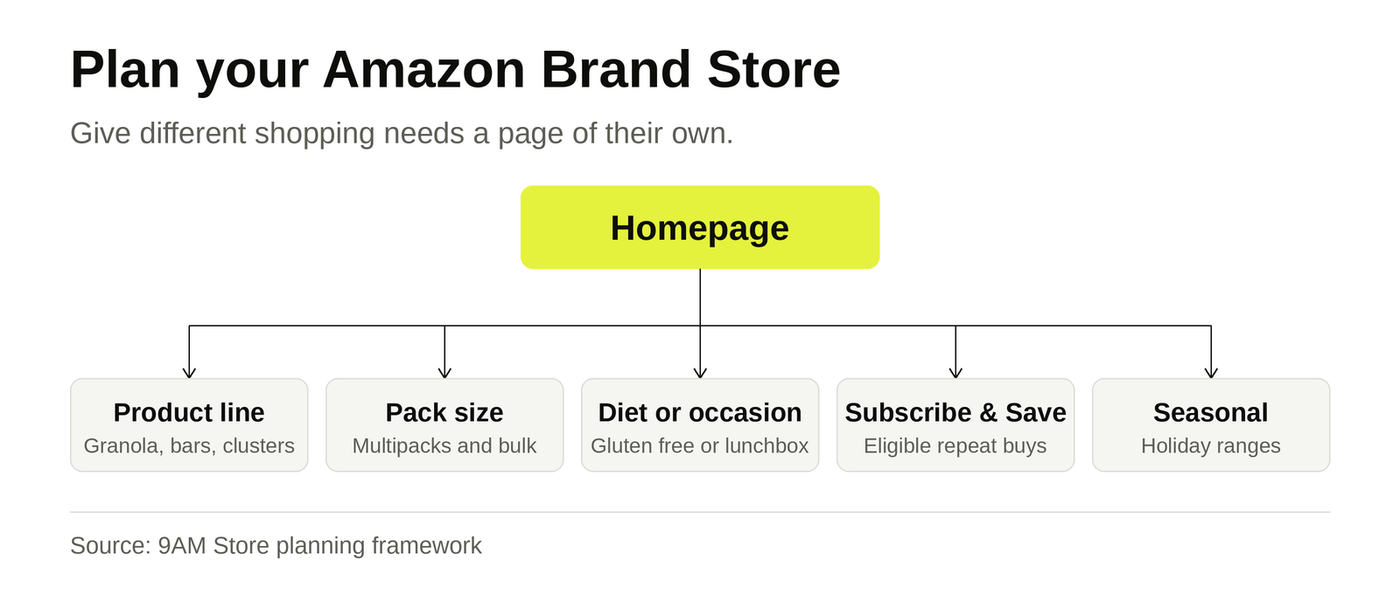
This example groups Store pages by five ways shoppers look for products.
When I plan a food Store, I start with the search term report.
If shoppers search "keto snacks" more than your sub-brand name, I build the keto page first so there’s somewhere useful to send those clicks.
Homepage
The homepage tells a new shopper what you sell in one screen: best sellers, the main product lines and one line about the brand.
I use it for broad branded searches, where shoppers know the brand and are still deciding what to buy.
Pages by Product Line or Flavor
I give each product line its own page, then group its flavors there.
Someone who searched "granola" can compare honey and chocolate on one screen, which is why I send shoppers from category ads to that page.
Pages by Pack Size and Multipack
A page for multipacks, bulk sizes or club packs serves shoppers searching for value or stocking up.
If someone searches "protein bars bulk," they should see the 12-pack as soon as the page loads.
Pages by Occasion or Diet
I build pages around searches like "gluten free granola" or "kids' lunchbox snacks" when the brand has products that match those searches.
A shopper who has never heard of your brand can see the products that meet their needs on the first screen.
Subscribe & Save and Bundle Pages
I give eligible Subscribe & Save products a page and group bundles or variety packs where shoppers can compare them.
That gives repeat-purchase ads a place to send someone who's ready to reorder, and shoppers can select the subscription on the product page.
New Product and Seasonal Pages
I give launches and seasonal ranges a page, such as holiday baking or summer drinks.
When the promotion ends, I update the page and its ads together so the next shopper sees an offer they can still buy.
Amazon Brand Store Design Best Practices for Food and Beverage
The best Amazon Brand Stores for food brands are built for phones, show pack size and flavor at a glance, use shoppable images and video and get refreshed at least every 90 days. The page design determines how quickly a shopper can find the product after clicking the ad.
I check these rules on every food Store. I pay particular attention to what a shopper sees on the first screen after clicking an ad.
Design on the mobile view first. The Store builder lets you switch views as you work, so you can catch a crop that cuts off the flavor or pack count.
Put pack size and flavor in the image. When the tile shows "12 × 40 g" and spells out the flavor, shoppers can compare packs before opening a detail page.
Use shoppable images. I’d use a breakfast-table photo where each pictured product has a shopping link, so someone who wants the granola can get to it from the photo.
Add short video. Ten seconds of a bar being snapped or a drink being poured says more about texture than any copy.
Lead with best sellers. Amazon's Best seller tile updates which products it shows, so I check what's in the tile before I send a campaign to that page.
Keep copy short. I use one line per section so a shopper can scan the page, then leave ingredient lists and the full product details to the detail page.
Refresh every 90 days. In Amazon's Store update analysis, Stores updated within 90 days averaged 11% more repeat visitors and 13% higher attributed sales per visitor.
If you want to geek out more on this topic, Amazon Ads shares ways to update your listings and campaigns on Amazon Ads using AI:
The store I'm proudest of looked plain next to the competitors': no founder banner, just clear flavor rows and a short video per line.
Shoppers on phones don't scroll past brand stories to find the chocolate one.
Ads and Traffic Sources That Can Send Shoppers to an Amazon Brand Store
Shoppers reach an Amazon Brand Store through Sponsored Brands, eligible display, video and streaming TV ads, and links from social, creators, search, packaging or email. I pick the page for each route based on what the shopper just saw or searched for.
The brand name on a product page can link to your Store, and Store pages can appear in search results. I plan campaign links separately because I can choose exactly which page opens after a click.
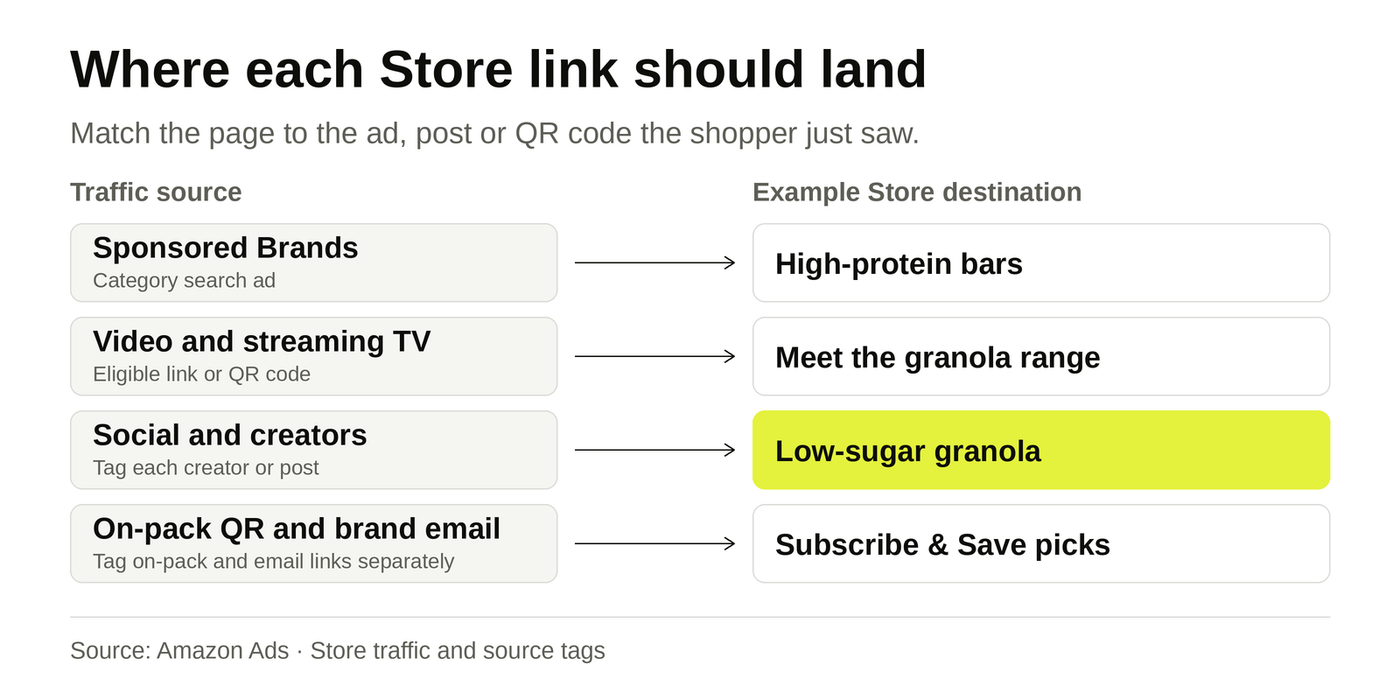
Send shoppers to the Store page that matches the offer in the ad, post or QR code.
Sponsored Brands with a Store Landing Page
Eligible Sponsored Brands formats can take shoppers to a Store page, and clicking a product image in a collection ad opens that product’s detail page.
Amazon's Sponsored Brands analysis reports that advertisers who linked campaigns to a Store saw shoppers spend about twice as long there, with 55% more product detail page views and 15% higher sales.
Display, Video and Streaming TV Ads
Display and video ads can also send shoppers to Store pages, and eligible streaming TV formats can send viewers there through a link or QR code.
For a prospecting ad, I usually send people to the product line so they can see what's in the range and choose a pack.
Social, Creator and Search Traffic with Store Source Tags
Links from Instagram, TikTok, creators or Google Ads can send shoppers to Store pages.
I add a Store source tag to each link so I can compare visits and attributed sales from individual posts and campaigns.
Store Links on Packaging and in Email
A QR code on the pack or a link in your own opt-in email gives past buyers a way to find the range again.
For food brands with strong retail distribution, the pack is often the biggest traffic source nobody tracks, so I give those QR scans their own source tag.
For buyer messages sent through Amazon, the buyer messaging rules prohibit promotions.
How to Match Paid Traffic to the Right Amazon Brand Store Page Step by Step
To match paid traffic to the right Brand Store page, group search terms and audiences by what the shopper wants, give each group one store page, build pages for your biggest ad groups, tag outside links, link each ad to its page and compare sales per visitor.
These are the seven steps I follow.
1. Group Search Terms and Audiences by Shopper Intent
Export the search term reports from Sponsored Products and Sponsored Brands, then group the terms by what the shopper wants, such as a product line, a diet, a pack size, an occasion or your brand.
I do the same for display and video audiences, so a returning buyer sees a range page and a new category shopper gets an introduction to the line.
2. Map Each Intent to One Store Page or Product Set
Give each intent group one destination.
I send broad branded searches to the homepage, "low sugar granola" to the low-sugar page, "protein bars bulk" to the multipack page and "granola for kids' lunchboxes" to the lunchbox page.
If two groups need different products first, I give them separate pages.
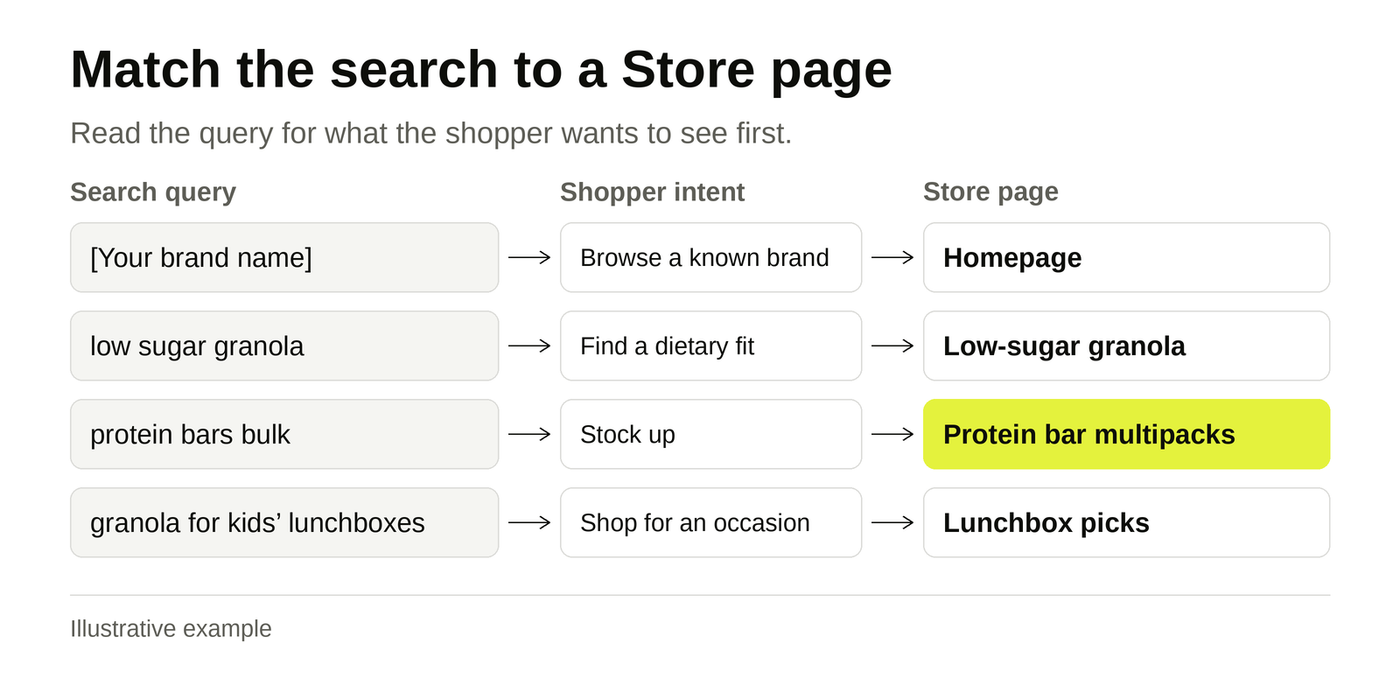
Use the search query to decide which products the Store page should show first.
3. Build a Store Page for Each High-Spend Ad Group
Where an ad group spends a lot and has no matching page, build one. Put the products that match the search at the top, so shoppers immediately see the products the ad promised.
This guide to landing page alignment shows what I check between the ad and that first screen.
4. Tag Every External Link with a Store Source Tag
In Store Insights, create a source tag for each outside channel and campaign, then use the tagged link in that channel. The Sources tab now breaks out external channels, and tags let you separate two creators on the same platform or one newsletter send from the next.
5. Point Sponsored Brands Ads to the Matching Store Page
Use the matching Store page when you set up an eligible Sponsored Brands ad. If you can’t change the destination for an active ad, build a new ad with the matching page.
An ad that says "high protein" should send shoppers to a page that shows those products first.
6. Compare Sales Per Visitor by Page and Traffic Source
Divide a Store page's attributed sales by its visitors for the same date range. The formula is this:
Sales per visitor = attributed Store sales ÷ visitors
I use the Pages view to compare landing pages and then check the Sources view separately, since a page drawing repeat buyers can look stronger than one drawing cold traffic.
A client once told me their keto page was their worst page because it had the fewest visits. Per visitor, it was their best, so my team sent more ads there, and it soon stopped being the smallest page.
7. Fix or Retire Store Pages That Lose Shoppers
If a page has high bounce and low sales per visitor, I first check what shoppers see on arrival.
I try clearer pack sizes, a different lead product or a different template, then reroute the ads if the page still underperforms.
Here, I’d recommend going through our guide to testing pages or ads, too, because it helps you decide which to change first.
How to Read Amazon Store Insights
Amazon Store Insights shows visitors and views, attributed sales, traffic sources and page-level performance. Start with Pages to find a weak landing page, then use Sources or your tags to see which campaigns send shoppers to the Store.
Visitors and Views
Amazon counts visitors using unique daily users or devices in the selected date range. Visits count arrivals by source or day, and views per visitor show how many pages people browse on average.
New to Store visitors are logged-in shoppers who haven't visited in the past 12 months.
Sales and Units
Store Insights estimates sales, orders and units visitors bought within 14 days of their last visit. I treat these as attributed numbers, since some shoppers may have bought anyway.
Traffic Sources
The Sources view shows traffic and attributed sales for channels such as Amazon ads, organic traffic and external sources.
I use tagged links to compare results more precisely, for example between two creators who sent people to the same page.
Page-Level Performance
In Store Insights, I check visits and dwell time by page and look at bounce rate for signs that shoppers couldn't find what they wanted. The Brand Store quality rating compares attributed sales performance with similar Stores and suggests changes.
I check these numbers monthly, and weekly during launches or Prime Day, when the mix of traffic sources can change quickly. If visits increase faster than sales, I check where the new visitors came from.
Say a category page gets 1,000 visitors and $1,000 in attributed sales, while a multipack page gets 250 visitors and $500 in attributed sales. That’s $1 per visitor for the category page and $2 for the multipack page. I check the traffic mix before deciding where to send the next campaign.
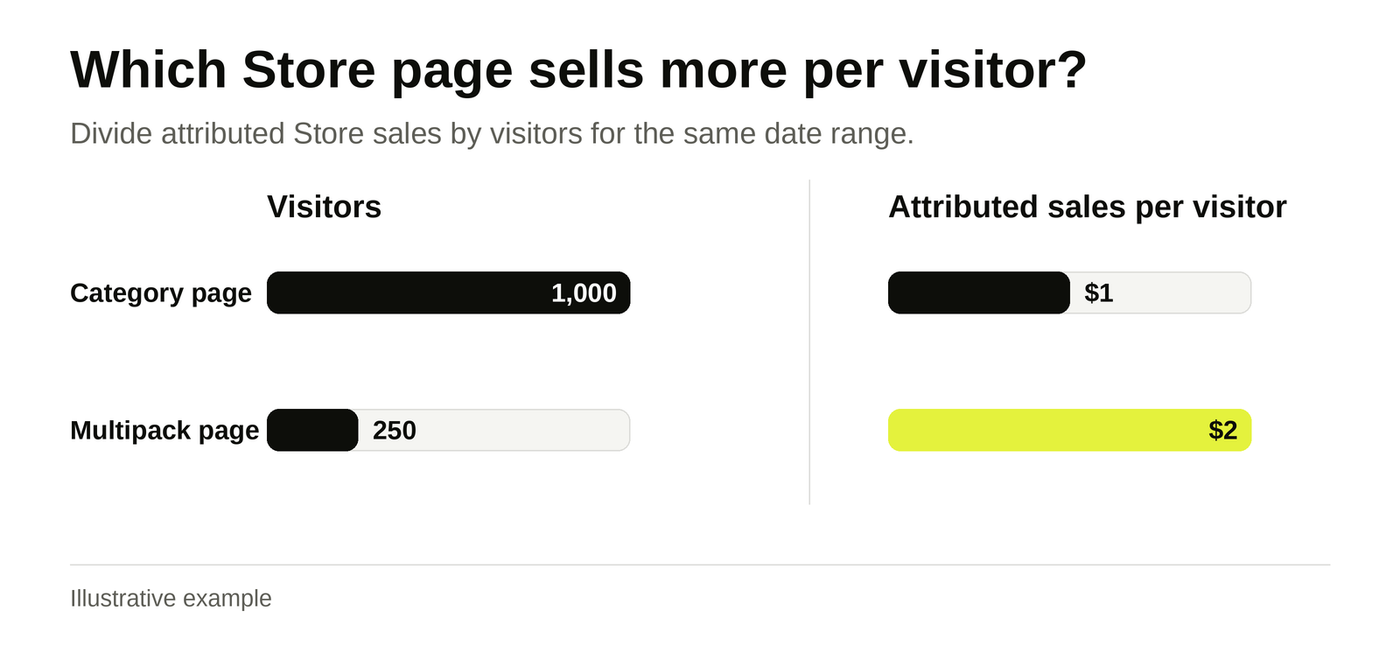
In this example, the multipack page gets fewer visitors and earns twice as much in attributed sales per visitor.
Amazon Brand Store Examples From Food and Beverage Brands
A Brand Store can help shoppers compare models, find a new flavor or see what they can make with a product. Here are three ways brands use those pages.
Hurom (United States)
We helped Hurom redesign its Amazon Brand Store. Its Easy Clean Juicers page puts the compact H70 alongside the H400, so shoppers who want an easier-to-clean juicer can compare models in one place. The Store also gives recipes and accessories their own pages.
If you search Amazon for "Hurom H400," you can see sponsored ads for the H80 and H330. Each linked straight to the product page for the model it showed.
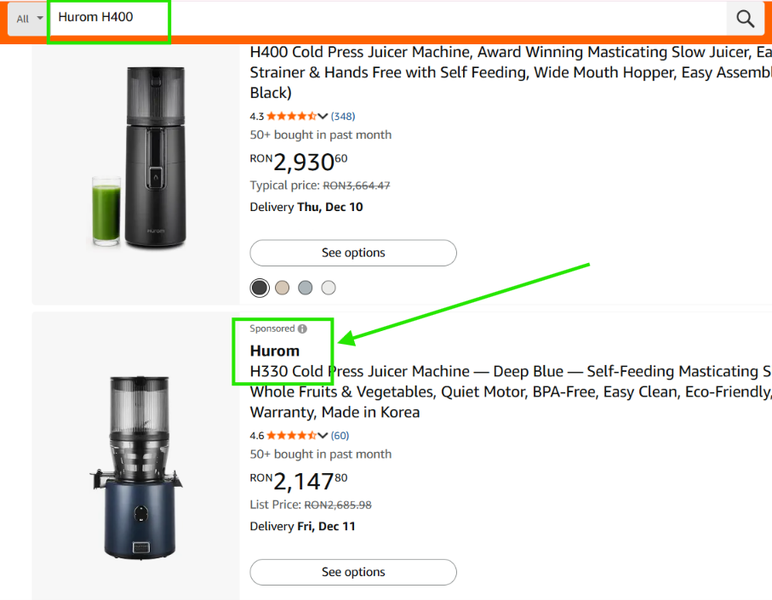
Screenshot from Amazon
For a broader ad about easy-clean cold press juicers, I'd send shoppers to the collection page so they can compare models.
NESCAFÉ Espresso Concentrate (Australia)
Ahead of Prime Day 2025, NESCAFÉ used QR codes in Prime Video ads to send shoppers to a Brand Store with three flavors and recipes that let them add ingredients to their cart in one tap. Circana measured an 8.9% national sales uplift for the featured range during the full campaign.
I liked how the Store page showed shoppers what they could make with the product from the ad. Someone scanning the QR code could go straight to drink recipes and shop the ingredients from the same page.
Nespresso
A Nespresso category analyst told Amazon one of the main benefits was showing the brand's full range in one place. For capsule shoppers who already know one blend, the range page gives them a place to find their next one.
What I'd copy is the range page for remarketing. Someone who already buys one blend has a place to see what else would fit their machine.
Should Amazon Ads Send Shoppers to a Brand Store or a Product Page?
Send ads to a Brand Store page when the shopper's search covers several of your products, and to a product page when the shopper is looking for one specific product. Send a search for "keto bars" to a Store page with your range. Send a search for your bestselling flavor by name to its product page.
This is how I decide by ad type:
Ad type or search | Best destination | Why |
|---|---|---|
Sponsored Products | Product detail page | The ad is one product |
Sponsored Brands, branded search | Store homepage | Shopper wants the brand |
Sponsored Brands, category or diet search | Matching store page | Shopper wants options |
Sponsored Brands, single hero product search | Product page, where eligible | One clear answer |
Display and video, prospecting | Product line store page | Cold shoppers need context |
Display, remarketing lapsed buyers | Range or Subscribe & Save page | Help past buyers find products to reorder |
Outside links from social or creators | Page named in the post | Keep the promise of the post |
When in doubt, I test it.
I compare a matching Store page with another destination the format supports and keep the keywords, bids and creative as close as possible.
Then I compare attributed sales per click over comparable periods, since a traffic surge during Prime Day can skew the result.
Build Amazon Store Pages That Keep Paid Traffic Shopping
An Amazon Brand Store is more likely to turn ad clicks into sales when each ad sends shoppers to products that match their search. For food brands, that means pages by product line, diet and pack size, Sponsored Brands ads linked to the matching page, tagged outside links and a monthly look at sales per visitor.
I think of it like a good librarian. Ask for a book about Inca history that’s also easy to read, and they point you in the right direction straight away.
The brands I see make good use of their Stores plan pages alongside ads. They choose a page for each campaign, update pages quarterly and replace pages that don’t generate sales.
If you want your ads and store pages planned as one system and improved every quarter, that's how my team runs Amazon for food brands.
Book a strategy call today and see your sales soar tomorrow*!
Disclaimer: it most likely won’t be tomorrow, but you get the drift. The parallelism looked too good (aka corny) not to use. And who reads the conclusions, anyway?!
Frequently Asked Questions
How much does an Amazon Brand Store cost?
An Amazon Brand Store is free to build, and you don't need to run ads. U.S. sellers need Brand Registry and a Professional selling plan, which costs $39.99 a month plus selling fees.
How often should a food brand update its Brand Store?
I aim for at least every 90 days, plus any time you launch a product, change packs or run a seasonal promotion. In Amazon's Store update analysis, Stores updated within 90 days averaged 11% more repeat visitors and 13% higher attributed sales per visitor.
What happens to out-of-stock products in a Brand Store?
Out-of-stock products can still appear in some Store tiles. Use the Hide out of stock products option on product grids where available, and check shoppable images manually so shoppers can still buy what's pictured.
Can a brand have more than one Amazon Brand Store?
Amazon's seller guidance allows one Store per registered brand in a marketplace. If you sell under several registered brands, each can have its own Store. I use subpages for product lines within a single brand.
About Corentin Grisoni
Corentin Grisoni helps DTC and wellness brands turn paid media into a connected growth system. As Retail Media Lead at inBeat Agency, he works across Amazon, Meta, TikTok, and Google to build omnichannel campaigns that are measurable, scalable, and tied to business outcomes.
His work brings together retail media strategy, paid social and search, attribution modeling, UGC, and performance creative. He focuses on helping retail, technology, and wellness brands understand where their media budget is working and create a system that compounds what performs.
More from Corentin Grisoni