
Click Fraud: How to Investigate Suspicious Paid Traffic Before Buying Protection
Click fraud or just a traffic spike? Use this nine-step evidence log to check what Google already filtered, then decide if protection software is worth it.
Paid search budgets get judged harder every quarter, and a sudden jump in clicks with no matching jump in leads looks like money leaking out. The worry has a real basis. Bots generated 53% of all web traffic last year, and 40% of it was malicious (according to Thales Imperva Bad Bot Report 2026).
Yet Google's own documentation says most click spikes have other causes, from budget changes to seasonality. The useful move is to gather evidence first and buy protection second.
This guide gives you a nine-step evidence log for doing exactly that.
P.S. If you'd like a second pair of eyes on a suspicious account, our Google Ads management team runs this investigation as part of every audit.
TL;DR
Most click spikes, low conversion rates and repeated IP addresses have explanations unrelated to fraud, and Google says so in its own help pages.
Google filters invalid clicks before billing and credits the ones it catches later, so check what you were actually charged for first.
An evidence log compares each suspicious signal with a baseline and records the non-fraud causes you ruled out.
Act on a pattern only when two independent sources agree, such as Google Ads data plus server logs, or site data plus CRM outcomes.
Click fraud protection software is worth paying for when unexplained invalid patterns keep returning after you've contained and escalated them.
We read every paid media number the same way: as a claim that needs corroboration before it moves budget. Platform reporting tells you what the ad network saw, your website tells you what arrived, and your CRM tells you what it was worth. A click fraud verdict built on one of those three is a guess with a dashboard attached. That's why the steps below start with a baseline and end with a verdict, and why the purchase decision comes last.
What Is Click Fraud?
Click fraud is the deliberate clicking of paid ads, by people or bots, with no intent to buy. The goal is to drain a competitor's budget or earn publisher revenue from ad placements. It's a subset of a wider category platforms call invalid traffic, which also covers accidental and automated clicks that nobody meant as fraud.
The industry's measurement body avoids the word "fraud" altogether. The Media Rating Council splits invalid traffic into two types:
General invalid traffic, caught with lists and routine checks, and:
Sophisticated invalid traffic, which needs advanced analytics and human review to identify.
Term | Who uses it | What it covers | Are you billed for it? |
|---|---|---|---|
Click fraud | Advertisers, vendors, press | Deliberate, intent-free clicks by competitors, publishers, bots or click farms | Only if the platform misses it |
Invalid clicks | Google Ads, Microsoft Advertising | Every click the platform filters: fraud, accidental double-clicks, crawlers, data-center traffic | No, filtered before billing or credited after |
Invalid traffic (IVT) | MRC, verification vendors | Clicks and impressions that fall short of measurement standards, split into GIVT and SIVT | Depends on detection timing |
Google lists the clicks it treats as invalid: accidental clicks such as the second half of a double-click, manual clicks meant to raise an advertiser's costs, manual clicks meant to raise a publisher's profits, clicks by bots and crawlers, and known data-center traffic.
The people behind deliberate click fraud tend to fall into four groups:
Competitors clicking your Search ads by hand or through cheap bot software.
Publishers inflating clicks on ads shown on their own sites to collect revenue.
Botnets, networks of malware-infected devices that make each click look like a different user.
Click farms, groups of low-paid workers clicking assigned links, whose behavior imitates real users more convincingly than bots.
Why Investigate Click Fraud Before Buying Protection?
You should investigate first because Google already filters most invalid clicks before you pay for them, and the patterns that look like fraud usually have ordinary causes. A tool bought on a hunch tends to report on clicks you were never charged for.
Google's help page on invalid traffic makes three points worth taking at face value:
Traffic spikes: raised budgets, higher max CPCs, new broad keywords, new Display placements and seasonal or news events all increase clicks without any fraud involved.
Low conversion rates: a weak landing page, generic keywords and unoptimized Display campaigns produce high traffic and few sales. Our landing page conversion benchmarks show how wide normal paid search conversion rates run.
Repeated IP addresses: comparison shoppers return, and universities and some ISPs assign one IP address to many users.
The same page warns that third-party tracking tools may flag duplicate IPs or bots that Google has already excluded from billing. A protection dashboard showing thousands of "blocked fraudulent clicks" can therefore overlap heavily with clicks that cost you nothing.
Platform detection also changes under your feet. Google reported a 40% drop in mobile invalid traffic from deceptive ad serving after deploying machine learning models built with Google DeepMind. Assumptions formed on last year's data go stale fast.
Timing matters as well. Google's manual investigations only cover the past 60 days, so an account that waits a quarter to look into a spike loses the right to escalate it.
Misdiagnosis carries its own costs:
Excluding real customers who share an IP
Pausing keywords that convert
Paying a monthly fee for protection against clicks that were already free
If your reporting has gaps to begin with, an attribution model audit is worth running alongside this investigation.
How to Investigate Click Fraud Step by Step
Investigating click fraud takes nine steps across three stages: set a baseline, test each suspicious signal against the data sources that can confirm or explain it, then act on what holds up. Work through them in order, since each step narrows what the next one has to examine.
The process below is written for Google Ads Search and Performance Max, where most click fraud concerns arise. The same logic applies to Microsoft Advertising, which reports low-quality clicks and a low-quality click rate in its performance reports.
Step 1: Open a Click Fraud Evidence Log
Start an evidence log the day you notice something odd, and record every signal against a baseline before you change anything in the account. The log is what turns a hunch into a case Google's specialists will act on.
Use the prior four weeks as your baseline, plus the same weeks last year if the business is seasonal. Then record one row per signal:
Date | Signal | Source | Baseline | Observed | Non-fraud cause | Verdict |
|---|---|---|---|---|---|---|
Oct 6 | Clicks on | Google | 140 a | 410 a | Budget, bids, | Open |
Oct 6 | Sessions from | GA4 | 128 a | 160 a | Consent banner and | Open |
The two rows above are an illustration. A gap like that one, where clicks nearly tripled and sessions barely moved, is exactly the kind of signal the next steps test.
Step 2: Rule Out Account and Market Changes Behind the Traffic Change
Check the account's change history for the same dates before you treat a traffic change as suspicious, since most spikes trace back to an edit someone made. Mark each item in the log as checked:
Open Change history for the date range and filter by campaign.
Look for budget increases and shared budget changes. Month-end catch-up spending is a common culprit, covered in our guide to marketing budget pacing.
Check bid changes, max CPC limits and any switch in bid strategy, which can push ads into higher positions overnight.
Look for new keywords, especially broad match, and for search terms the new keywords now match.
Review audience, location and device targeting edits.
Rule out seasonality, promotions, competitor outages and news events that raised demand for the query.
Anything that explains the change goes in the "Non-fraud cause checked" column, and the signal closes there.
Step 3: Check What Google Ads Already Filtered and Credited
Pull Google's own invalid click data next, because clicks it filtered or credited are already off your bill. Three places hold it:
Invalid clicks and Invalid click rate columns. Add them to the campaigns table through Columns, then search for "Invalid clicks." These show clicks Google's systems filtered in real time, so a high number here means the protection worked.
The Invalid Activity Credit Report. Google documented this report in June 2026 for Search and Performance Max. Find it in Report Editor's template gallery as "Invalid Activity Credit Report: Search & PMax." It shows credited clicks, credited amount, adjusted CPC and adjusted conversion rate by campaign and network.
Billing Summary. Credits for invalid traffic found after an invoice appear as "Invalid Activity" under Adjustments in each month's card.
Google issues credits and adjustments here, never refunds. A credit can also land in the month after the click, so compare adjusted figures across billing periods before concluding anything. Clicks found in any of these three places get the verdict "already filtered" in your log.
Step 4: Segment Suspicious Clicks by Network, Placement, Location, Device, and Hour
Break the suspicious clicks into segments until the problem concentrates in one place, since real click fraud rarely spreads evenly across an account. Use this table to separate innocent explanations from patterns worth logging:
Segment | Innocent explanation | Pattern worth logging | Where to check in Google |
|---|---|---|---|
Network | Search partners reach | Search partner clicks | Segment > Network (with |
Placement | A new site in automatic | Unexpected apps or sites | Where ads showed (Display, |
Location | Default targeting | Clicks from countries | Locations report, "Matched |
Device and | Mobile share grows with | One device model or | Segment > Device; GA4 tech |
Hour of day | Ad schedule or bid | Clicks cluster at 2 to 5 | Segment > Time > Hour of |
Search terms | New broad match terms | Irrelevant or nonsense | Search terms report |
Location deserves a second look before you call anything fraud. Google's default location option is "Presence or Interest", which shows ads to people who have shown interest in your area, so out-of-area clicks are often legitimate searchers. Switching to "Presence" tests that explanation quickly.
Step 5: Match Ad Clicks to Site Behavior in GA4 and Server Logs
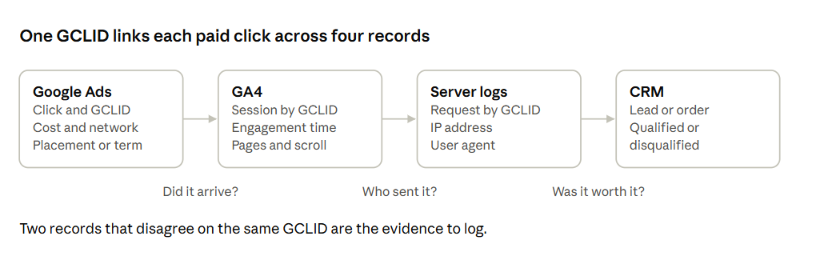
Compare ad clicks with what actually reached your site, using GCLIDs to tie each visit back to a specific ad interaction. Turn on auto-tagging if it's off; Google recommends it for tracking only Google Ads clicks.
Work through these checks for the suspicious segment:
Compare clicks in Google Ads with sessions in GA4 for the same campaign and dates. A gap can come from blocked tags or consent settings, so confirm your tracking first. Our guide to server-side tracking explains why browser-side tags undercount paid traffic.
In GA4, look for sessions with zero engagement time, one page view and no scroll, concentrated in the suspicious segment.
Pull server logs for the same window and find the GCLIDs, user agents and IP addresses behind those sessions.
Flag user agents that belong to automation tools or headless browsers, and IP addresses that resolve to hosting providers or data centers.
Treat repeated IP addresses with care. Shared ISP and campus addresses produce repeats from many genuine people.
Any GCLID, IP address and user agent you flag here becomes part of the escalation package in Step 9.
Step 6: Check Lead and Sale Quality by Traffic Source
Judge traffic by what it turns into, because invalid clicks can show up first as junk leads.
How to check lead quality by source:
Break CRM outcomes down by campaign, plus any keyword or source data you capture.
For Display campaigns, add placement through the {placement} ValueTrack parameter.
Compare the suspicious segment's disqualification rate with your baseline.
PMax placement reports only show where ads appeared and their impressions. They can't tie junk leads to a specific domain.
Spam form patterns to look for:
Gibberish names
Disposable email domains
Duplicate phone numbers
Nonexistent businesses
Forms completed in a few seconds
The problem shows up on every network. In February 2025, MediaPost reported that Aimclear found fake Microsoft Ads leads across client campaigns, with examples from late 2024.
Google's three lead quality defenses:
Server-side validation on web forms
Double opt-in to confirm interest
Enhanced conversions for leads to track which leads qualify
Feeding qualified leads back as offline conversions also keeps Smart Bidding away from the junk. A funnel leak analysis shows whether the drop sits at the ad, the form or the follow-up.
Step 7: Assign a Verdict to Each Signal
Give every row in the log one of four verdicts, and act only on patterns that two independent sources confirm. One source alone, however alarming, stays open.
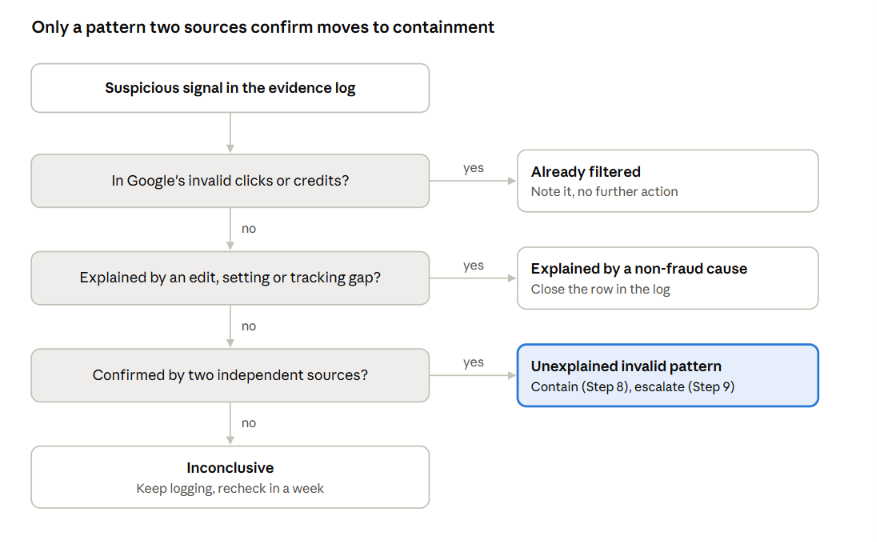
The four verdicts are:
Already filtered: Google's invalid click data or credit report accounts for the clicks. No action needed beyond noting it.
Explained by a non-fraud cause: an account change, targeting setting, tracking gap or seasonal shift accounts for the signal.
Unexplained invalid pattern: two sources agree, such as a campaign sending visits from data-center IP addresses while its CRM disqualification rate spikes. Move to Steps 8 and 9.
Inconclusive: keep logging for another week before acting.
This is the step where most suspected click fraud resolves without any purchase.
If you'd like analysts to run the matching across Google Ads, GA4 and your CRM, our marketing analytics team builds that view as standard.
Step 8: Contain Confirmed Sources Inside Google Ads
Apply the narrowest fix that removes each confirmed source, then measure the effect in your log two to four weeks later. Work from the most targeted tool to the broadest:
Exclude IP addresses. Google allows up to 500 IP exclusions per campaign, plus account-level exclusions. Reserve them for repeat offenders, since bots on residential proxies rotate addresses faster than any list can follow.
Exclude placements. Remove apps and sites with confirmed invalid patterns at account level.
Opt out of search partners for campaigns where partner traffic failed the verdict.
Switch location targeting to "Presence" when out-of-area clicks drove the signal.
Add negative keywords for the irrelevant search terms found in Step 4.
Harden forms with server-side validation and a bot challenge if junk leads were the symptom.
Record each change and its date in the log, so the before-and-after comparison is clean.
Step 9: Escalate to Google With the Evidence Package
Submit the confirmed patterns to Google through the Click Quality Form while they still fall inside the 60-day investigation window. Google asks for this package:
Your 10-digit Google Ads customer ID.
The exact dates of the suspicious activity, within the past 60 days.
The campaign and ad group names affected.
The keywords driving the unusual traffic.
Web server log extracts showing IP addresses, user agents and GCLIDs.
A short trend explanation, such as a 300% click spike with no conversion change, or clicks from regions you don't target.
Google says the review typically takes several business days and ends with an email. Keep the log open, since any credit that follows belongs in it as the final row.
When Is Click Fraud Protection Software Worth Buying?
Click fraud protection software is worth buying when unexplained invalid patterns keep returning after you've contained and escalated them, and their monthly cost exceeds the tool's fee. Until the evidence log shows that, the tool is paying for itself only on paper.
Situation | Buy click fraud protection software? | Reason |
|---|---|---|
Signals closed as "already filtered" or "explained" | No | Google's filtering and your fixes already cover the problem |
One confirmed source, contained in Step 8 | No | IP, placement and targeting exclusions solved it |
Confirmed patterns return within weeks of containment | Likely yes | Rotating sources outpace manual exclusion lists |
Lead-gen account with recurring bot form fills | Yes, or a form-level bot defense | Junk leads distort Smart Bidding as well as spend |
High spend across Google and Microsoft Ads with thin in-house analytics | Worth a trial | Monitoring time costs more than the fee |
The math is simple.
Multiply monthly spend in the affected campaigns by the share of clicks your log classed as unexplained invalid, then compare the result with the tool's monthly fee.
For example, $40,000 a month with 4% unexplained invalid clicks means about $1,600 a month at stake, which supports a tool priced well below that and argues against one priced above it.
Questions to Ask a Click Fraud Protection Vendor
Ask every vendor these questions before signing, and get the answers in writing:
How do you separate clicks Google already filtered or credited from clicks you count as blocked?
How do you handle false positives, such as shared office or campus IP addresses?
Can you export IP addresses, user agents and GCLIDs in the format Google's Click Quality Form needs?
How do you work within Google's 500 IP exclusions per campaign and with Performance Max?
Is pricing based on ad spend, clicks or a flat fee?
Will you run a trial on a holdout campaign so we can compare it with an unprotected one?
Audit Suspicious Paid Traffic With 9AM
A click fraud investigation is only as good as the data behind it, and the same data decides where your next budget dollar goes.
At 9AM, we run this evidence log inside our media buying work: platform reporting, site behavior and CRM outcomes read together, with verdicts that hold up when Google reviews them.
That way you stop paying for clicks that never had a chance to convert, and you only buy protection when the numbers justify it.
Book a strategy call and we'll review your invalid click data, segment the suspicious traffic and tell you whether click fraud protection software would earn its fee.
FAQs
How high does a Google Ads invalid click rate need to be before you investigate?
There's no reliable industry threshold, since published averages come mostly from vendors with tools to sell. Compare your invalid click rate with your own four-week baseline, and investigate a sharp change. A high rate on its own shows Google filtering clicks you weren't charged for.
Can competitors keep clicking Search ads after you exclude their IP addresses?
Yes. Mobile networks reassign IP addresses constantly, and residential proxies let anyone rotate through thousands of them. IP exclusions work for repeat offenders on fixed connections, so pair them with placement, location and schedule controls.
Why can conversions exceed clicks after Google filters invalid traffic?
Google notes that a click can be marked invalid and removed while the conversion that followed it stays in your reports. In rare cases that leaves more conversions than clicks. Check the Invalid Activity Credit Report's adjusted metrics before reading too much into it.
Does Performance Max make click fraud harder to investigate?
It used to, and it still limits some controls. Performance Max now has channel and placement reporting, and the Invalid Activity Credit Report covers it alongside Search. Campaign-level IP exclusions are more limited for PMax, so account-level exclusions and placement exclusions carry more of the work.
Should you exclude Google search partners to reduce click fraud?
Only when your own data says so. Segment by network in Step 4 and compare search partner conversion rates and lead quality with Google Search. If partners convert at a similar cost, they add volume worth keeping.
Keep exploring.
Insights
Which Performance Marketing Agency San Francisco Brands Should Hire for Profitable Growth
October 22, 2026

Insights
Performance Marketing Agency Toronto: Shortlist for Ecommerce and Consumer Growth
October 22, 2026
Insights
Offline Conversion Tracking: How to Feed Qualified Leads and Closed Sales Back Into Paid Search
October 19, 2026