Attribution Windows: How to Compare Paid Media on a Consistent Basis
Attribution windows differ by platform. See 2026 defaults for Meta, Google, TikTok, and GA4, plus a free template to compare results correctly.

· 13 min read
The same week of spend can produce three different stories: one in Meta Ads Manager, one in Google Ads, and one in your store's order report. Before anyone debates which channel is working, it's worth checking whether the three reports are even counting the same way.
Trigger warning: most of the time they probably aren't.
Google Ads counts click conversions for 30 days by default; Meta and TikTok default to 7 days. Since January 2026, Meta has also dropped its longer view-through windows, which changed reported results without any change in performance.
This guide covers what attribution windows are, the 2026 defaults by platform, and a step-by-step method for comparing channels on one consistent basis.
P.S. If you want someone to build the settings inventory and the reconciliation for you, our analytics team does this for paid media teams.
TL;DR
An attribution window is how long after an ad click or view a conversion can still be credited to that ad.
Longer windows report more conversions from the same spend, so channels on different windows can't be compared directly.
2026 defaults: Meta 7-day click, 1-day engage-through, 1-day view; Google Ads 30-day click; TikTok 7-day click, 1-day view; GA4 90-day lookback.
Compare channels on one window, one date basis, and click-only credit, then reconcile the total against real orders.
Aligned windows make numbers comparable. They don't show what a channel added; only incrementality tests do.
Our view, before the mechanics: we run media buying, creative, and measurement as one loop, and the loop only works if every channel is read on the same ruler. A 30-day window on one platform and a 7-day window on another will lead you to allocate budget toward whichever platform counts more generously. Aligning the settings won't tell you what caused the sales BUT it does make sure the argument about budget starts from comparable numbers.
What Is an Attribution Window?
An attribution window is the period after someone interacts with an ad during which a conversion can be credited to that ad. With a 7-day click window, a purchase six days after a click counts; a purchase on day eight doesn't.
Platforms run separate windows for different kinds of interaction:
Click-through window: the person clicked the ad, then converted.
View-through window: the person saw the ad without clicking, then converted.
Engage-through window (Meta): the person liked, shared, saved, or commented on the ad, or watched a video ad, then converted.
Engaged-view window (Google, TikTok): the person watched a video ad for a set time without clicking, then converted.
The same idea goes by other names. Google Ads calls it a conversion window, and Google Analytics 4 calls it a lookback window. This guide uses "attribution window" throughout.
Here’s a good visual explanation:
How Attribution Windows Change Reported Results
A longer attribution window reports more conversions from the same spend, because it lets more of the late conversions qualify. Nothing about the campaign changes; only how much of its result the report can see.
The window also decides which credit is visible, separately from how credit is split.
WorkMagic shows this with one customer who clicked a Meta ad, then a Google ad 11 days later, and bought $100 of product three days after that, with credit split evenly:
Window | Meta credit | Google credit | Total shown |
|---|---|---|---|
30-day | $50 | $50 | $100 |
7-day | $0 | $50 | $50 |
1-day | $0 | $0 | $0 |
On the 7-day view, Google doesn't absorb Meta's share. Meta's $50 simply drops out of the report, so channel totals shrink as the window narrows while spend stays the same.
Across platforms, the effect runs the other way.
Each platform applies its own window to its own touchpoints, so the same order can be claimed by Meta, Google, and TikTok at once. Added together, platform-reported conversions usually exceed the orders you actually received, a gap we come back to in step 6.
Attribution Window Defaults by Platform in 2026
Each platform sets its own default window, and the defaults don't match: Google Ads counts click conversions for 30 days, while Meta and TikTok count them for 7. Several of these settings changed in 2026, so a setup that was documented last year may already be out of date.

Meta Ads Attribution Window
Meta's standard setting is 7-day click, 1-day engage-through, and 1-day view. Two changes in 2026 reshaped it:
January 12, 2026: Meta stopped returning 7-day view and 28-day view windows in its Ads Insights API. 1-day click, 7-day click, 28-day click, 1-day engaged view, and 1-day view remain available.
March 2026: click-through attribution for website and in-store conversions now counts link clicks only. Likes, shares, saves, and comments moved into a separate engage-through category with a 1-day window.
Meta also lets you report on a different window from the one used to optimize delivery, which matters when you compare its numbers with other platforms.
Google Ads Conversion Window
Google Ads defaults to a 30-day click-through window, a 3-day engaged-view window, and a 1-day view-through window. You can set click windows from 1 to 90 days per conversion action, depending on the conversion source.
Changes only apply from the day you make them; past conversions aren't recounted.
Google Ads also reports conversions on the date of the ad interaction, unless you use the "by conv. time" columns so you can see it reported by the date of purchase.
Google Analytics 4 Lookback Window
GA4 uses a 90-day lookback window for most key events, with 30 or 60 days as alternatives, and 30 days for acquisition events such as first visit. GA4 reports credit paid and organic channels by default. Google Ads defaults to Google paid credit for GA4-based conversions, but that setting can be changed, so check it before comparing the reports.
TikTok Ads Attribution Window
TikTok defaults web campaigns to 7-day click and 1-day view. Click windows can be 1, 7, 14, or 28 days, and view windows can be off, 1 day, or 7 days, set at the ad group level.
Klaviyo Email and SMS Attribution Window
Klaviyo credits a purchase to the last message a customer interacted with, within a 5-day window for email opens and clicks by default for current accounts. Because it counts email opens, the same order can also appear in paid-channel reports, so Klaviyo revenue shouldn't be added to them.
Platform | Default click window | Default view or engage window | Click window options |
|---|---|---|---|
Meta Ads | 7 days (link clicks only) | 1-day engage-through, 1-day view | 1 or 7 days; 28 days for comparison |
Google Ads | 30 days | 3-day engaged view, 1-day view | 1 to 90 days, by conversion source |
Google Analytics 4 | 90-day lookback (key events) | Not applicable | 30, 60, or 90 days |
TikTok Ads | 7 days | 1-day view | 1, 7, 14, or 28 days |
Klaviyo | 5 days (email clicks) | 5-day email opens | Custom, per channel |
Check each platform's settings page before you rely on this table; defaults change, and accounts created in different years can carry different settings.
Click-Through vs View-Through vs Engage-Through Windows
"7-day click, 1-day view" means the platform credits a conversion if it happens within 7 days of someone clicking the ad, or within 1 day of someone seeing it without clicking. If both happened, platforms give priority to the click.
The three types carry different weight as evidence:
Click-through is the strongest signal. The person chose to visit, and since March 2026, Meta counts only link clicks here, which brings it closer to how Google Analytics counts clicks.
Engage-through sits in the middle. A like or a share shows attention, but not intent to visit.
View-through is the weakest. Many people who saw an ad would have bought anyway, so view credit tends to include sales the ad didn't cause.
For comparing channels, use click-through as the shared basis and report view and engage credit separately. View and engage credit can still be useful for prospecting and video, but only an incrementality test shows how much of it is real.
Event Date vs Interaction Date in Attribution Reports
Platforms also differ on which day a conversion is reported. Some put it on the day of the ad interaction, others on the day of the purchase, so the same order can sit in different weeks in different reports, even with identical windows.
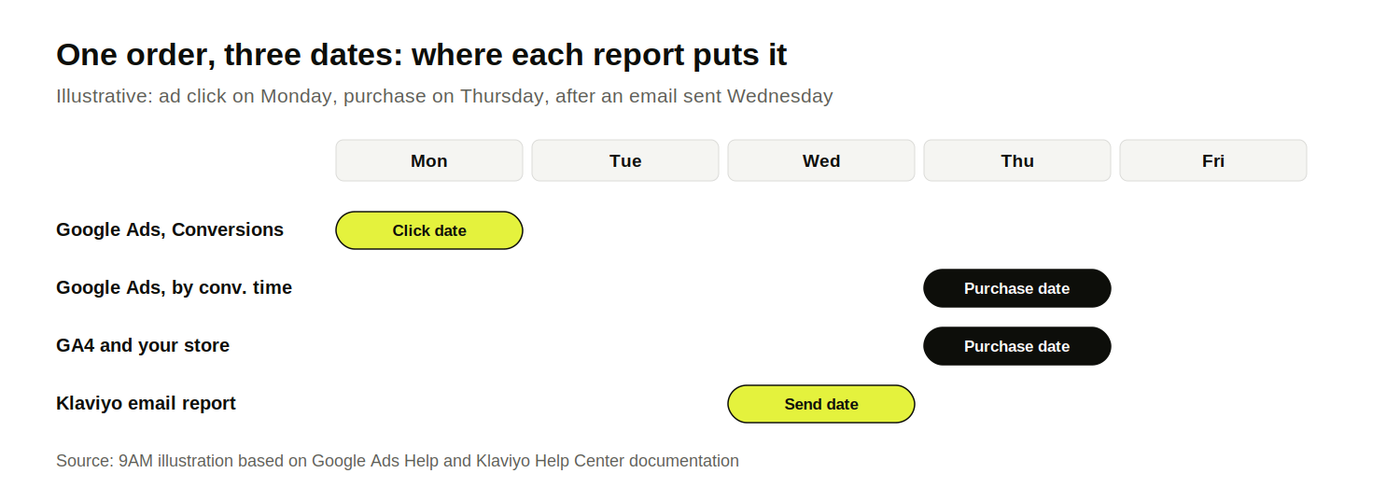
Google Ads is the clearest example.
Its standard Conversions column credits the day of the ad interaction, while the "by conv. time" columns credit the day the conversion happened.
WorkMagic describes the same split as source date and event date, and recommends picking one per workflow and sticking with it.
Report | Conversion lands on | What it's good for |
|---|---|---|
Google Ads, Conversions column | Date of the ad interaction | Judging the spend that produced the sale |
Google Ads, by conv. time columns | Date of the conversion | Matching store or finance totals |
Google Analytics 4 reports | Date of the key event | Matching site and store data |
Klaviyo message reports | Day the message was sent | Comparing campaigns and flows |
Your store or CRM | Date of the order | Source of truth for orders and revenue |
Time zones add one more shift.
Google notes that if a Google Ads account and a GA4 property use different time zones, their reports can disagree even when nothing else differs.
Interaction-date reporting also means the newest days keep filling in as late conversions arrive. When you compare recent weeks across platforms, compare weeks of the same age.
How to Compare Paid-Media Results on a Consistent Basis, Step by Step
Comparing paid media on a consistent basis takes seven steps: write down every platform's settings, choose one comparison standard, pull each platform at that standard, and reconcile the total against real orders.
The first time takes an afternoon; after that, it's a monthly check.
Download the attribution window comparison template (Excel).
It has a settings inventory for every platform and conversion action, and a reconciliation sheet that compares platform-reported purchase conversions with actual orders.
It flags the gap for investigation but it doesn't identify which orders were counted twice because it works with totals.
So, if the totals don't match, check date settings, reporting delays, and duplicate purchase events first. To check cross-platform overlap, compare order IDs wherever your tracking setup makes them available.
Step 1: Build an Attribution Settings Inventory
List every platform and every conversion action you report on, with the settings that change the numbers:
click, view, and engage windows
the date the conversion is reported on
attribution model
counting method (every conversion or one per click)
account time zone and currency
whether the window used for optimization differs from the one used for reporting
Most teams find at least one surprise here: an old conversion action on a 90-day window, a GA4 property in a different time zone, or a Meta report still set to include view-through.
Step 2: Choose One Comparison Window per Decision
Pick the window you'll use to compare channels, and use it for every platform. For most DTC brands, 7-day click is a practical shared standard, because Meta and TikTok default to it and Google Ads can be read at that length.
The right length depends on how long your customers take to buy.
If most of your conversion value arrives within a week of the click, 7 days works.
If your buying cycle runs for weeks, Meta's Compare Attribution Settings can show 28-day click results without changing delivery.
Check which longer windows each platform can report before choosing a shared standard.
Step 3: Pull Every Platform at the Comparison Window
Pull each platform's results at the chosen standard:
Meta: use the attribution setting comparison in Ads Manager's columns to report 7-day click by itself.
TikTok: use attribution analytics to view results at a different window from the ad group default.
Google Ads: a conversion window change only applies going forward. For past data, isolate click-through conversions using the Ad event type segment, then use Days to conversion to keep only conversions within your standard. A time filter alone can still include engaged-view conversions.
GA4: keep its standard reports alongside the comparison, with the lookback window clearly labeled. For purchases, GA4 offers 30, 60, or 90 days, so those reports won't match a 7-day click standard just because the date range matches. A matching 7-day view needs a separate calculation from event-level data.
Step 4: Align the Date Basis and Time Zone
Use one date basis for every platform in the comparison. For judging spend, interaction date is usually the better fit; for matching finance, use the conversion date, which in Google Ads means the by conv. time columns.
Then check time zones. A one-hour difference moves late-night orders into the next day and can shift a weekly total.
Step 5: Separate Click Credit From View and Engage Credit
Report click-through conversions as the shared basis, and show view-through and engage-through conversions in their own columns.
Mixing them hides how much of a channel's result rests on people who never visited the site.
Step 6: Reconcile Platform Totals Against Orders
Add up the purchase conversions every platform claims, then compare the sum with the orders your store or CRM recorded. Use conversion-date reporting for this check and allow for reporting delays.
If platform claims exceed actual orders, investigate overlap and tracking errors.
The gap doesn't tell you how many orders were counted twice by itself; and matching totals don't prove there's no overlap.
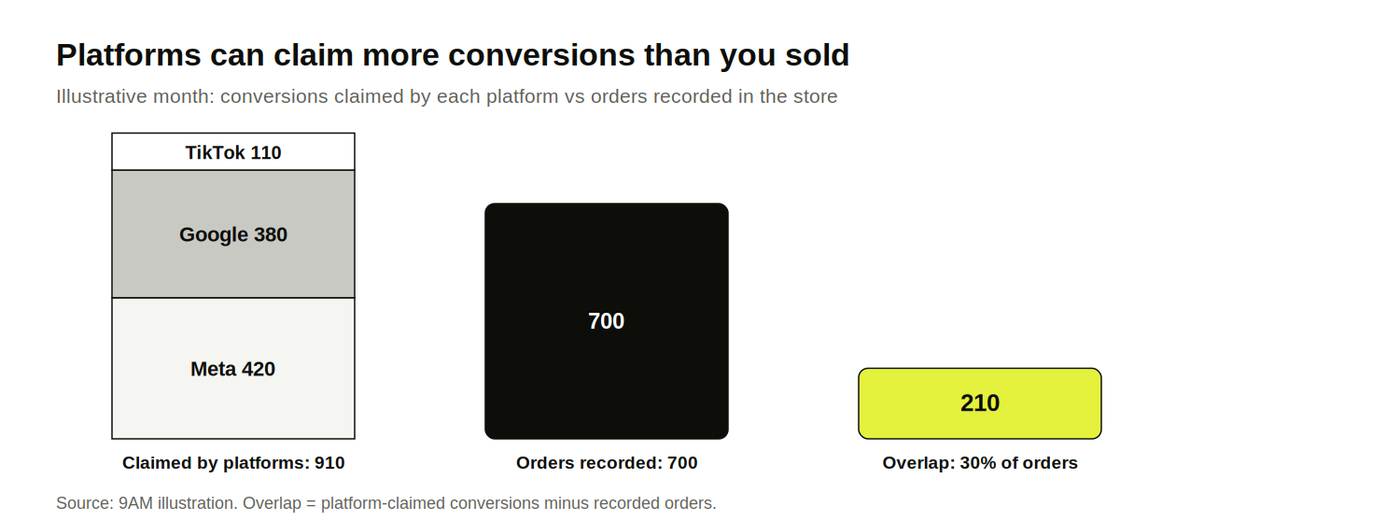
Use the overlap as a sanity check on how much weight platform numbers can carry, and track blended efficiency next to them. Our guides to blended CAC vs paid CAC and the marketing efficiency ratio cover the account-level numbers that don't double-count.
Step 7: Log Every Settings Change
Keep a dated log of every window, model, or conversion action change, and note it on any report that crosses the date.
Pro tip: Check how each platform handles the change: Google Ads applies new windows going forward, while Klaviyo recalculates historical attribution too.
Save the settings and export date with each report so you know which version of the numbers you're comparing.
The log is also the first thing to check when a channel's numbers jump for no visible reason, alongside the tracking checks in our guide to server-side tracking.
What Aligned Attribution Windows Cannot Tell You
Aligned attribution windows make channel numbers comparable. They can't tell you which channel caused the sales, because every window, however consistent, still credits conversions that might have happened without the ad.
Two limits remain after alignment:
Incrementality. A 7-day click conversion on Meta and one on Google can both be customers who were going to buy anyway. Retargeting and brand search are the usual examples, as we cover in the last-click attribution problem.
Overlap. Aligning windows reduces how differently platforms count, but each still credits its own touchpoints, so the same order can still appear twice.
To learn what a channel adds, run a holdout or a geo-lift test, and use the aligned numbers to decide which channel to test first. A broader attribution model audit puts windows, models, and tests in one review.
Compare Channels on One Standard with 9AM
Cross-channel reporting gets easier once every platform reads on the same window, the same date basis, and the same click-only standard. Budget conversations then start from numbers that mean the same thing, and the disagreements left are the ones worth testing.
At 9AM, our media buying team builds the settings inventory across your platforms, sets a shared comparison standard, reconciles platform claims against orders, and uses the gaps to plan incrementality tests.
Book a strategy call and we'll review your current attribution settings across Meta, Google, TikTok, and GA4, and show where they make channels look better or worse than they are.
FAQs
Should the optimization window and the reporting window be the same?
They can differ, and on Meta they even should. Meta can optimize on a wider setting that includes view and engage signals while you report on 7-day click for comparisons. Just label which window every number in a report uses.
Does changing a Google Ads conversion window change past data?
No. Google applies a new window only to conversions recorded from the day you change it, and past conversions aren't recounted. Log the date of every change, and avoid comparing periods on either side of it without adjusting.
How do you compare Meta's 7-day click with Google Ads' 30-day default?
Read both at 7-day click. In Meta, report 7-day click without view or engage credit. In Google Ads, isolate click-through conversions, then use Days to conversion to keep those within 7 days. If your buying cycle is longer, Meta can also show 28-day click through Compare Attribution Settings. Use the same longer window on both sides where the reporting supports it.
Should Klaviyo-attributed revenue sit in the same comparison as paid media?
Keep it in a separate column. Klaviyo credits any order placed within its window after an email open or click, so the same orders generally also appear in paid-channel reports. Adding it to paid totals counts those orders twice.
About Mustafa Alkhtab
Mustafa Alkhtab is Head of Performance Media at inBeat, where he oversees paid media and performance creative results across the agency's accounts. Before inBeat, he built growth programs for ecommerce, lead generation, and mobile app businesses in international markets. He writes about media buying, measurement, and conversion rate optimization.
More from Mustafa Alkhtab