Google Ads Conversion Lag: When Recent ROAS Is Too Early to Judge
Google Ads conversion lag makes recent ROAS look worse than it is. Get a free Excel calculator to find when your data is mature enough to act on.

· 15 min read
The last few days of any Google Ads report look worse than the weeks before them. Spend is all there; the conversions those clicks will produce are still on their way.
Google says it plainly: because conversions are reported by click date, conversion lag can make CPA look inflated and ROAS look deflated.
And it gets worse:
Teams that read those days as final cut budgets from campaigns that were working.
We’ll help you fix that.
This guide shows how to measure your own conversion lag, tell it apart from tracking problems, and set review windows that say when recent results are mature enough to act on.
P.S. If you'd rather have someone build the lag curves and the reporting rules with you, our analytics team sets up conversion reporting for paid media teams.
TL;DR
Conversion lag is the time between an ad click and the conversion. Google credits the conversion to the click date, so recent days fill in over time.
Lag, data freshness, and broken tracking all make recent numbers look low. Each needs a different check.
Measure lag with the Days to conversion segment, lag hover cards, path metrics, and the by conversion time columns.
Set review windows from your own lag curve: the bigger the decision, the more of the conversion value should have arrived.
Compare click cohorts at the same age, and mark immature days in every report.
Our view: we treat measurement as the part of media buying that decides what earns the next dollar. A report that mixes mature weeks with half-finished days answers that question badly, and it always answers it against the newest work. Spend that gets cut on incomplete data teaches the account nothing, and it usually costs the campaigns that were just starting to pay back.
What Is Conversion Lag in Google Ads?
Conversion lag is the time between an ad click and the conversion it leads to. Google also calls it conversion delay, and it can range from minutes to weeks.
Here’s a neat visual explanation:
The lag itself is normal buyer behavior.
What makes it a reporting problem is how Google Ads dates the conversion: in the standard Conversions column, it's credited to the day of the click; you won’t see it on the day of the purchase or lead.
So a click from Monday that converts on Friday shows up in Monday's row, but only from Friday onward. Conversions can keep landing up to 90 days after the click, depending on the conversion window you set.
Four terms carry the rest of this guide:
Conversion lag: days from click to conversion, for one conversion action.
Click cohort: all clicks from one day or week, tracked as their conversions arrive.
Mature data: a cohort old enough that almost all of its conversion value has arrived.
Data freshness: the hours Google needs to process and show data, separate from buyer lag.
Why Recent ROAS Looks Worse Than It Really Is
Recent ROAS looks worse because spend is reported in full right away, while the conversion value from those clicks arrives over the following days or weeks.
Google notes that this makes recent performance look weaker than past performance, with fewer conversions and a higher cost per conversion.
The clearest way to see it is to read one click week several times.
The numbers below are an illustration: one week of clicks costing $10,000, opened in the report on five different dates.
Report opened | Days since the week ended | Conversions | Conversion value | ROAS |
|---|---|---|---|---|
Monday after | 1 | 96 | $14,400 | 1.4x |
Wednesday after | 3 | 152 | $22,800 | 2.3x |
One week later | 7 | 203 | $30,400 | 3.0x |
Two weeks later | 14 | 233 | $35,000 | 3.5x |
One month later | 30 | 253 | $38,000 | 3.8x |
Same clicks, same spend, five different answers. Read on the Monday, this week misses a 3.0x target by half. Read a month later, it beats it by 27%.
The gap between those readings is exactly where budget cuts go wrong.
In one example GTECH describes, a campaign that showed 4 conversions in its first week ended at 18 once its delayed conversions came in, more than the 12 its "winning" neighbor had shown.
Conversion Lag vs Data Freshness vs Tracking Failures
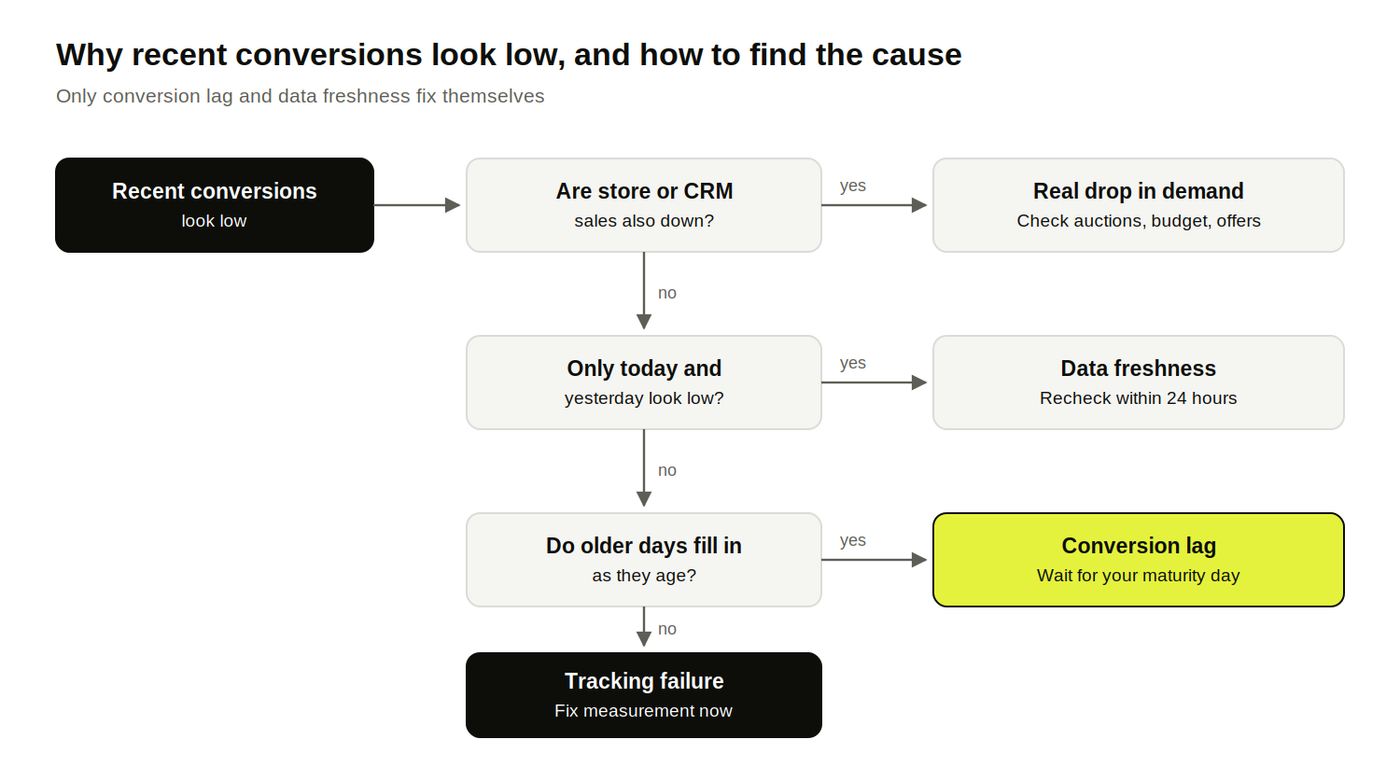
Three different things make recent conversions look low: buyers who haven't converted yet (lag), data Google hasn't processed yet (freshness), and conversions that are never going to be recorded (a tracking failure). Only the first two fix themselves, so the first job with any dip is to work out which one you're looking at.
Data Freshness
Data freshness is processing time, measured in hours. Google's own figures: conversion tracking data appears within about 3 hours under last-click attribution and up to 15 hours under other models, and goals imported from Google Analytics take up to 12 and 24 hours respectively.
In practice, freshness only distorts today and yesterday. If a dip reaches back a week, freshness isn't the cause.
Tracking Failures
A tracking failure means conversions are happening and not being recorded. Google lists a sudden drop or spike in tag fires for a bidding conversion action as one of the common reasons for performance swings, because Smart Bidding reacts to it immediately.
The tell is the shape. Lag makes the newest days low and older days complete; a tracking failure makes every day after a certain date low, mature days included.
Here's how to tell the three apart:
What you see | Conversion lag | Data freshness | Tracking failure |
|---|---|---|---|
Which days look low | The last few days to weeks, fading with age | Today and yesterday | Every day since a specific date |
Do the numbers fill in? | Yes, over days or weeks | Yes, within hours | No |
Conversion action status | Recording conversions | Recording conversions | Inactive, no recent conversions, or tag errors |
Your store or CRM | Sales arriving as normal | Sales arriving as normal | Sales normal, Google Ads low |
First check | Days to conversion segment | Wait a day and recheck | Conversion action diagnostics and tag fires |
The store or CRM row settles most cases in a minute. If the business is recording sales and Google Ads isn't, stop reading performance and fix the measurement first, starting with a look at server-side tracking if browser tags keep dropping events.
How to Measure Conversion Lag in Google Ads
Google Ads gives you four ways to measure conversion lag, and each answers a slightly different question. The Days to conversion segment is the one to build review windows from; the other three help you read recent data and reconcile it.
Days to Conversion Segment
The Days to conversion segment shows how many conversions, and how much value, arrived at each delay after the click.
It's on the Campaigns, Ad groups, and Search keywords tables, under Segment, then Conversions, then Days to conversion, and it splits results into up to 19 rows.
Pro tip: Use a historical click-date range whose newest clicks are older than the conversion action’s full window so you can have extra time for normal processing and offline uploads. Run it per conversion action: a purchase and a qualified lead have very different lag.
Conversion Lag in Campaign and Bid Strategy Reports
On Search, Performance Max, and App campaigns, Google adds lag information to hover cards on the Conversions, Cost/conv., and Conv. rate columns.
Hover over them to see the average delay and how many conversions Google predicts haven't been reported yet.
The performance chart also marks the date range where more conversions may still come in. It's the quickest way to see which days on screen are still provisional.
Path Metrics in Attribution Reports
Path metrics, in the attribution reports under Goals, show the average days and interactions before a conversion, from first interaction or from last click. Smarter Ecommerce recommends a range of 3 to 6 months or more for solid results.
Use it to see the full consideration journey. For review windows, Days to conversion is more practical because it splits the delay by campaign and conversion action.
Conversions by Conversion Time Columns
The by conversion time columns credit each conversion to the date it actually happened, where the standard columns use the click date. They include Conversions, Conv. value, and Value/conv., each "by conv. time."
They're the right view for matching Google Ads to your store's or finance team's daily sales. For judging whether a campaign worked, stay on the click-date columns, because those tie the result to the spend that produced it.
Report | Where to find it | What it shows | Use it for |
|---|---|---|---|
Days to conversion | Campaigns, ad groups, keywords: Segment, Conversions | Conversions and value by delay after the click | Building the lag curve and review windows |
Lag hover cards | Conversion columns and performance chart | Average delay and conversions not yet reported | Reading recent days without guessing |
Path metrics | Goals, Measurement, Attribution | Days and interactions before conversion | Understanding the consideration journey |
By conversion time columns | Columns, Conversions | Conversions by the date they happened | Reconciling with store or finance data |
How to Set Review Windows From Your Own Conversion Lag, Step by Step
A review window is the age a click cohort must reach before you use it for a given decision. Build it from your own lag curve in seven steps, and every report gets a clear line between data you can act on and data you can only watch.
Download the conversion lag curve calculator (Excel).
Paste your Days to conversion export and it returns the cumulative share of conversion value by day, plus the day your account reaches 80%, 90%, and 95%.
Step 1: Pull Days to Conversion for Each Action Used for Bidding
Export at least 90 days of click-date data for each conversion action used for bidding. End the period far enough in the past for its full conversion window and any normal reporting or import delay to have elapsed.
Pull conversion value as well as conversion count, since a few slow, high-value conversions can move ROAS more than many fast small ones.
Keep each conversion action separate. Mixing a same-day purchase with a three-week qualified lead produces a curve that describes neither.
Step 2: Find When Most Conversion Value Has Arrived
Add the value up row by row and divide by the total to get the share that had arrived by each delay. Mark three points on that curve: the days by which 80%, 90%, and 95% of the value had come in.
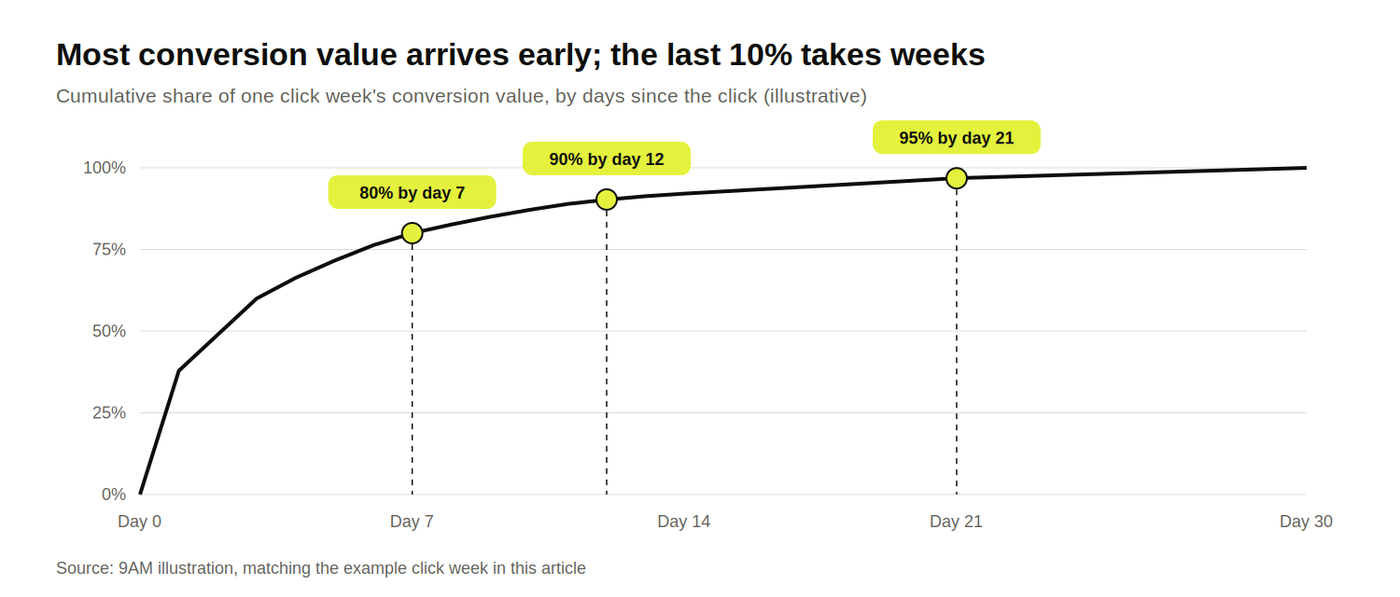
For example, a per-click lag curve might reach 80% of conversion value by day 7, 90% by day 12, and 95% by day 21. These points are measured from each click, whereas the earlier table measures time since the click week ended. Keep those two clocks separate.
Step 3: Match the Maturity Level to the Decision
Ask for more mature data before decisions that are hard to undo. A small bid target change can be reversed next week. Pausing a campaign stops delivery and may require readjustment after reactivation, but it does not erase historical conversion data.
One way to set it, as a starting point to adapt to your own risk tolerance:
Decision | How easy it is to undo | Wait until the cohort reaches |
|---|---|---|
Daily monitoring and alerts | Nothing to undo | Any age, labeled provisional |
Small bid or target adjustment | Easy | Your 80% day |
Budget cut or shift between campaigns | Moderate | Your 90% day |
Pausing a campaign or calling a test | Hard* | Your 95% day |
* Pausing is reversible, but missed traffic cannot be recovered; ending a test is harder to undo.
Step 4: Mark Provisional Days in Every Report
Shade or label every day younger than your 80% point as provisional, in Google Ads views, dashboards, and slides alike. People read a number on screen as final unless the report tells them otherwise.
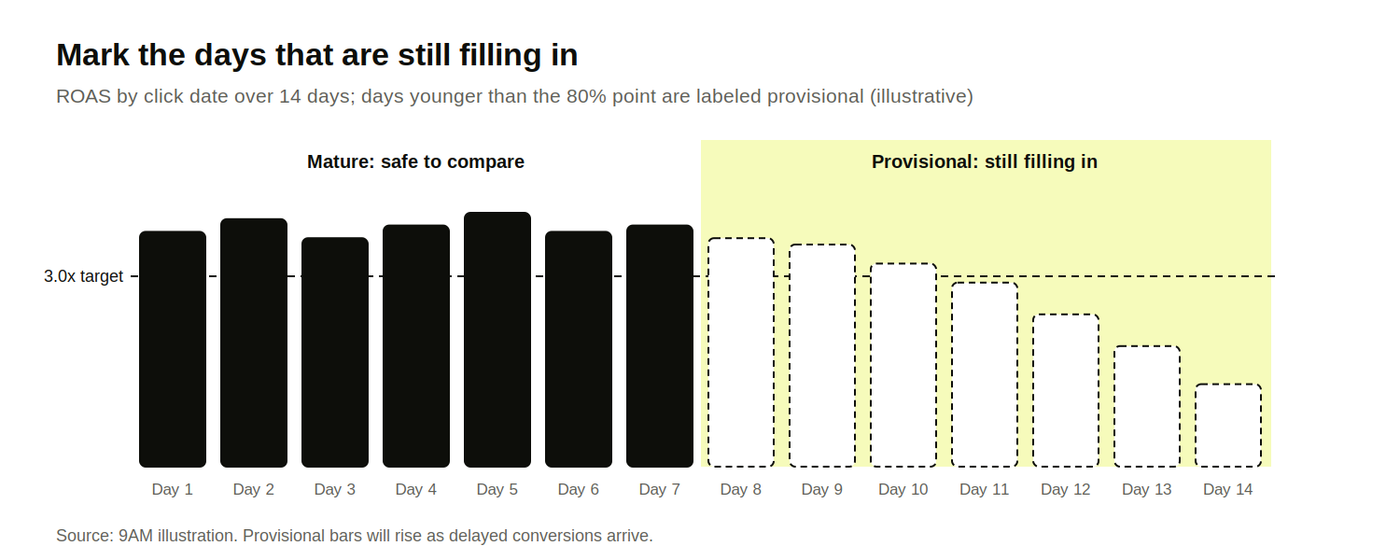
Put the label into your weekly performance review too, so nobody makes a budget call on the provisional part of the week.
Step 5: Compare Click Cohorts at the Same Age
Compare this week at day 7 with last month's weeks at day 7. A mistake we see quite a lot is comparing it with their final numbers. Equal ages cancel out the lag, so whatever difference remains is real.
To get those readings, save a snapshot of each week's conversions and value at fixed ages (day 1, 7, 14, 30), or pull the Days to conversion segment for past weeks and add up only the rows up to the matching delay.
Step 6: Treat Google's Lag Forecasts as Estimates
Use the conversions Google predicts are still to come as a guide to how much is missing, and keep decisions on reported data. Google itself describes conversion delay figures as estimates for planning bids and budgets.
The forecast is most useful when it disagrees with your own curve. A big gap between the two is a reason to check tracking.
Step 7: Rebuild the Lag Curve After Changes
Rebuild the curve every quarter, and straight after anything that changes how fast conversions arrive or how they're counted:
a new primary conversion action, or a switch from form fills to qualified leads
a change of attribution model or conversion window
a new offline conversion import or upload schedule
a new offer, price point, or product line with a different buying cycle
A curve built before the change will tell you the wrong day to wait for.
How Conversion Lag Differs by Business Model and Campaign Type
Conversion lag follows the buying decision, so price, sales cycle, and campaign role all change it. That's why one account-wide rule ("ignore the last 7 days") fits some campaigns and badly misreads others.
Business or campaign | Where the lag comes from | What it means for review windows |
|---|---|---|
Low-price ecommerce | Short research; many same-day orders | Maturity in days, so weekly reads work |
High-ticket ecommerce | Comparison shopping, financing, partner input | Several weeks; judge on monthly cohorts |
Lead gen with offline imports | Sales qualification in the CRM, plus upload timing | Lag in weeks, set by the slowest stage you bid on |
Brand vs non-brand Search | Brand searchers are closer to buying | Brand matures faster; don't benchmark one on the other |
Performance Max and video | Mix of prospecting and remarketing | Read per campaign; video and prospecting run longer |
Campaign role can shift lag more than people expect.
In one account Five Nine Strategy reviewed, non-brand Search averaged 28 days to convert against 17 for Performance Max, which leaned on remarketing. Treat that as an example of the spread as it’s NOT a benchmark.
For lead gen, the upload schedule adds its own delay on top of the buyer's. A qualified lead marked in the CRM on Thursday and uploaded the following Monday adds four days to the lag Google sees.
Our guide to offline conversion tracking covers daily uploads and the import windows.
How Conversion Lag Affects Smart Bidding
Smart Bidding learns from conversions as they arrive, so long lag slows its learning and short-term readings of its results are unreliable.
Google's guidance for value-based bidding recommends conversion delays under 7 days and daily uploads for offline conversions, and warns that ramp-up can take months when nothing arrives in the first week.
Lag also changes how to judge a bid change.
Google recommends waiting one to two full conversion cycles before comparing a new target with actual results, and avoiding several target changes within one cycle.
Two practical rules follow:
Bid on a stage that arrives quickly. If your closed deals take two months, bid on a qualified stage that lands within days. Keep closed deals as a secondary action for reporting, and exclude them from any custom goal used for bidding. Our media buying team usually makes this change first in lead-gen accounts.
Read target changes on mature cohorts. Since August 2026, Google says Smart Bidding reacts to target changes in real time. The bidder adapts fast; the reporting still matures at the speed of your lag curve.
When Recent Data Is Enough to Act
Act on recent data when the problem is in spend, traffic, or tracking, since those show up in full right away. Waiting for maturity only applies to conversions and the metrics built on them.
Don't wait in these cases:
Tracking broke. Store or CRM sales are normal and Google Ads shows a cliff from one date. Fix the measurement today, because Smart Bidding is already bidding on the broken signal.
Spend or CPC jumped. Cost is reported within the hour, so a runaway budget or a CPC spike is real the day you see it. Our guide to budget pacing covers the controls.
Ads or assets were disapproved. Lost impressions are visible immediately.
Conversions are missing past your curve. If a cohort is past its 80% day and still shows a fraction of the usual value, the lag explanation has run out.
Traffic quality changed. A sudden rise in clicks with no change in engagement can point to invalid traffic, which a click fraud investigation can confirm.
When you do act early, log the decision with the cohort's age at the time. Rechecking it once the cohort matures shows whether the early call held up.
Judge Google Ads on Mature Data with 9AM
Conversion lag makes recent data provisional, and provisional data is still useful when it's labeled. Teams that know their own lag curve read the newest days for what they are, wait the right number of days before big calls, and stop cutting campaigns that hadn't finished converting.
At 9AM, media buying and analytics work together.
We build lag curves per conversion action, set review windows by decision type, and put the provisional line into the reports your team and finance already use, so budget calls rest on mature cohorts.
Book a strategy call and we'll pull your Days to conversion data, map your maturity points, and show which recent budget or bid decisions were made on data that hadn't finished arriving.
FAQs
Should you switch your default Google Ads view to conversions by conversion time?
Keep the click-date columns as the default for judging campaigns, since they tie conversions to the spend that caused them. Add the by conversion time columns next to them for finance reconciliation and daily sales checks. A large gap between the two is itself a quick signal of how long your lag runs.
How does a 90-day conversion window change the review window?
A longer window lets later conversions count, so the curve keeps rising for longer and your 95% point moves out. It doesn't change your 80% point much if most buyers convert early. Rebuild the curve after changing the window, and compare cohorts only within the same window setting.
Does data-driven attribution add reporting delay compared with last click?
Yes, a little. Google processes conversions under models other than last click in up to 15 hours, against about 3 hours for last click. That only affects the last day or so, so it matters for daily monitoring and barely registers in review windows measured in weeks.
How do you report a week to leadership when half its conversions haven't arrived?
Show the week's reported numbers next to the same week's expected value from your lag curve, and label the gap as provisional. Pair it with a mature week for comparison. For forward-looking numbers, use your paid media revenue forecast, and leave the provisional days out of the projection.
About Mustafa Alkhtab
Mustafa Alkhtab is Head of Performance Media at inBeat, where he oversees paid media and performance creative results across the agency's accounts. Before inBeat, he built growth programs for ecommerce, lead generation, and mobile app businesses in international markets. He writes about media buying, measurement, and conversion rate optimization.
More from Mustafa Alkhtab