Customer Match in Google Ads: Customer Lists, Acquisition Exclusions, and Audience Hygiene
Build Customer Match lists that keep existing customers out of acquisition campaigns: eligibility, exclusions, match rates and list hygiene.

· 11 min read
An acquisition campaign that keeps winning back last month's buyers looks efficient in Google Ads and expensive in the bank account.
The clicks may convert, but the customers were already yours.
Customer Match lets you keep existing customers out of acquisition campaigns, so your budget stops paying for people who would have bought anyway.
It only works when the lists behind it are built and kept clean, and this guide covers both.
P.S. If you'd like a second pair of eyes on your audience setup, our Google Ads team audits Customer Match as part of every account review.
TL;DR
What it is: Google Ads matches your hashed customer data to signed-in Google accounts, so you can exclude, signal or target those people.
Who can exclude: every policy-compliant account. Targeting needs 90 days of history and more than USD 50,000 in lifetime spend.
How to exclude: add a list as an audience exclusion on Search, Shopping, Display, Demand Gen and video, or use the new customer acquisition goal.
How to keep lists clean: sync often, remove opt-outs, and refresh at least 100 members within every 540 days.
How to measure: track cost per new customer as the headline number.
Acquisition budgets should pay for new customers. Every dollar spent re-buying an existing one is a retention cost hiding in your acquisition line.
That's why the exclusion steps below come before the targeting ones.
What Is Customer Match in Google Ads?
Customer Match is a Google Ads feature that uses the contact details your customers gave you, such as emails and phone numbers, to find those people on Google. It runs across Search, the Shopping tab, YouTube, Gmail and Display, per Google's Customer Match overview.
You can use a matched list in three ways:
Exclude existing customers from acquisition campaigns.
Signal who your best customers are to Smart Bidding.
Target customers directly, if your account is eligible.
One regional limit applies. Since early March 2024, Customer Match lists no longer serve on third-party inventory in the EEA, UK and Switzerland. They still work on Google's own properties.
How Does Customer Match Work?
Customer Match works by hashing your customer data and comparing it with hashed Google account data. People who match join a segment you can use in campaigns.
The process runs in four stages:
Upload or sync a customer list from a file, a CRM or a data warehouse.
Normalize and hash each identifier with SHA256. Google hashes plain-text files on your computer before sending them.
Match the hashed values against signed-in Google accounts.
Use the matched segment once processing finishes, which can take up to 48 hours.
Two automatic behaviors matter for acquisition campaigns.
First, campaigns using Smart Bidding or optimized targeting include all your Customer Match lists by default. You can opt out at account level.
Second, the new customer acquisition goal uses your lists to tell new customers from existing ones. It offers two main modes:
Bid higher for new customers, which adds value to a first purchase (recommended by Google).
Only bid for new customers, which limits ads to people Google treats as new.
Google decides who counts as existing from the lists you choose, plus its own autodetection of purchasers from up to the last 540 days.
Why Use Customer Match for Acquisition Campaigns?
Customer Match earns its place in acquisition campaigns because it fixes your numbers as well as your targeting. Once returning buyers stop counting as new, cost per new customer shows what acquisition really costs, which keeps blended and paid CAC honest.
There’s also less wasted acquisition spend as a direct consequence.
Besides, your lists teach Smart Bidding. A high-value customer list shows it what a good customer looks like, and a lapsed-customer list lets you run win-back campaigns separately, at a price that suits them.
One common claim is out of date. Many guides still describe "similar audiences" built from Customer Match lists. Google retired similar audiences in 2023, and optimized targeting, audience expansion and Smart Bidding now do that job.
Customer Match Requirements and Eligibility
Every account with a good policy and payment history can use Customer Match for exclusions and observation. Targeting needs more account history, per the Customer Match policy.
Feature | All policy-compliant accounts | 90 days of history and over USD 50,000 lifetime spend |
|---|---|---|
Exclusions | Yes | Yes |
Observation setting | Yes | Yes |
Targeting setting | No | Yes |
Manual bid adjustments | No | Yes |
The same policy sets the data rules:
First-party data only: information customers shared directly with you, online or offline.
Privacy disclosure: your privacy policy must say you share customer data with third parties that perform services for you.
Consent: obtain it where the law or Google's EU user consent policy requires it.
No children's data: nothing from customers under 13, or from sites aimed at them.
Freshness: at least 100 members must be added or updated within any 540-day window for a list to stay eligible.
How to Build Customer Lists, Exclusions, and Clean Audiences Step by Step
Building a working Customer Match setup takes eight steps: define the lists, upload them, apply them, then keep them clean and measure the result. Steps 4 and 7 do most of the work for acquisition.
Step 1: Define Each List by the Job It Does
Give every list one job before you upload anything. A list built "just in case" ends up applied in the wrong place.
List | Who is in it | Use in Google Ads | Refresh cadence |
|---|---|---|---|
All customers | Everyone who has bought | Exclusion and existing customer definition | Daily or weekly sync |
Recent buyers | Bought in the last 30 to 90 days | Exclusion from re-engagement offers | Daily or weekly sync |
High-value customers | Top customers by margin or LTV | Signal for Smart Bidding | Monthly |
Lapsed customers | No purchase in your normal repurchase window | Re-engagement campaigns | Monthly |
Open leads | Leads not yet won or lost | Exclusion from lead-gen campaigns | Daily or weekly sync |
Define "high-value" with real margin or lifetime value data. Our guide to LTV data for acquisition covers which numbers to trust early.
Step 2: Format the Customer Data File
Format the file exactly as Google expects, or rows will fail to match. Google's data file guide sets these rules:
Use English column headers: Email, Phone, First Name, Last Name, Country and Zip.
Save as CSV in ASCII or UTF-8.
Normalize each value. Trim spaces, lowercase text, and remove dots before the domain in Gmail addresses.
Format phones in E.164, with the country code.
Include all four address fields if you match on mailing address.
You can upload plain text or hash the data yourself with SHA256. Don't hash Country or Zip.
Step 3: Upload the File or Connect a Data Source
Upload the file once to test it, then switch to an automatic connection for anything you'll refresh.
Upload a CSV manually under Tools, Shared library, Audience manager, then Customer list. Tick the policy box and set a membership duration of up to 540 days.
Connect a source through Data Manager, which lets Google Ads pull lists directly from BigQuery, Snowflake, Redshift, Salesforce, Cloud Storage and others.
Build a custom integration with the Data Manager API, which Google recommends over the Google Ads API for new Customer Match integrations.
After processing, Google shows how many rows uploaded and your match rate.
Step 4: Exclude Existing Customers From Acquisition Campaigns
Exclude existing customers in every campaign meant to find new ones. The method depends on the campaign type.
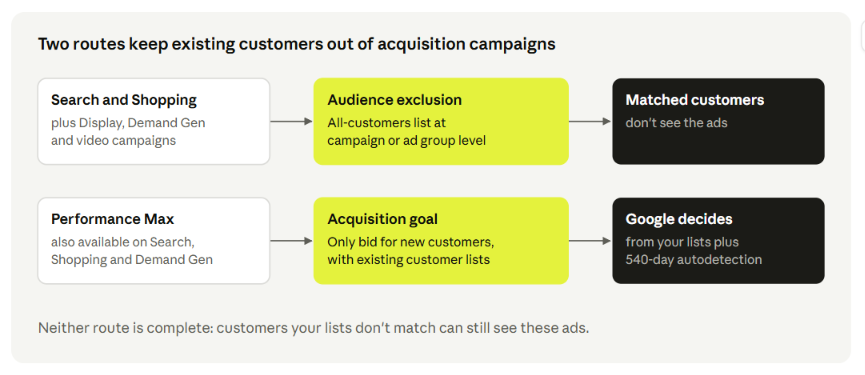
On Search, Display, Demand Gen, Standard Shopping and video campaigns, add the list as an audience exclusion at campaign or ad group level. Google doesn't offer audience exclusions during campaign creation, so add them right after launch.
On Performance Max, use the new customer acquisition goal in "only bid for new customers" mode. Then choose your all-customers list in the existing customer definition.
Keep two limits in mind:
Coverage isn't complete. Unmatched customers can still see your ads, and Google says new-customers-only ads may reach some existing customers for privacy and technical reasons.
Small lists weaken detection. Google's lifecycle goal guide notes that lists under 1,000 members may limit new customer acquisition.
If you also run brand terms through Performance Max, pair this with our guide to PMax brand exclusions.
Step 5: Decide How Lists Feed Smart Bidding, Signals, and Observation
Decide, account by account, how much freedom Smart Bidding gets with your lists. The defaults suit most accounts, but not all.
Keep auto-inclusion on if your lists are accurate, and turn it off in Account settings if a list mixes in customers you'd never want to reach. Google's Customer Match guide shows where the setting lives.
Add your high-value list as an audience signal in Performance Max. It guides the campaign without restricting reach.
Use observation when you want reporting on a list without limiting reach. Targeting limits reach to the list and needs the eligibility in the table above.
If your ads still reach people outside a targeted list, check whether optimized targeting is on. It expands beyond the list by design. Our marketing analytics team can audit these settings across accounts.
Step 6: Diagnose and Raise Low Match Rates
Read the match rate as a data quality check. Google describes it as the share of your list that connects to Google users, and says it doesn't predict list performance.
When the rate is low, check these in order:
Formatting errors: wrong headers, missing country codes or unnormalized emails.
Single identifier: add phone and address alongside email. Google says more match keys raise the rate.
Work emails: B2B lists heavy in company addresses may match fewer accounts, since many people sign in to Google with a personal address. Add personal emails or phones where customers gave them.
Stale data: old addresses and numbers stop matching over time.
Capture quality starts on your site. Our guide to server-side tracking covers keeping form data intact before it reaches your CRM.
Step 7: Refresh, Prune, and Audit Lists on a Schedule
Treat list hygiene as a recurring job with a named owner. Stale lists quietly let existing customers back into acquisition campaigns.
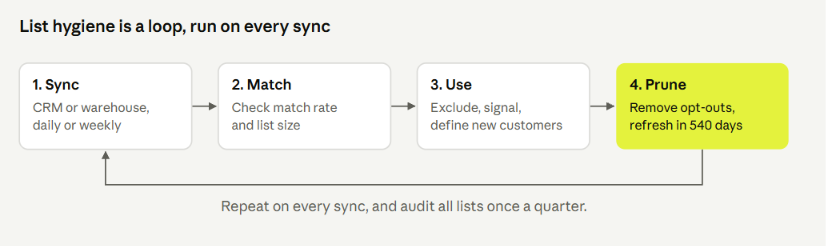
Run this routine:
Sync automatically from your CRM or warehouse so new buyers join the exclusion list within a day or a week.
Remove opt-outs as soon as customers withdraw consent, using Google's remove option or your connector.
Watch the 540-day window: a list needs at least 100 members added or updated within 540 days to stay eligible.
Name lists by job and date rule, such as "All customers, purchased ever" or "Lapsed, no order in 180 days".
Audit quarterly: delete unused lists, check sizes, and confirm each list still has an owner.
Google also notes that list sizes drop when members are inactive for 30 days or opt out of personalized ads. A sudden drop is worth a check, especially on lists that also feed your retention marketing.
Step 8: Measure New Customer Acquisition Results
Measure success as new customers per dollar. Google reports new and returning customers for campaigns using the acquisition goal, so you can calculate cost per new customer.
Track three numbers each month:
Cost per new customer, by campaign.
Share of conversions from existing customers in acquisition campaigns. It should fall after exclusions go live.
Payback time on the new customers you won.
Compare the first two numbers before and after exclusions go live, over date ranges of the same length, so a seasonal swing doesn't pass for improvement.
Our guide to the CAC payback period shows how to set a target for the third number.
Customer Match Mistakes That Waste Acquisition Budget
Most Customer Match problems come from a handful of repeat mistakes. Each one maps to a step above:
One list doing every job, with no separate lists by purpose. Fix in Step 1.
Rejected rows from wrong headers or unformatted phones. Fix in Step 2.
Manual uploads that never get refreshed. Fix in Steps 3 and 7.
No exclusions on acquisition campaigns, so existing customers keep converting at acquisition prices. Fix in Step 4.
Assuming new-customers-only means zero existing customers. Check the share in Step 8.
Uploading lists you didn't collect yourself, which breaks the first-party rule in the policy.
Letting lists expire past the 540-day window. Fix in Step 7.
Run Cleaner Google Ads Audiences With 9AM
One decision sits under everything in this guide, and most accounts never make it on purpose: who counts as a new customer.
Google's autodetection looks back up to 540 days, while your finance team may treat a customer who lapsed a year ago as new again, or never.
When the two definitions differ, Google's new customer count and your CAC report won't match.
Worse, "bid higher for new customers" can pay a premium for buyers your P&L treats as returning. Building your existing customer list on finance's definition is what makes the goal bid for growth your business actually counts.
At 9AM, we agree that definition with your finance team before a single bid changes. Book a strategy call and we'll set up Customer Match so the new customers Google pays for are the ones that grow your revenue.
FAQs
Can you use Customer Match without USD 50,000 in lifetime spend?
Yes, for exclusions and observation. Any account with a good policy and payment history can use those. Targeting and manual bid adjustments need 90 days of history and more than USD 50,000 in lifetime spend.
How long does a Customer Match upload take to process?
Up to 48 hours. Once it's done, Google shows the uploaded row count and the match rate.
Is Customer Match the same as enhanced conversions?
No. Customer Match builds audiences from your customer lists. Enhanced conversions sends hashed customer data with conversions to improve measurement. Many accounts use both.
Should you leave Customer Match on for Smart Bidding?
Usually yes, if your lists are accurate and segmented by purpose. Turn auto-inclusion off only if a list contains people you'd never want to reach, then fix the list.
Can you use Customer Match lists in the EEA?
Yes, on Google's own properties such as Search, YouTube and Gmail. Since March 2024, the lists no longer serve on third-party sites and apps in the EEA, UK and Switzerland, and uploads need the required consent signals.
Does "only bid for new customers" guarantee zero existing customers?
No. Google says some existing customers may still see these ads for privacy and technical reasons, and unmatched customers can't be identified. Track the share in your reporting.
About Mustafa Alkhtab
Mustafa Alkhtab is Head of Performance Media at inBeat, where he oversees paid media and performance creative results across the agency's accounts. Before inBeat, he built growth programs for ecommerce, lead generation, and mobile app businesses in international markets. He writes about media buying, measurement, and conversion rate optimization.
More from Mustafa Alkhtab