
Lead Response Time: How to Connect Paid Leads to Sales Follow-Up
Measure lead response time, see what the research really found, and wire Google and Meta leads into your CRM so sales reaches them while they're warm.

· 13 min read
A prospect clicks your ad at 9:40 p.m., fills in the form and waits. Sales sees the lead at 10 a.m. the next day, after the prospect has already booked a call with a competitor.
That gap is lead response time, and for paid leads it decides whether the click you bought turns into pipeline.
This guide shows how to measure it and, more importantly, how to wire paid leads straight into sales follow-up.
P.S. If you'd like help connecting your ad platforms to your CRM, our marketing analytics team builds this pipe for paid media clients.
TL;DR
Lead response time is the time from a lead's submission to the first human sales contact.
A 2011 HBR audit found firms that responded within an hour were nearly 7 times more likely to qualify a lead. The "5-minute rule" comes from a separate 2007 MIT and InsideSales study.
Platform lead forms hold leads outside your CRM, and bidding optimizes for form fills unless sales outcomes flow back.
To fix that, push every lead source into the CRM in real time, carry the ad source with it, route by intent and cover after-hours.
The payoff: send qualified and closed leads back to Google and Meta so bidding favors leads sales can actually work.
Media spend only pays off if someone answers the leads it buys. At 9AM, we treat response time as part of the media plan, because a lead that waits overnight costs the same as one called in two minutes.
What Is Lead Response Time?
Lead response time is the elapsed time between a lead's submission and the first human sales attempt. The clock starts when the prospect submits a form, calls or messages, not when the record appears in your CRM.
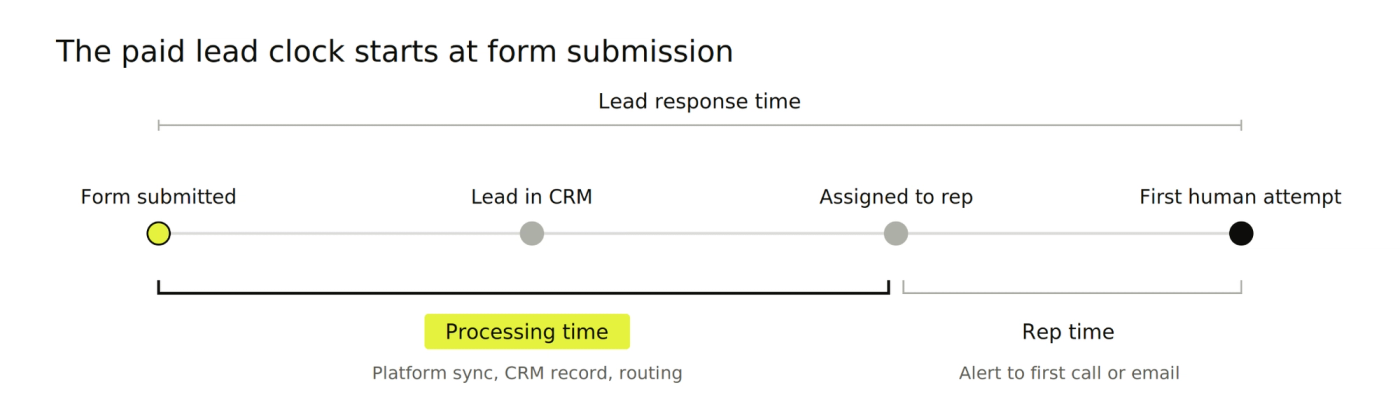
The total splits into two parts:
Processing time: the minutes before a rep sees the lead. That includes syncing from the ad platform, creating the CRM record, enrichment and routing.
Rep time: the minutes between assignment and the rep's first call, email or message.
For paid leads, processing time is often the larger part. Leads can sit in an ad platform's form inbox for hours before anyone moves them.
How to Calculate Lead Response Time
Calculate lead response time by subtracting the submission timestamp from the first human attempt timestamp. Do it for every lead, then summarize:
Use the submission time, taken from the form or ad platform. CRM creation time hides sync delays.
Use the first human attempt. Automated confirmations don't count.
Report the median and the 90th percentile alongside the average. One overnight lead can distort an average, and the 90th percentile shows how bad the slow cases get.
Split processing time from rep time, so you know whether to fix systems or staffing.
Measure in clock hours and staffed hours. Clock hours show the buyer's experience; staffed hours show how the team performs.
Track two more numbers alongside it:
First conversation time: a fast attempt that reaches voicemail isn't a conversation.
Coverage rate: the share of leads that got any human attempt at all. Averages built only on contacted leads hide the ones nobody called.
What Is a Good Lead Response Time?
A good lead response time for high-intent paid leads is under five minutes during staffed hours. Lower-intent leads can wait longer without much loss.
Use these as starting targets, then test them against your own qualification data:
Lead type | Target first human touch | Why |
|---|---|---|
Demo, quote or pricing request | Under 5 minutes in staffed hours | Highest intent, buyer is comparing options now |
Inbound call from an ad | Answer live, or call back within 5 minutes | The buyer chose the fastest channel |
Google or Meta lead form | Under 15 minutes | Quick to submit, so intent cools fast |
General contact form | Within 1 hour | Mixed intent, triage first |
Content download | Same business day | Research stage, nurture fits better |
After-hours lead of any type | First 30 minutes of the next staffed shift | Queue it ahead of new daytime leads |
What the Research Actually Found
Two studies sit behind most lead response statistics, and they're frequently mixed up.
HBR, 2011: the researchers sent test leads to 2,241 US companies. Only 37% responded within an hour and 23% never responded. Among those that replied within 30 days, the average response took 42 hours, according to the HBR article.
The same HBR article reports a companion analysis of 1.25 million leads. Firms that tried to contact a lead within an hour were nearly 7 times as likely to qualify it as firms that waited an hour longer.
MIT and InsideSales, 2007: this is the source of the five-minute figures. Calling within 5 minutes, compared with 30 minutes, raised contact odds 100 times and qualification odds 21 times, per InsideSales' summary.
Both studies are well over a decade old and predate today's platform lead forms. Treat them as direction, and set your own targets from your CRM data.
Speed also can't rescue a weak landing page. Check your form against our conversion benchmarks before blaming sales.
Why Lead Response Time Matters More for Paid Leads
Paid leads are expensive, and the systems that collect them weren't built for sales follow-up. Four things raise the stakes:
You paid for every lead. A lead that never gets a call still counts toward your cost per lead.
Platform forms hold leads outside your CRM. Google Ads keeps lead form submissions available for CSV download for only 30 days, per its lead form guide. A lead nobody exports sits unseen until it's gone.
Bidding learns from what you report. If Google or Meta only sees form fills, it finds more people who fill in forms, including ones sales can never reach.
Ads run while sales sleeps. Campaigns set to run all day keep generating leads after the sales team logs off.
What Slows Down Paid Lead Follow-Up?
Most delay happens before a rep sees the lead. The 2011 HBR study named three causes it found in slow firms: pulling leads from the CRM once a day, reps focused on their own outbound work, and assignment rules based on geography or "fairness".
Paid media adds its own:
Leads left in ad platforms, waiting for someone to download a CSV. Fixed in Step 2 below.
Missing source data, so reps don't know which ad or offer the lead saw. Fixed in Step 3.
Manual assignment or slow handoffs. Fixed in Step 4.
No after-hours path, so evening leads wait until morning. Fixed in Step 5.
One attempt and done, when the first call reaches voicemail. Fixed in Step 7.
No reporting by campaign, so nobody sees which sources wait longest. Fixed in Step 8.
A funnel leak analysis helps size how much each of these costs you.
How to Connect Paid Leads to Sales Follow-Up Step by Step
Connecting paid leads to sales follow-up takes nine steps: get every lead into the CRM fast, route it well, reach it, then report and feed results back. Steps 2 and 9 are the ones most paid media teams skip.
Step 1: Map Where Every Paid Lead Lands Today
List every way a paid lead can reach you, and where it lands by default. You'll usually find at least one source nobody checks daily.
Lead source | Where it lands by default | Risk | Fix |
|---|---|---|---|
Website form from an ad click | Form tool, then CRM | Batch sync, missing ad source | Real-time CRM integration with hidden source fields |
Google lead form asset | Google Ads account | Sits until someone downloads it | Webhook to the CRM |
Meta instant form | Meta's lead inbox | Sits until someone downloads it | Native CRM integration or webhook |
Call from a call asset | Phone line or call tracking | Missed calls after hours | Schedule call assets, text back missed calls |
Chat started from a landing page | Chat tool inbox | Never becomes a CRM lead | Sync chat leads to the CRM |
Step 2: Push Every Lead Source Into the CRM in Real Time
Send every lead into the CRM the moment it's submitted. Daily exports and CSV downloads are where paid leads go cold.
Set up a webhook for Google lead form assets so leads post straight to your CRM, as Google's lead form guide describes.
Connect Meta lead ads through a native CRM integration or a webhook. Meta's lead ads documentation notes webhooks deliver each new lead in real time.
Sync LinkedIn Lead Gen Forms to your CRM or marketing automation platform, and add hidden fields for UTMs and campaign IDs, as LinkedIn's lead form help describes.
Connect TikTok instant forms to your CRM from TikTok Ads Manager, or use its webhooks. TikTok keeps lead data for only 90 days, per its instant form help.
Send calls and messaging-ad conversations into the CRM as leads, through your call tracking and chat tools, so they enter the same routing.
Post website forms directly to the CRM so nobody has to forward an inbox.
Test each path with a dummy lead after every form or CRM change. A broken webhook fails silently.
Step 3: Carry Ad Source Data Into the Lead Record
Store the ad source on every lead so reps know what the prospect saw and reporting can tie leads to campaigns.
Capture each ad platform's click ID in hidden form fields, such as GCLID for Google, FBCLID for Meta, MSCLKID for Microsoft Ads and TTCLID for TikTok. Google's GCLID guide shows the pattern, and it works the same for the others.
Capture UTMs for source, medium, campaign and content, so platforms without a click ID still get attributed.
Record the form type, such as demo request or content download, since it drives routing in Step 4.
Show all of it to the rep on the lead record or alert.
Browsers can strip these values. Our guide to server-side tracking covers how to keep capture rates high.
Step 4: Route by Intent and Set an SLA for Each Lead Type
Route each lead to an available rep automatically, with an SLA set by lead type. Manual assignment adds delay at the worst possible moment.
Sort by intent first. Demo and quote requests jump the queue; content downloads go to a slower path or nurture.
Assign automatically by territory, round-robin or rep availability.
Set an SLA per lead type, using the targets in the table above.
Reassign on breach. If the owner hasn't attempted contact within the SLA, move the lead to a backup rep or shared queue.
Step 5: Cover After-Hours Leads and Match Ad Schedules to Sales Coverage
Decide what happens to every lead that arrives when nobody is working, then align your ads with the hours sales can answer.
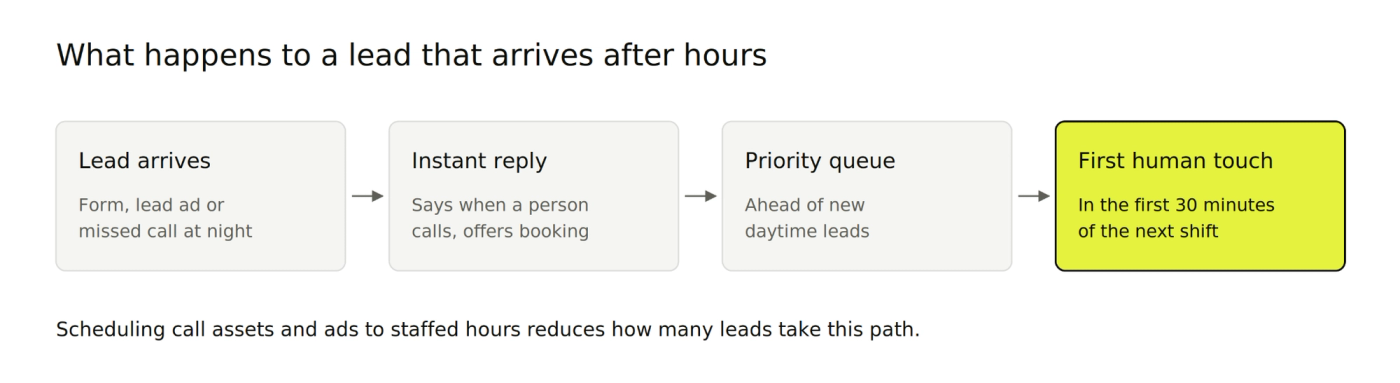
Send an instant acknowledgment that says when a person will reply and offers a booking link.
Queue after-hours leads first for the next staffed shift.
Show call buttons only when someone can answer the phone. Google's call asset settings let you schedule them by day and hour, and the same rule applies to click-to-call ads on any platform.
Review ad schedules on every platform you buy on. Google's ad scheduling controls the hours ads can show, Microsoft Advertising offers the same, and Meta lets you schedule ad sets that run on a lifetime budget. Keep running overnight only if your follow-up can handle those leads.
Our Google Ads team sets these schedules against real sales coverage for client accounts.
Step 6: Send an Instant Acknowledgment, Then a Human First Touch on the Right Channel
Automate the acknowledgment and keep the first real conversation human. Count only the human attempt in your response time.
Acknowledge within seconds by email, confirming the request and offering a booking link.
Make the first human touch on the channel the lead chose. Call back phone and form leads; reply in chat to chat leads.
Use SMS only with consent that the form asked for at opt-in. An unexpected text can feel intrusive.
Reference the ad or offer they responded to, using the source data from Step 3.
Not every team can staff phones overnight, and that's fine. A chatbot or AI assistant on the landing page can answer common questions, qualify the lead and book a slot while sales is offline.
Where a bot isn't an option, such as in regulated industries with strict rules on what you can tell prospects, automated email and social message replies with a booking link still keep the lead warm.
Either way, keep measuring the first human touch for an accurate lead response time.
Step 7: Follow Up Until the Lead Answers or Disqualifies
Plan several attempts across channels, because the first call can reach voicemail in many cases. A lead marked "no answer" after one try is a lead you paid for and lost, and it stretches your CAC payback period.
Build a short cadence:
First call within the SLA, with a voicemail and a follow-up email.
Second attempt later the same day on a different channel.
Further attempts over the next few days, spaced out, before the lead moves to nurture.
Track attempts per lead and contact rate, so you can see whether more persistence or faster first touches move results.
Step 8: Report Response Time by Campaign and Source
Report response time by campaign, platform and lead type, next to qualification rate. This is where speed connects to spend.
Split processing time from rep time for each source.
Show the median, the 90th percentile and coverage rate for each campaign.
Bucket leads by response time, such as under 5 minutes, 5 to 60 minutes, 1 to 24 hours and over 24 hours. Then compare qualification rates across buckets.
If one campaign's leads always wait longest, fix the pipe before cutting the budget. An attribution model audit helps confirm what each campaign actually contributes.
Step 9: Send Qualified and Closed Outcomes Back to Ad Platforms
Send lead outcomes from your CRM back to Google and Meta, so bidding learns which leads sales can reach and close.
Google Ads: import qualified and converted leads as offline conversion goals. Google recommends enhanced conversions for leads for new setups.
Meta: share CRM lead outcomes through the Conversions API, which Meta's lead ads documentation says lets it optimize for quality leads.
Optimize toward qualified leads, once you have enough volume, so bids favor lead sources sales can work.
This closes the loop that last-click reporting leaves open, so spend gets judged on the pipeline it creates.
Which Tools Help Teams Respond to Paid Leads Faster?
The right stack removes manual steps between submission and first call. Most teams need a few categories, mapped to the steps above:
Tool category | What it fixes | Examples | Step it supports |
|---|---|---|---|
Platform-to-CRM connectors | Leads stuck in ad platforms | Native integrations, webhooks, Zapier | Step 2 |
CRM workflows | Manual assignment, missing alerts | HubSpot or Salesforce automation | Steps 4 and 6 |
Lead routing | Slow or unfair distribution | Routing tools for your CRM | Step 4 |
Instant scheduling | Back-and-forth to book a call | Calendar booking on the thank-you page | Steps 5 and 6 |
Calling and SMS | Slow dialing, missed calls | Dialers with click-to-call and text-back | Steps 6 and 7 |
Call tracking | Calls with no campaign source | Dynamic number insertion | Steps 3 and 8 |
Start with connectors and CRM workflows. They're often already included in tools you pay for.
Fix Paid Lead Follow-Up With 9AM
Lead response time sits between marketing and sales, so, in most cases, it belongs to nobody. At 9AM, we connect your paid media data with your CRM and revenue records, so you can see which campaigns produce leads your team actually reaches and closes.
That way, every lead you pay for reaches a person while it's still warm.
Book a strategy call and we'll map where your paid leads wait today.
FAQs
Does an automated email count as a lead response?
No. An automated confirmation reassures the lead, but response time should measure the first human attempt. Track both, separately.
Does lead response time matter for B2B leads with long sales cycles?
Yes. The HBR analysis of 1.25 million leads included B2B companies alongside B2C ones. A long sales cycle doesn't give the first conversation more time; it still decides whether you qualify the lead before a competitor does.
How do you track lead response time in HubSpot or Salesforce?
You need two timestamps on every lead: the submission time synced from the form or ad platform, and the first logged human call or email. Store the gap in a calculated field, then report on it by campaign and lead source.
Does lead response time affect Google Ads or Meta performance?
Indirectly. Faster follow-up raises the share of leads that qualify. When you send those qualified outcomes back as conversions, bidding shifts toward the campaigns that produce them.
How is speed to lead different from lead response time?
They're the same metric under two names. "Speed to lead" is more common in sales tool marketing; "lead response time" is more common in reporting.
About Mustafa Alkhtab
Mustafa Alkhtab is Head of Performance Media at inBeat, where he oversees paid media and performance creative results across the agency's accounts. Before inBeat, he built growth programs for ecommerce, lead generation, and mobile app businesses in international markets. He writes about media buying, measurement, and conversion rate optimization.
More from Mustafa AlkhtabKeep exploring.

Insights
Sample Ratio Mismatch: The Quality Check to Run Before Trusting an A/B Test
October 23, 2026

Insights
Marketing Data Warehouse: A Minimum Viable Setup for Paid Media, CRM, and Revenue Data
October 23, 2026
Insights
Customer Match in Google Ads: Customer Lists, Acquisition Exclusions, and Audience Hygiene
October 23, 2026