
Sample Ratio Mismatch: The Quality Check to Run Before Trusting an A/B Test
Sample ratio mismatch can invalidate a winning A/B test. Run the chi-square check, trace the cause and decide whether to rerun.

· 11 min read

A landing page test wins by 12%, the variant ships, and the lift never shows up in revenue. Frequently the problem started on day one: the two groups in the test were never comparable.
Sample ratio mismatch is the check that catches this. It takes a few minutes, needs only the visitor count per variant, and belongs before any reading of conversion rates.
P.S. If your landing page tests feed paid media decisions, our growth strategy team builds this check into every test plan.
TL;DR
What it is: a gap between the traffic split you configured and the split you actually got, too large to be chance.
How common it is: about 6% of Microsoft experiments showed one in a year of data.
How to check: run a chi-square test on visitors per variant. A p-value below 0.001 means SRM.
Usual marketing causes: redirect tests, campaign URLs aimed at one variant, a slower variant, caching and bot filtering.
What to do: find the cause, fix it and rerun. Rescuing a broken test rarely works.
We treat every test result the way we treat every media number: as a claim that needs checking before it moves budget. A lift from a broken split is a confident answer to the wrong question.
That's why the SRM check comes first in this guide, and the conversion rate comes last.
What Is Sample Ratio Mismatch?
Sample ratio mismatch (SRM) is a statistically significant difference between the traffic split you configured for an A/B test and the split you observed. If you set 50/50 and the counts land far enough from 50/50, random assignment has likely failed somewhere.
Small gaps are normal. Large ones at high volume are not.
The Microsoft, Booking.com and Outreach.io researchers behind the standard SRM paper give a clear example:
A 50/50 test ended with 821,588 vs 815,482 users, a 50.2/49.8 split.
The odds of that gap arising by chance were under 1 in 500,000.
The same percentage gap means different things at different volumes. The chart shows a fixed 50.5/49.5 split at rising traffic levels.
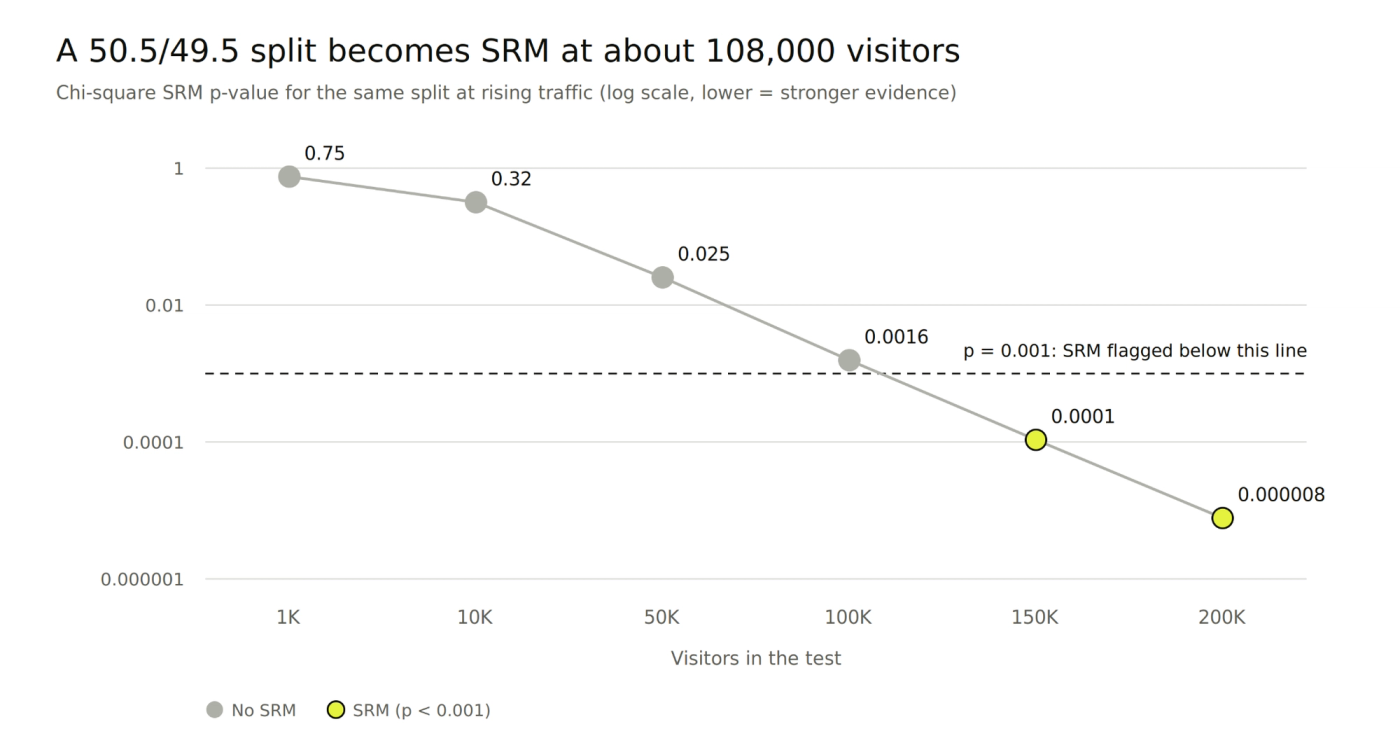
A few rules follow from this:
Unequal splits count too. An 80/20 test that lands at 70/30 has SRM.
Bayesian tests need the check. The SRM Checker FAQ notes most causes affect Bayesian analyses the same way.
Bandit tests are different. Their split moves on purpose, so a fixed-ratio check doesn't apply.
Why Sample Ratio Mismatch Invalidates A/B Test Results
SRM invalidates a test because the groups stop being comparable. A lift could come from the change you made, or from who ended up in each group.
The researchers put it bluntly: SRM causes selection bias, and that bias rules out cause-and-effect conclusions.
The examples show how far results can move:
A result that flipped. An MSN carousel test looked like a loss. The bot filter was removing the most engaged treatment users. Once fixed, the change was a clear win.
A slower variant. In a 50/50 test from the SRM Checker FAQ, the variant got 7,681 visitors to control's 9,463. It loaded about 5 seconds slower, and the lost visitors could hide an 18% conversion drop.
Inflated wins. DoorDash found its experiments with SRM had twice as many statistically significant metrics.
A lift that looks large next to typical landing page conversion rates is a good reason to run the check first.
SRM is also common, even at companies with mature testing programs:
About 6% of experiments at Microsoft, from over 10,000 experiments studied.
About 10% of LinkedIn's triggered analyses, per the same paper.
4.5% of experiments on Kameleoon, per its SRM documentation.
Media tests are not immune. Upworthy's headline tests are a public research dataset, and its authors later found 7,004 tests, or 22%, were likely affected. A web cache was serving one headline at a time.
How to Check an A/B Test for Sample Ratio Mismatch Step by Step
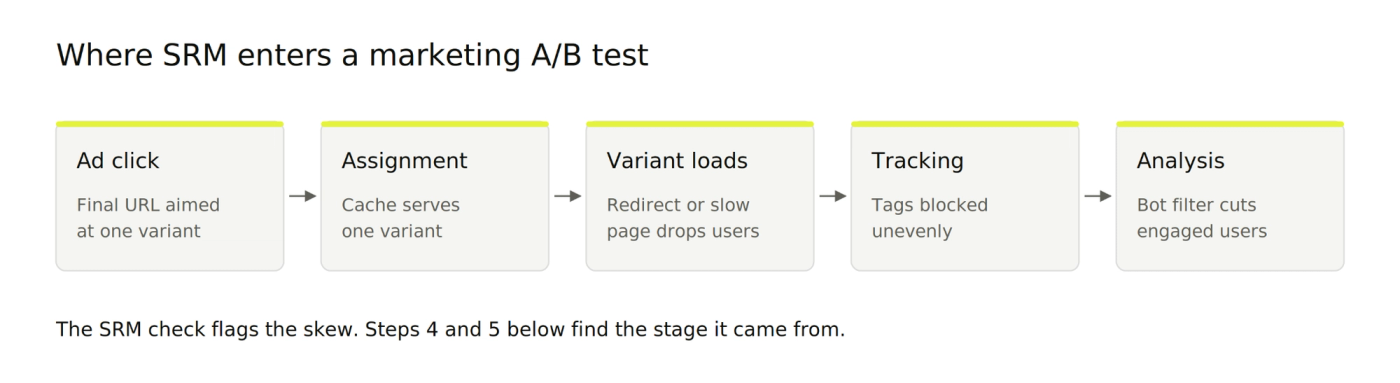
Checking for SRM takes seven steps: record the plan, collect the counts, test them, then locate and fix any cause. The first three take minutes and catch the problem. The last four find out why.
Step 1: Write Down the Configured Split and the Unit of Assignment
Start with what the test was supposed to do. If you're still choosing what to test, our guide on which to test first helps. Then note two things:
The configured split, such as 50/50, 80/20 or 33/33/33.
The unit of assignment, the thing the tool randomizes: visitors, sessions or page views.
Count every group in the same unit. Comparing visitors in control with sessions in the variant creates a false mismatch.
If your report only covers visitors who reached a certain page or event, note that too. The paper's first rule of thumb: if SRM appears in that filtered view but not across all visitors, the filter is likely the cause.
Step 2: Pull Visitor Counts per Variant From Two Sources
Take the visitor count per variant from your testing tool. Then pull the same counts from a second source, such as GA4 or your data warehouse.
Two sources tell you more than one:
Both show SRM: the problem sits in assignment or delivery.
Only one shows SRM: the problem sits in that source's tracking or processing.
The paper lists this comparison across pipelines as one of its ten diagnostic rules. If browser tags drop visits unevenly, our guide to server-side tracking covers the fix.
Step 3: Run a Chi-Square Goodness-of-Fit Test on the Counts
Run a chi-square goodness-of-fit test, which measures how surprising your observed split is, given the expected one. Here's a worked example for a 50/50 test with 20,000 visitors:
Group | Expected | Observed | (Observed − Expected)² ÷ Expected |
|---|---|---|---|
Control | 10,000 | 10,240 | 5.76 |
Variant | 10,000 | 9,760 | 5.76 |
Total | 20,000 | 20,000 | χ² = 11.52 |
With one degree of freedom, χ² = 11.52 gives p ≈ 0.0007. That's SRM, from a gap of just 1.2 points per group.
You can run it without the math:
In a spreadsheet: Excel's CHISQ.TEST function takes the observed and expected counts and returns the p-value.
In a calculator: paste the two counts and the configured split into an online SRM calculator.
Use these thresholds:
p below 0.001: treat it as SRM. GrowthBook and Kameleoon use this cut-off.
p between 0.001 and 0.01: possible imbalance. Statsig shows a warning here and rechecks the next day.
p above 0.01: no evidence of SRM.
The strict 0.001 line keeps false alarms rare, which matters when the check runs on every test.
Step 4: Break the Split Down by Day and by Segment
Recalculate the split for each day of the test, then for key segments. SRM that sits in one place points straight at the cause.
Check these cuts first:
Day: if the imbalance is strongest on day one, look at caching or a variant that launched late.
Device and browser: a variant that breaks on one browser loses those visitors.
Traffic source and campaign: one campaign sending far more people to one variant is a strong clue.
New and returning visitors: returning visitors may still hold an old assignment from an earlier test.
Kameleoon's documentation suggests exactly this: apply breakdown filters until one variable explains the imbalance. Our marketing analytics team builds these daily and segment views for client tests.
Step 5: Trace the Mismatch to Its Cause
Match what the data shows to a known cause. The paper lists 25 distinct causes across five stages, from assignment to analysis. These are the ones marketing tests hit most:
Cause | What the data shows | Marketing example | Fix |
|---|---|---|---|
Redirect test | Fewer visitors in the redirected variant | Split-URL test where the redirect fires before tracking | Redirect both variants, or test on one URL |
Campaign URL forcing a variant | Imbalance in one traffic source only | A search ad whose final URL points at the variant page | Point every ad at the control URL |
Slower variant | Fewer visitors in the variant, worst on mobile | Heavy hero video added to the variant only | Match load speed before relaunch |
Caching | Imbalance in time blocks | CDN serves one cached version for hours | Exclude test pages from caching |
Bot filtering after exposure | Variant loses its most active users | Engaged users flagged as bots | Classify bots at first exposure |
Mid-test changes | Imbalance starts on a specific date | Variant paused, edited or reweighted mid-test | Restart with fresh assignment |
Internal traffic | Small skew with outsized metric impact | Staff forced into the variant to preview it | Exclude internal IPs and preview links |
One of these comes straight from the research. At Microsoft, a search campaign with a misconfigured URL sent users directly to one variant.
DoorDash’s blog illustrates another risk with a hypothetical example: employees assigned to treatment make up about 1% of the sample and create an apparent 2% revenue lift.
Redirects deserve extra care. GrowthBook's redirect documentation says missed tracking calls are generally the largest contributor to SRM.
Speed matters for the same reason, and our guide to landing page alignment covers load-time fixes.
Step 6: Decide Whether to Rerun, Segment Out, or Discard the Test
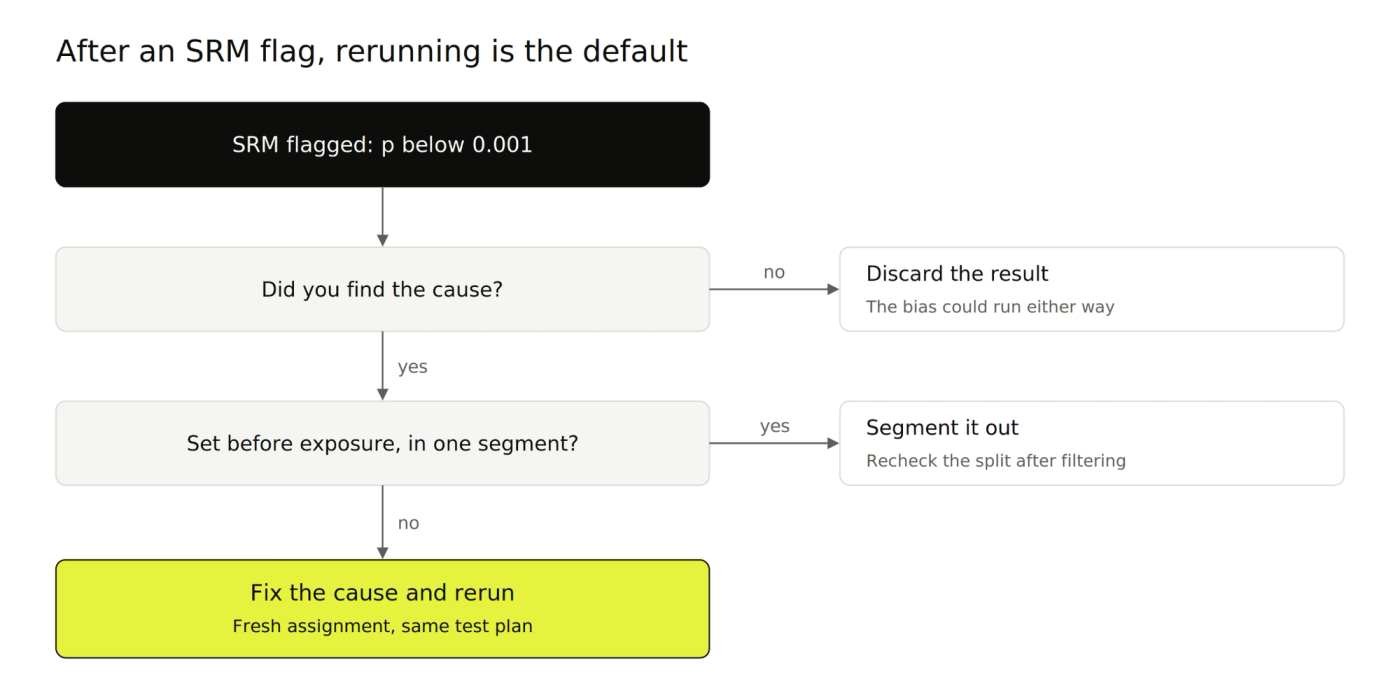
Default to fixing the cause and rerunning the test with fresh assignment. A clean rerun is slower, but it's the only result you can fully trust.
Two narrower options exist:
Segment out the affected visitors when the cause is isolated and was set before exposure, such as one browser version. Kameleoon allows this if the imbalance disappears after filtering. Microsoft did it for its misrouted search campaign.
Discard the test when you can't find the cause. Without it, you can't know which way the bias runs.
Avoid rescuing results with just math. The SRM Checker FAQ describes "extreme value bounds", but notes they are frequently too wide to support a decision.
Fix the cause before relaunching. DoorDash recommends restarting with reshuffled assignment after a mid-test bug fix, so both groups begin from the same point.
Step 7: Build the SRM Check Into Every Test From Launch
Make the SRM check part of every test, so problems surface in days and not after the test ends. Optimizely's own guidance argues the same: an end-of-test check comes too late and can miss imbalances that fade.
Add these to your test process:
Run an A/A test on a new setup. Two identical variants should split cleanly, and Microsoft found an assignment bug this way.
QA the launch: both variants redirect the same way, ad final URLs point at the control URL, and internal traffic is excluded.
Check the split daily for the first few days, using the Step 3 thresholds.
Log every root cause you find, so the next test avoids it. A documented creative testing system works the same way.
DoorDash's checks, alerts and team training led to a 70% drop in SRM incidents within six months.
Which A/B Testing Tools Check for Sample Ratio Mismatch Automatically?
Several major testing tools now run an SRM check for you. Defaults differ, so it's worth knowing what yours flags:
Tool | Automatic SRM check | Default threshold | Notes |
|---|---|---|---|
GrowthBook | Yes, every experiment | p < 0.001 | Threshold adjustable in experiment settings |
Kameleoon | Yes, in-app alert | p < 0.001 | Breakdown filters help locate the cause |
Statsig | Yes, "Exposures are balanced" health check | Warning at p 0.001 to 0.01, alert below 0.001 | Alert also needs a gap above 0.1% |
Optimizely | Yes, sequential check | Not published as a fixed p-value | Manual traffic split, 45 days or less, 1,000+ visitors |
Sources: GrowthBook docs, Kameleoon docs, Statsig docs and Optimizely docs.
Optimizely also skips the check on segmented results, and Statsig ignores tiny gaps in very large tests. Read each tool's rules before assuming you're covered.
If your tool has no built-in check, run Step 3 yourself at launch and then daily.
Get Test Results You Can Put Budget Behind
A 12% lift means nothing if the split broke on day one. Every landing page test 9AM runs for paid media starts with a launch QA and a daily SRM check. A broken test gets caught in its first few days, before the variant ships and before you allocate any resources based on its result.
Book a strategy call and we’ll audit your current testing setup: how traffic is split, how visits are tracked, and where a skew is most likely to creep in.
FAQs
Can you still use A/B test results that have a sample ratio mismatch?
Only when you've found the cause and can remove the affected visitors cleanly. Even then, a rerun is safer. Without a known cause, treat the result as unreliable.
How big a traffic difference counts as sample ratio mismatch?
A 50.5/49.5 split counts as SRM above roughly 108,000 visitors, yet it's normal at 10,000. The threshold moves with volume, so always run the chi-square test before judging by eye.
Can an A/A test have sample ratio mismatch?
Yes. Microsoft found SRM in an A/A test on MSN.com, caused by a bug in its assignment service. That's why an A/A test is a good first check for a new setup.
Do Bayesian A/B tests need a sample ratio mismatch check?
Yes. SRM is a data quality problem, and it biases Bayesian results the same way. Run the same chi-square check on the visitor counts.
Do Google Ads and Meta experiments need a sample ratio mismatch check?
They face a related problem. In ad platform A/B tests, delivery algorithms can show each variant to different audiences.
A Meta-backed study of 181,890 A/B tests found clear audience imbalance, while Lift tests showed none. Treat platform A/B results as ad performance comparisons, and use Lift tests for causal questions.
About Mustafa Alkhtab
Mustafa Alkhtab is Head of Performance Media at inBeat, where he oversees paid media and performance creative results across the agency's accounts. Before inBeat, he built growth programs for ecommerce, lead generation, and mobile app businesses in international markets. He writes about media buying, measurement, and conversion rate optimization.
More from Mustafa AlkhtabKeep exploring.

Insights
Marketing Data Warehouse: A Minimum Viable Setup for Paid Media, CRM, and Revenue Data
October 23, 2026

Insights
Customer Match in Google Ads: Customer Lists, Acquisition Exclusions, and Audience Hygiene
October 23, 2026

Insights
Lead Response Time: How to Connect Paid Leads to Sales Follow-Up
October 23, 2026