
Marketing Data Warehouse: A Minimum Viable Setup for Paid Media, CRM, and Revenue Data
The smallest marketing data warehouse that joins ad spend, CRM deals and revenue, plus how to build it step-by-step.

· 12 min read
The CFO asks which campaigns produced revenue last quarter. However, the spend sits in Google Ads and Meta, the deals sit in HubSpot or Salesforce, and nothing links the two.
A marketing data warehouse fixes that, and the first version can be small. This guide covers the minimum setup that answers revenue questions, and nothing more.
P.S. If you want this setup built for you, our marketing analytics team sets up this exact stack for paid media clients.
TL;DR
The minimum setup: three sources (ad spend, CRM, revenue), one join key, five tables and three reports.
Why now: Meta now keeps some API breakdowns for only 13 or 6 months. History you don't store is gone.
The join key: click IDs and UTMs captured on every lead and saved in the CRM.
The warehouse: use the one your company already pays for. BigQuery is the cheapest start for Google-heavy stacks.
The payoff: CAC by channel, revenue per dollar by campaign, and the lag between lead and revenue.
Budget decisions should follow revenue the business can see. Do not follow only the conversions each platform reports about itself. A warehouse is how you put both on one table.
Everything below is the smallest version that does that job.
What Is a Marketing Data Warehouse?
A marketing data warehouse is a database that stores ad spend, CRM and revenue data side by side, so you can join them and answer questions no single platform can. It's usually a cloud warehouse such as BigQuery or Snowflake, used for marketing data.
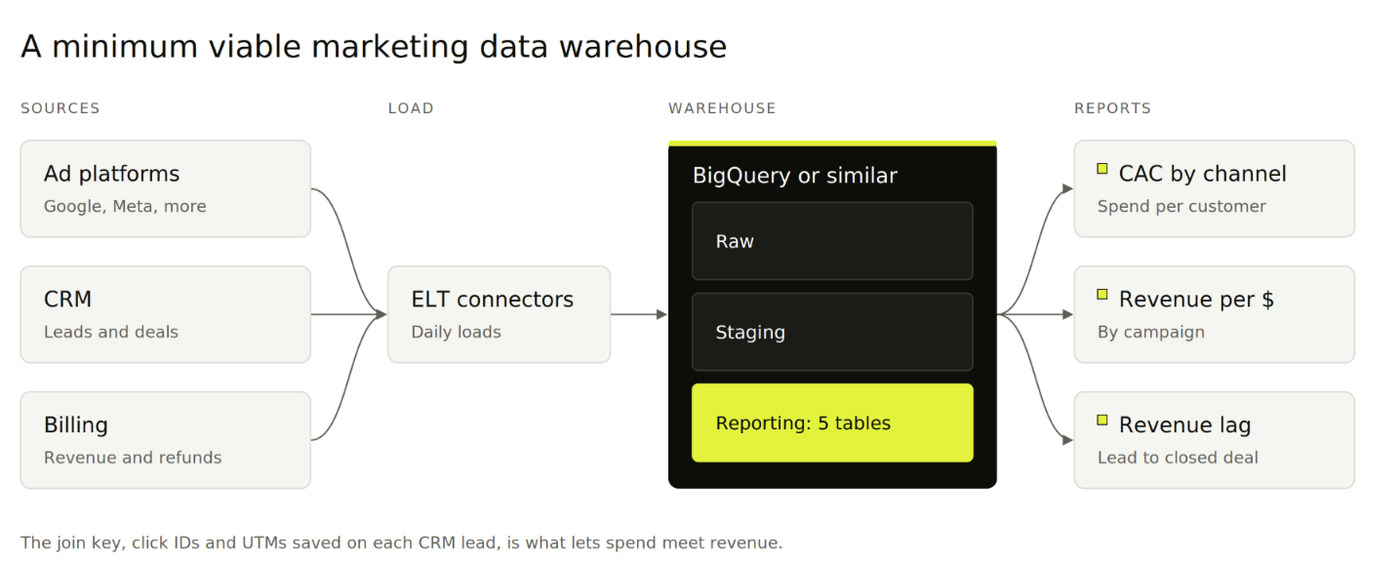
The minimum viable version has four parts:
Three sources: daily ad spend, CRM leads and deals, and closed revenue.
One join key: the click ID or campaign ID that travels from the ad to the lead record.
Five tables: one for campaigns, four for spend, leads, deals and revenue.
Three reports: the numbers your budget decisions actually need.
Data moves in with ELT: you extract it from each platform, load it raw, then transform it inside the warehouse. That order keeps the raw history safe if a definition changes later.
Data Warehouse vs Data Lake vs Database vs Data Mart for Marketing
These four terms get used interchangeably, but each does a different job. For marketing, the difference comes down to what's stored and who queries it.
Type | What it stores | Marketing example | Use it for |
|---|---|---|---|
Data warehouse | Structured data from many sources | Ad spend, CRM deals and revenue in BigQuery | Cross-channel reporting and analysis |
Data lake | Raw files in any format | Exported logs, images, JSON from APIs | Storage and data science work |
Database | Live records for one application | Your CRM's contact and deal records | Running the application day to day |
Data mart | A department's slice of a warehouse | A marketing schema inside the company warehouse | Giving one team its own tables |
In practice, your CRM is a database, and it's one of the sources you load. If finance already runs a company warehouse, your "marketing data warehouse" will usually be a data mart inside it.
Why Paid Media Teams Need One Now
Paid media teams need a warehouse now because ad platforms keep less history, and they never see the revenue your CRM records. Three changes make the case:
Platforms are shortening history. From January 12, 2026, Meta's Ads Insights API limits unique-count and hourly breakdowns to 13 months and frequency breakdowns to 6 months. Totals stay available for 37 months, per Meta's developer blog.
Exports have caps. Standard GA4 properties can send up to 1 million events a day in the daily BigQuery export.
Revenue lives outside the ad platforms. Ad platforms report conversions they observed. Closed deals and refunds sit in your CRM and billing system.
A warehouse gives you three benefits in return:
History you own, stored before the platforms drop it.
A single source of truth, so "CAC" means the same thing in every report.
Spend joined to revenue, the basis for blended and paid CAC.
The entry cost is low. BigQuery's first 10 GiB of storage and first 1 TiB of queries each month are free, per its pricing page.
Do You Need a Marketing Data Warehouse Yet?
You need one when all four of these are true:
You spend on two or more ad platforms.
Your CRM or billing system records revenue per customer.
You have a budget question your dashboards can't answer, such as which campaigns produce closed revenue.
Someone will own it, with basic SQL skills and a few hours a month.
Wait if you run one channel, have no revenue in the CRM, or have no owner. A warehouse nobody maintains drifts out of date within weeks.
Know the limits before you start:
SQL is required. Most warehouses expect queries, so someone has to write and maintain them.
Connectors need upkeep. Platform APIs change, and tokens expire. BigQuery's Facebook Ads connector, for example, uses an access token that expires after 60 days unless you set up a system user token.
A warehouse doesn't act on data. Sending audiences back to ad platforms needs extra tooling.
If your current reporting already leans on last-click numbers, our piece on the last-click attribution problem explains what a warehouse lets you replace.
Which Data Warehouse Should Marketing Teams Use?
Use the warehouse your company already pays for. If there isn't one, BigQuery is the cheapest start for teams that run mostly Google Ads and GA4.
Warehouse | Best fit | Native marketing connectors | Pricing model |
|---|---|---|---|
Google BigQuery | Google Ads and GA4-heavy teams | Free Google Ads transfer, GA4 export, paid Facebook Ads transfer | Per TiB queried or per slot-hour, plus storage |
Snowflake | Companies with a Snowflake contract already | Third-party connectors | Credits for compute, storage billed separately |
Amazon Redshift | AWS-based companies | Third-party connectors | Provisioned nodes or Serverless capacity |
Databricks | Teams with data science work | Third-party connectors | Databricks Units (DBUs) plus cloud costs |
Sources: BigQuery pricing (linked above), Snowflake cost docs, Redshift pricing and Databricks pricing.
Azure Synapse Analytics follows the same logic for Microsoft-based companies. All of them handle marketing-sized data comfortably.
The deciding factors are the contract you already have and who on your team writes SQL.
How to Build a Minimum Viable Marketing Data Warehouse Step by Step
Building the minimum version takes eight steps: scope it, set it up, load the data, connect it, then report and check it. Most of the effort sits in Steps 4 and 6, where spend gets tied to revenue.
Step 1: Choose the Budget Decisions the Warehouse Must Support
Start with decisions. List the two or three budget calls you'll make from the warehouse:
Shifting budget between channels, which needs spend and revenue by channel.
Cutting or scaling campaigns, which needs spend and revenue by campaign.
Timing spend against the sales cycle, which needs lead and close dates.
Anything that doesn't feed one of these decisions waits for version two. If month-end budget swings are a pain point, pair this with our guide to marketing budget pacing.
Step 2: Create the Project, Datasets, and Access Roles
Set up three datasets so raw data stays separate from finished tables:
Raw: data exactly as each connector loads it. Nobody edits it.
Staging: cleaned and renamed versions of the raw tables.
Reporting: the five core tables and anything a dashboard reads.
Give analysts write access to staging and reporting only. Give everyone else read access to reporting. BigQuery also offers a sandbox you can try without a credit card.
Step 3: Load Daily Ad Spend From Every Platform
Load spend at campaign-by-day level from every platform you buy media on. That grain is small, cheap to store, and enough for budget decisions.
Google Ads: use the BigQuery Data Transfer Service. Google doesn't charge for running transfers from its own sources, and the Google Ads transfer runs daily with a default refresh window of 7 days.
Meta: BigQuery has a Facebook Ads transfer billed per slot-hour, or use a third-party connector.
LinkedIn, TikTok and others: use a third-party connector such as Fivetran or Airbyte.
Backfill as much history as each platform allows on day one. For Meta, pull unique-count and frequency breakdowns first, since those now expire soonest.
Step 4: Capture Click IDs and UTMs on Every Lead
Capture the click ID and UTM parameters on every form, then save them on the CRM contact. This is the join key that ties spend to revenue.
Add hidden form fields for GCLID, FBCLID and the five UTM parameters.
Fill them from the landing page URL with a small script, and keep them in a first-party cookie for return visits. Google's GCLID guide shows the pattern.
Map each field to a custom property on the CRM contact or lead.
Put the platform campaign ID in utm_campaign, using Google's ValueTrack parameters. Names change, IDs don't.
Meta adds an fbclid parameter to ad clicks, as its Conversions API docs explain. Browser restrictions can strip these values, so our guide to server-side tracking covers how to keep capture rates up.
Step 5: Load CRM Leads, Deals, and Revenue
Load three objects from the CRM, with their timestamps:
Contacts or leads, with the click IDs and UTMs from Step 4 and a created date.
Deals or opportunities, with the lead they came from, each stage date and the close date.
Revenue, from closed-won deals, or from billing or ecommerce data if the CRM doesn't hold final amounts.
Keep refunds and cancellations. Revenue that gets reversed shouldn't count toward a campaign's return.
Step 6: Model Five Core Fact and Dimension Tables
Turn the raw loads into five tables in the reporting dataset: one dimension table that describes campaigns, and four fact tables that record events.
Each table has one job:
dim_campaign: one row per campaign, with platform, channel and the campaign ID.
fct_ad_spend_daily: spend, clicks and impressions per campaign per day.
fct_leads: one row per lead, with click IDs, UTMs and the campaign ID they map to.
fct_deals: one row per deal, linked to its lead, with stage and close dates.
fct_revenue: one row per payment or closed deal amount, net of refunds.
Write the transformations as SQL views or scheduled queries. A tool like dbt helps once you have more than a handful of models.
Step 7: Build Three Reports on Top of the Tables
Build three reports, each tied to a decision from Step 1:
CAC by channel: spend divided by new customers, per channel per month.
Revenue per dollar by campaign: closed revenue divided by spend, per campaign.
Lead-to-revenue lag: median days from lead created to deal closed, per channel.
Looker Studio connects to BigQuery at no extra license cost and handles all three. The third report also tells you how long to wait before judging a new campaign.
Once these work, an attribution model audit is the natural next step for testing how credit gets split across channels.
Step 8: Add Data Checks and Name an Owner
Add four checks that run daily, and name one person who fixes them:
Spend reconciliation: warehouse spend should match each platform's reported spend for the same days.
Click ID fill rate: the share of paid leads with a GCLID, FBCLID or UTM. A drop means a form broke.
Freshness: every table should have yesterday's data by mid-morning.
Row counts: sudden drops or spikes usually mean a connector failed or duplicated a day.
Without an owner, the checks fire and nobody acts. Our growth strategy team can own this layer for you if nobody in-house has the time.
What a Minimum Viable Marketing Data Warehouse Costs
A minimum setup on BigQuery can cost little or nothing for a small team. Costs grow with data volume, query habits and paid connectors.
Component | Free option | When you start paying | Pricing note |
|---|---|---|---|
Storage | First 10 GiB a month in BigQuery | Above 10 GiB | Active logical storage runs about $23.55 per TiB a month |
Queries | First 1 TiB a month in BigQuery | Above 1 TiB | $6.25 per TiB on demand |
Google Ads load | BigQuery Data Transfer Service | Never for orchestration | Loading is free; merges use standard query rates |
Meta, LinkedIn, TikTok load | None reliable at no cost | From the first connector | BigQuery's Facebook Ads transfer bills per slot-hour; vendors vary |
Reporting | Looker Studio | Rarely for a minimum setup | Paid BI tools add per-seat costs |
Source: BigQuery's pricing page for us-central1, checked October 2026. Third-party connector pricing varies by vendor and data volume, so quote it directly before you commit.
The largest cost is usually people, not software. Plan for setup time and a few hours a month of upkeep.
Build Your Marketing Data Warehouse With 9AM
A warehouse earns its keep when budget decisions start following closed revenue. At 9AM, we connect paid media, CRM and revenue data so every media buying decision can be checked against what the business actually earned.
That way, you know which campaigns pay back and how long they take to do it. Book a strategy call and we'll map the minimum setup for your stack.
FAQs
Is a marketing data warehouse the same as a CDP?
No. A warehouse stores data for analysis and reporting. A customer data platform builds live customer profiles and sends audiences to marketing tools. Many teams use both, with the warehouse as the reporting source.
What is the difference between ETL and ELT for marketing data?
ETL transforms data before loading it. ELT loads raw data first and transforms it inside the warehouse. ELT suits marketing data better, because raw history stays intact when a metric definition changes.
Can you use Google Sheets as a marketing data warehouse?
Only at very small scale. Sheets work for a few months of campaign-level spend from one or two platforms. Once you join CRM deals and revenue, row limits and manual exports make it fragile.
Do you need dbt to model marketing data?
No. Scheduled SQL queries or views cover the five tables in this guide. dbt adds testing, documentation and version control, which helps once your models grow past a handful.
What happens to Meta data older than 37 months?
Meta's API stops returning it. From January 2026, totals stay available for 37 months, while unique-count and hourly breakdowns stop at 13 months and frequency at 6 months. Store it in your warehouse before it ages out.
About Mustafa Alkhtab
Mustafa Alkhtab is Head of Performance Media at inBeat, where he oversees paid media and performance creative results across the agency's accounts. Before inBeat, he built growth programs for ecommerce, lead generation, and mobile app businesses in international markets. He writes about media buying, measurement, and conversion rate optimization.
More from Mustafa AlkhtabKeep exploring.
Insights
Sample Ratio Mismatch: The Quality Check to Run Before Trusting an A/B Test
October 23, 2026
Insights
Customer Match in Google Ads: Customer Lists, Acquisition Exclusions, and Audience Hygiene
October 23, 2026
Insights
Lead Response Time: How to Connect Paid Leads to Sales Follow-Up
October 23, 2026