Healthcare Landing Pages: What Patients Need to Know Before They Book
Build healthcare landing pages that answer availability, cost, clinician and next-step questions before the booking form, with telehealth examples and a checklist.

· 19 min read
Paid search and paid social can send a healthcare brand thousands of clicks that never become appointments.
That’s because landing pages, in many cases, leave people unsure whether care is available in their state, what it costs, or what happens after the Book.
Besides, booking friction is a choice-shaping factor.
In Press Ganey's 2025 consumer research, 80% of consumers said online scheduling influences which provider they choose, and 24% look elsewhere when booking feels harder than reserving a dinner table.
This guide covers what a healthcare landing page needs before the booking form, with telehealth examples and a pre-launch checklist.
P.S. Want paid search and booking pages planned together around appointments? Our healthcare PPC team builds both and keeps improving them with you. Book a strategy call.
We treat the ad, the landing page and the measurement as one system. Patient questions from ad comments, support tickets and intake calls shape the creative brief and the page copy together. Media buying then shows which answer earns the booking, and that result feeds the next brief.
What Is a Healthcare Landing Page?
A healthcare landing page is a post-click page built for one service, one audience and one booking action. That action might be booking a visit, checking insurance coverage or calling an intake team. People also call it a medical landing page. It exists to turn an ad click into a scheduled appointment.
It differs from a homepage or a service page in scope. A homepage serves every visitor, and a service page explains everything a provider offers. A landing page answers only the questions a patient has about one offer, in the order they come up.
Healthcare adds requirements most other categories don't carry:
Eligibility: care may be limited by state licensure, age, condition or payer.
Cost: in many cases, the price depends on the patient's insurance plan.
Claims: clinical statements need review before they appear in ads or on pages.
Privacy: forms and tracking tags can expose health information.
Speed, message scent and social proof matter here as on any page, and the landing page alignment guide covers them. This article covers the information patients need before they book.
Why Healthcare Landing Pages Lose Bookings Before the Form
Healthcare landing pages lose bookings when a visitor reaches the form with an unanswered question about access, cost, the clinician or the next step. Each open question is a reason to leave and compare another provider.
Patients arrive with four questions:
Can I get care here? The service, location and eligibility rules have to fit.
What will it cost me? Coverage and out-of-pocket price decide many bookings.
Who will treat me? Credentials and fit matter more in care than in retail.
What happens after I click? Unclear next steps feel risky when health is involved.
Survey data puts weight behind each one.
In Kyruus Health's 2024 survey of 1,000 consumers, 84% called out-of-pocket costs extremely or very important when choosing a new provider. In the same survey, 93% wanted to confirm insurance coverage online, and 47% had skipped or delayed care in the past year.
The ad usually raises these questions first.
Mental health and telehealth ads often lead with affordability, insurance coverage or how to get started. When an ad leads with "covered by insurance," the page has to carry that answer through to the form.
Key Elements of a Healthcare Landing Page
The key elements of a healthcare landing page are the parts that answer a patient's booking questions before the form. Each one below has its own step in the build guide that follows.
Matching headline and one CTA: the H1 repeats the ad's promise, and one button names the action, such as "Check my coverage."
Availability and eligibility: the service area, who the service is for and the time to a first appointment.
Cost and coverage: accepted payers, a typical cost with insurance and the self-pay price.
Clinician information: credentials, state licensing and how matching works.
Checkable proof: reviews and outcome claims with their source, period and population.
Next steps: a short numbered sequence from the first click to the first appointment.
On-page FAQ: answers to the questions the sections above leave open.
Short booking path: a form limited to what scheduling needs, plus a staffed phone option.
Crisis resources on mental health pages: 988 and 911, shown where a visitor in urgent need can find them.
How to Build a Healthcare Landing Page That Answers Booking Questions, Step by Step
Build the page in the order a patient decides: fit, cost, clinician, proof, next step, remaining doubts, form, then measurement. Each step below answers one of the four booking questions or protects the booking once it starts.
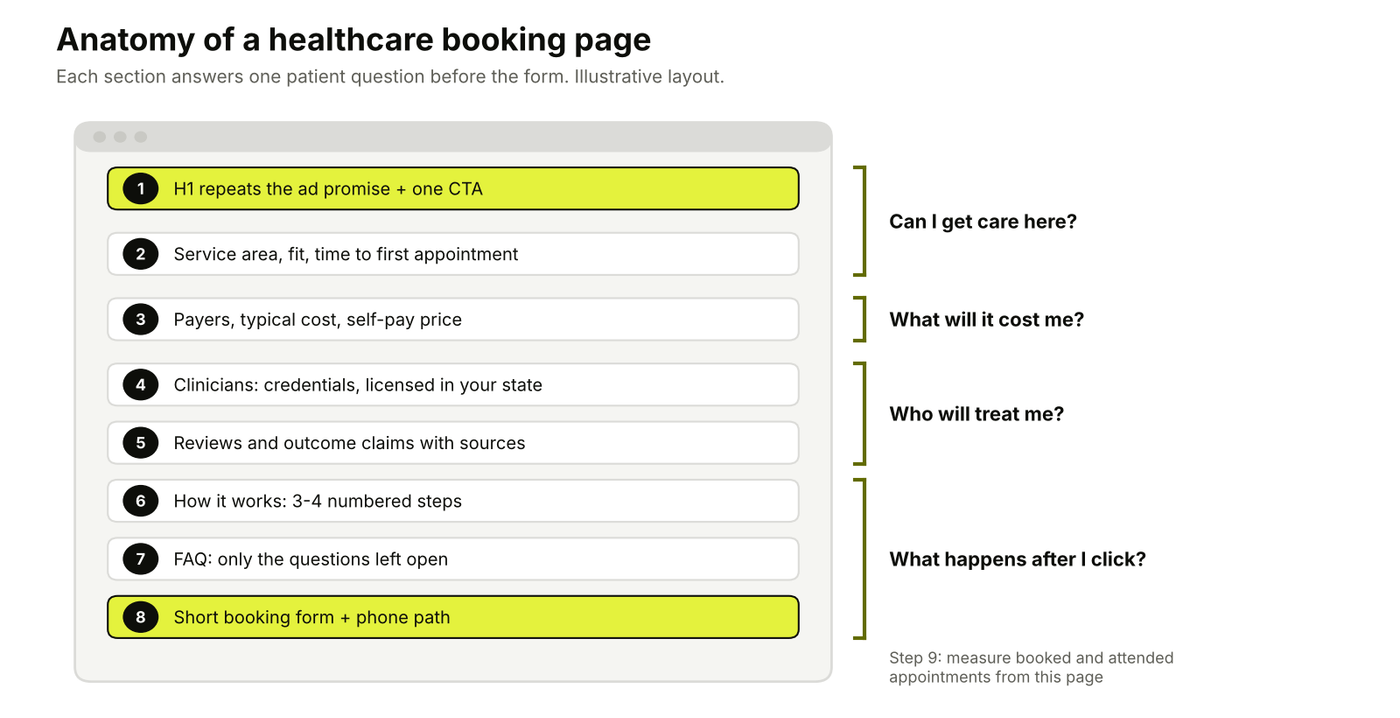
Each section of the page answers one patient question before the form. Illustrative layout by 9AM.
Step 1: Match the Page to One Service, One Audience, and One Booking Action
Send each ad group to a page about the one service that ad promotes. A visitor who clicked "online therapy covered by Aetna" should land on a page whose headline repeats that promise, with one primary action.
Build a separate page when any of the four answers changes. A new state, specialty, payer or patient age group usually means a new page or a page variant.
Ad promise | Landing page H1 | Primary CTA |
|---|---|---|
Online therapy covered by Aetna | Online therapy with Aetna coverage, starting this week | Check my coverage |
Psychiatry appointments in Texas | Psychiatric care for Texas adults, by video | See available times |
Self-pay therapy at one flat session price | Therapy at one flat price, no insurance needed | Book a first session |
Rows are illustrative examples.
Step 2: State Service Availability and Eligibility Above the Fold
State where care is available and who it is for in the first screen. For telehealth, care is generally delivered where the patient is located, so providers need to verify patient location and hold the right licence, registration or compact privileges for that state.
Put these facts above the fold:
Service area: the states or cities you serve, or a location selector.
Service type: therapy, psychiatry, primary care or a named program.
Fit: the ages and needs you treat, plus the needs you refer elsewhere.
Availability: a time to first appointment you can support with scheduling data.
Grow Therapy's homepage shows the shape of a supportable claim: it says most clients start within 2 days. Give one person ownership of availability copy, so the page changes when clinician supply does.
Step 3: Explain Cost and Insurance Coverage Before the Booking Form
Show the cost answer before the form, because price uncertainty suppresses scheduling.
In three online experiments published in Psychology & Marketing in October 2026, adults told an endoscopy would cost them $787 rated their likelihood of scheduling at 2.87 out of 7, against 4.26 when it cost nothing.
The scenarios were hypothetical, but the direction is clear.
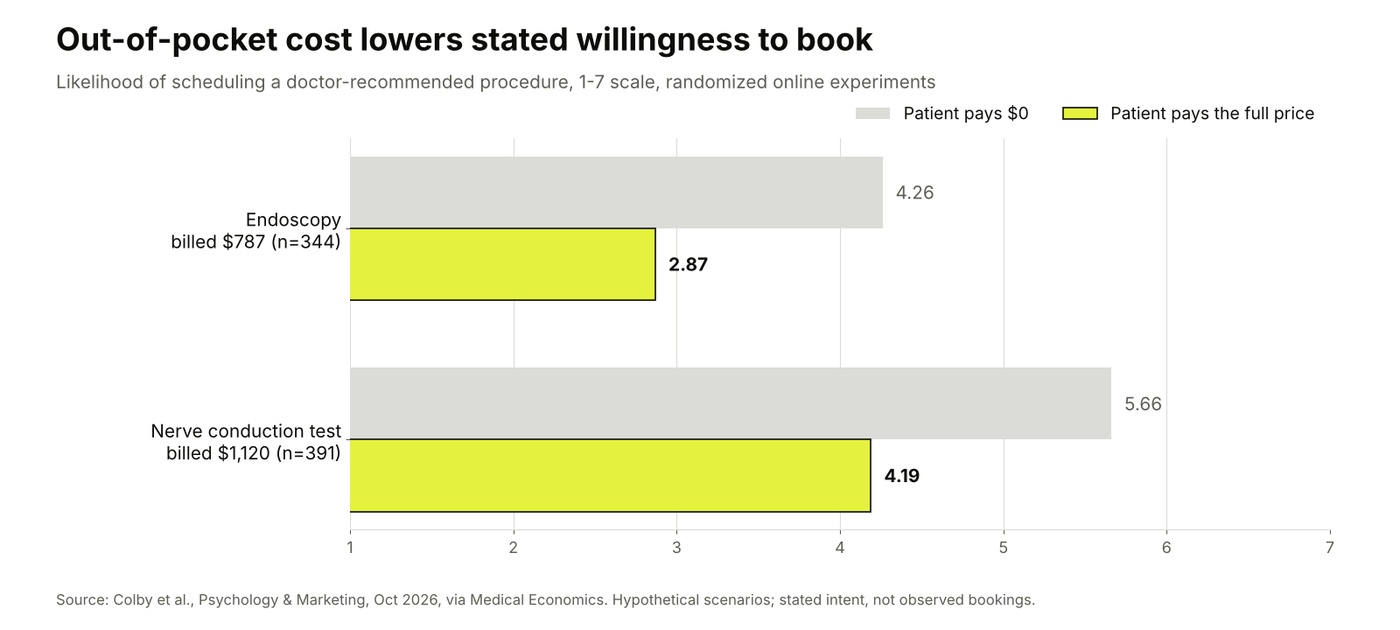
Stated likelihood of scheduling fell in both experiments when patients faced the full price. Source: Psychology & Marketing, October 2026, via Medical Economics.
Cover four cost facts:
Insurance accepted: a list of payers or a coverage check tool.
Typical cost with insurance: a range or average, with the plan-variation caveat. Grow Therapy states sessions average $21 with insurance and notes that costs vary by plan.
Self-pay price: Talkspace, for example, lists out-of-pocket plans from $69 per week.
Billing timing: when the patient pays. Grow's insurance FAQ explains that insured clients are charged 3-4 weeks after the appointment.
Self-pay patients have one more right to surface.
Under the No Surprises Act, uninsured or self-pay patients who schedule at least 3 business days ahead should receive a good faith estimate of expected charges.
Payment situation | What to show | Wording to avoid |
|---|---|---|
In-network insurance | Payers accepted, coverage check, typical copay range | "Free with insurance" when deductibles apply |
Out-of-network insurance | Self-pay rate, superbill option, reimbursement steps | "We work with all insurance" |
Self-pay | Price per session or plan, good faith estimate notice | Prices that appear only after sign-up |
Employer or EAP benefit | How to check eligibility, sessions included | Unqualified "no cost" claims |
Step 4: Introduce the Clinicians and the Care Model
Show who will treat the patient and how they are matched. Patients look for this: in Kyruus Health's 2024 survey, 70% of Millennials wished for detailed provider profiles with photos, videos and care philosophy.
Include:
Credentials and licences: degree, licence type and a "licensed in your state" statement.
Specialties: the conditions and populations clinicians focus on.
Matching: how a clinician is chosen, and whether the patient can choose.
Switching: whether changing clinicians is possible and what it costs. Talkspace states patients can switch providers at no cost.
Use real clinician photos where clinicians consent, and have clinical leads approve every statement about treatment. Our healthcare PPC compliance questions list who should review ad copy and landing pages, and how fast.
Step 5: Show Patient Reviews and Outcome Claims Patients Can Verify
Place reviews and outcome claims near the booking button, with their source stated. In a December 2024 rater8 survey of 1,008 US adults, 84% of patients checked online reviews before choosing a new provider, and 51% read at least six.
Make every proof point checkable:
Review ratings: name the platform and the number of reviews.
Outcome statistics: state the measure, the period and the population. Grow Therapy labels its outcome data as client-reported PHQ-9, GAD-7 and survey data from 2026, with "results may vary."
Testimonials: use only real patient statements with written permission.
The FTC's rule on consumer reviews and testimonials has been in effect since October 21, 2024. It treats reviews featured in your advertising as testimonials, so the business is responsible for their truthfulness.
Step 6: Show the Steps After the Booking Click
Show the booking journey as a short numbered sequence. Grow Therapy uses three steps: tell us what you need, choose your therapist, book and begin. Talkspace uses four: check eligibility, get matched, start therapy, switch providers any time.
Each step should answer what happens, how long it takes and what the patient needs:
The first action: a coverage check, an assessment or choosing a time.
The confirmation: how and when the patient hears back.
The first appointment: format, length and what to prepare.
The terms: cancellation and rescheduling rules.
If your team wants this sequence planned with the ads that feed it, our growth strategy service maps the full path from click to first visit.
Step 7: Answer Remaining Booking Questions in an On-Page FAQ
Close the page with an FAQ that covers only what the sections above leave open. Grow Therapy, Talkspace and Brightside all end their homepages with one, covering cost, therapist fit and how care works.
Source the questions from evidence:
Scheduling and intake call notes
Support tickets from new patients
Comments on your ads
Search terms that trigger your campaigns
Keep answers to two or three sentences, and send detail to dedicated help pages.
Step 8: Limit Booking Form Fields and Tracking Tags to the Next Step
Ask only for what the scheduler needs to book the first appointment. Insurance details belong at the coverage check, and clinical history belongs in intake after booking.
The tracking question carries legal weight. HHS guidance says tracking technologies on an unauthenticated scheduling page can access protected health information when a visitor types an email address or a reason for seeking care. The same bulletin states that cookie banners don't count as a valid HIPAA authorization. A June 2024 court order vacated part of that guidance, so have privacy counsel review your setup.
Ad platforms add their own limits. Meta can assign a health and wellness category to telemedicine sites and patient portals, which brings data-sharing restrictions. Our guide to HIPAA-compliant marketing covers the tracking architecture.
Keep a phone path for patients who prefer to talk:
Show staffed hours next to the number.
Offer tap-to-call on mobile.
Test the booking widget on a phone before launch.
Step 9: Measure Booked and Attended Appointments
Measure the page on booked and attended appointments, since form submissions overstate success. Each event later in this list sits closer to revenue. Track four events in order:
Coverage check or assessment started
Booking started
Appointment booked
First appointment attended
The last two usually live in your scheduling system. Connect them to campaign data inside an approved reporting environment, then compare spend, bookings and attended visits by campaign.
Sending outcomes back to ad platforms is a separate decision: standard offline conversion imports use individual conversion records, so have privacy counsel approve the data flow and confirm that the platform permits it.
If an import isn't permitted, use the internal report to guide budget decisions.
The last two usually live in your scheduling system, so send them back to ad platforms in aggregate through offline conversion tracking, with privacy review on every field you share.
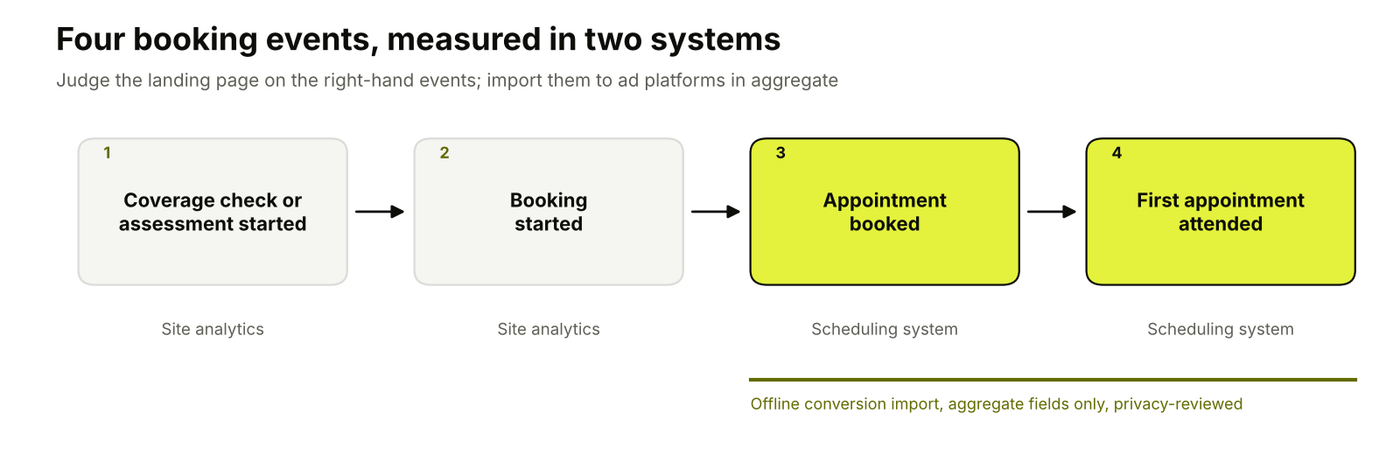
Booked and attended appointments live in the scheduling system, so they reach ad platforms through an aggregate offline import. Diagram by 9AM.
Read the results by ad group, because each ad group sends a different promise to the page. Wait until most bookings from a test period have reached their appointment date before judging attended visits, since first appointments can sit days or weeks after the booking.
Test one booking question at a time. Change the cost section or the availability statement, measure booked appointments for each variant, and keep the winner. Pages with low traffic need longer tests, so plan the test length from your weekly booking volume before you start.
Pro tip: run the page test after an ad test settles which promise wins. A winning ad tells you which question the page has to answer first, and our guide on whether to run a landing page test or ad test explains the order.
Healthcare Landing Page Best Practices
Healthcare landing page best practices cover how the page is built and maintained: mobile layout, CTA wording, reading level, accessibility, speed and the tools you use to study visitors. They apply on top of the nine steps above.
Design for Mobile First
Design the page for a phone screen first, because many patients compare providers on their phones between other tasks. A visitor should be able to see the cost answer, the availability statement and the booking button without hunting for them.
Keep the primary CTA visible as a sticky button on small screens.
Offer tap-to-call for the intake line, with staffed hours next to it.
Stack the cost and availability blocks so each fits on one screen.
Use One Specific Call to Action
Give the page one primary action and name it in the button. "Check my coverage," "See available times" and "Book a first session" each tell the visitor what happens next, which "Submit" and "Learn more" can't.
A phone number or a link to the FAQ can sit beside the main button. Keep them visually lighter, so the page still has one obvious next step.
Write in Plain Language
Write the way a patient would describe their situation, and keep clinical terms for the places they're needed. Short sentences, common words and defined terms help visitors who are anxious, tired or reading in a second language.
The CDC's Clear Communication Index gives a scored checklist for health materials, and it works well as a pre-launch review of page copy.
Meet Web Accessibility Standards
Build the page to WCAG 2.1 Level AA. HHS's Section 504 rule requires recipients of HHS funding to make their web content and mobile apps conform to that standard, and in May 2026 HHS extended the compliance dates, with larger recipients now due by May 11, 2027.
HHS uses booking as an example of the problem: scheduling websites that don't work with screen readers or require a mouse to select options. Before launch, check that:
The booking widget works with just a keyboard and with a screen reader.
Videos have captions.
Text and buttons pass color contrast checks.
Keep the Page Fast
Keep load time low, especially on mobile connections. Google's Core Web Vitals set the thresholds most teams use: Largest Contentful Paint within 2.5 seconds, Interaction to Next Paint within 200 milliseconds and Cumulative Layout Shift below 0.1.
Booking widgets, chat tools and video embeds usually add the most weight, so test the page with all of them loaded.
Review Visitor Behavior With Privacy-Safe Tools
Use heatmaps, scroll depth and click data to see where visitors stop, then test a fix for that section. In healthcare, review every tool before it goes on a booking page, because HHS guidance lists session replay scripts among the tracking technologies that can collect health information.
Mask form fields and leave booking steps out of recordings unless privacy counsel has approved the setup.
Healthcare Landing Page Examples From Telehealth and Mental Health Brands
Grow Therapy, Talkspace and Brightside are telehealth mental health brands whose homepages answer the four booking questions in different ways. We reviewed each page in November 2026. They are homepages that serve every visitor, so each review ends with what a dedicated paid landing page could tighten.
1. Grow Therapy
Grow Therapy's homepage leads with cost and speed, two of the questions that affordability-focused therapy ads raise.
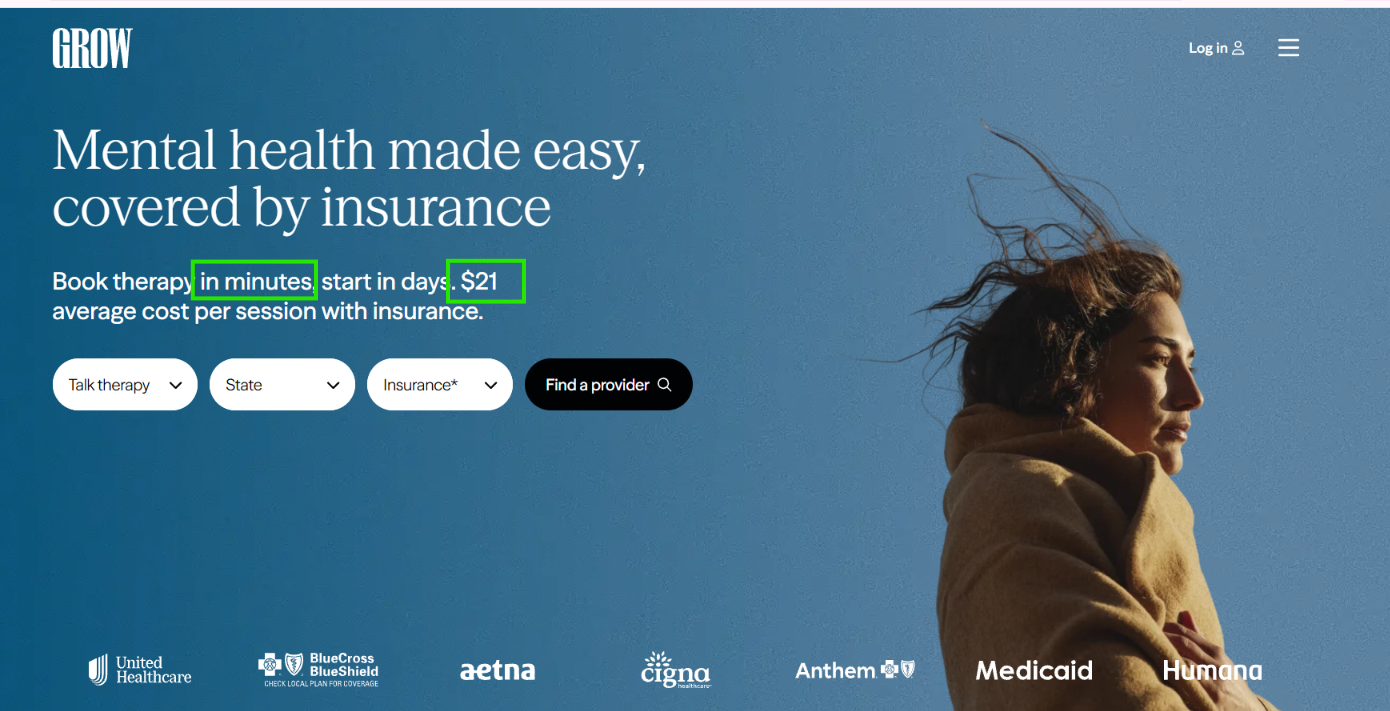
What works well
The page states that sessions average $21 with insurance and offers a cost estimate tool, so an insured visitor gets a number before booking. The availability claim is specific: most clients start within 2 days.
The next steps fit in three short stages: tell us what you need, choose your therapist, book and begin. Outcome data is labeled as client-reported, with "results may vary," which makes the proof checkable.
What could be improved
An average cost covers many plans. A paid page for one payer or state could show that plan's typical copay and the list of accepted plans, so a visitor who clicked an Aetna ad learns whether Aetna applies without running the estimate tool.
2. Talkspace
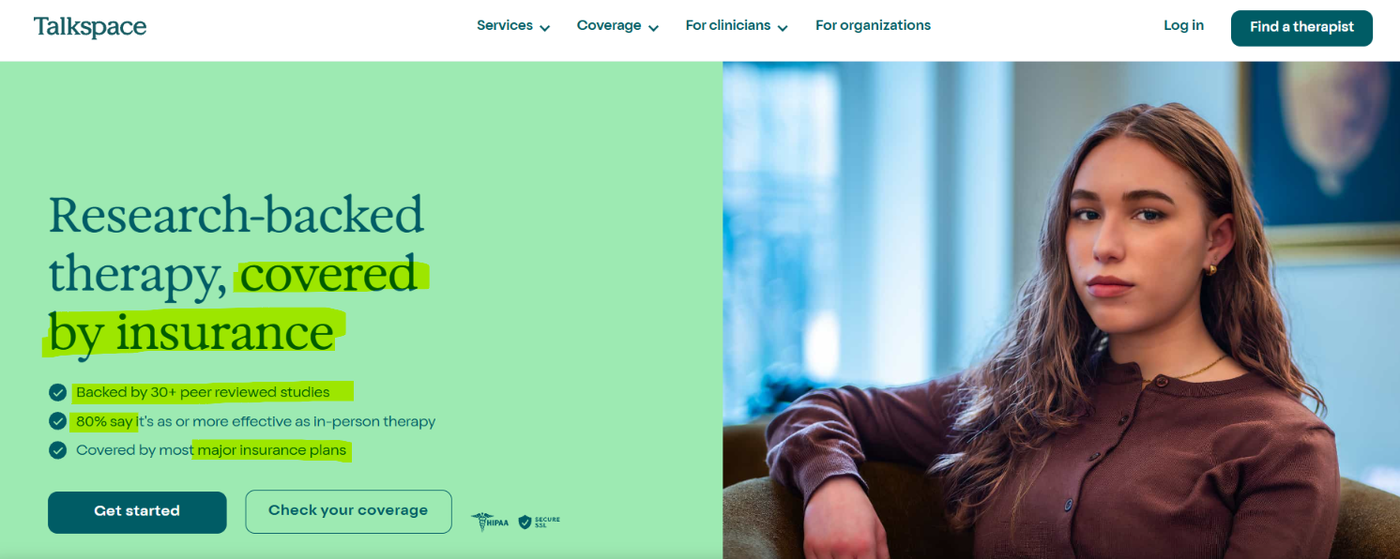
Talkspace puts insurance first, with a coverage check as its main action. It also features proof.
What works well
The Talkspace homepage names insurers, states that most insured members have a $0 copay and lists a self-pay option from $69 per week. Insured, out-of-network and self-pay visitors each find their answer on the same page.
Its four-step sequence ends with switching providers at no cost, which answers the question of what happens if the first match isn't right.
What could be improved
The $0 copay claim depends on the plan, so plan-level copay ranges or a note on deductibles would keep it accurate for visitors whose plans don't qualify. The page also says a patient can match with a therapist as soon as today. A paid page should tie that claim to current scheduling data.
3. Brightside
Brightside offers both therapy and psychiatry, and its homepage is the most explicit of the three about who the service doesn't suit.
What works well
The Brightside homepage lists conditions online care doesn't fit, such as psychosis and medically unstable eating disorders, and points those patients to in-person care. That protects patients and keeps unsuitable bookings out of the schedule.
It also states first-session lengths (30 minutes for a first therapy appointment and 55 minutes for follow-ups), says providers are licensed in the patient's state and accepts most major insurance, including Medicare and Medicaid. Its FAQ shows the 988 Suicide and Crisis Lifeline and 911, so a visitor who needs urgent help is routed away from the scheduling flow.
What could be improved
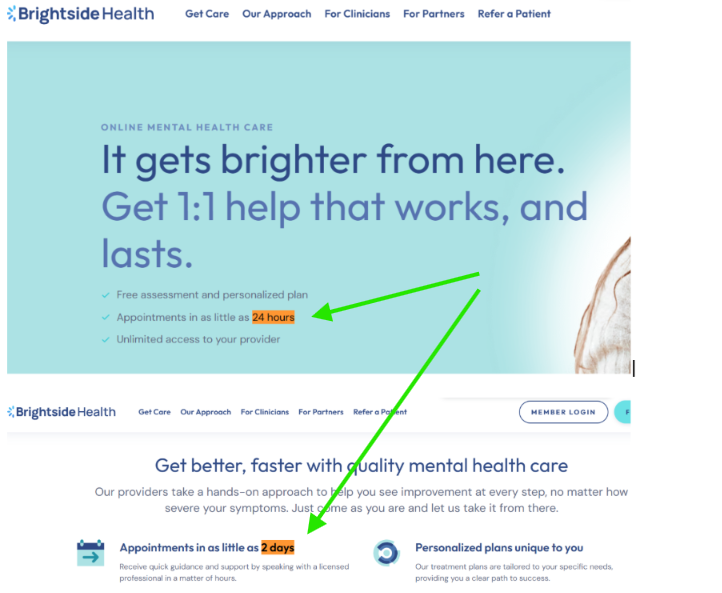
The page makes two availability claims: "as little as 24 hours" in the hero and "as little as 2 days" lower down. A paid landing page should carry one claim, set from scheduling data and owned by one person.
Healthcare Landing Page Mistakes to Check Before Launch
Most healthcare landing page mistakes are missing answers, unsupported claims or forms that ask too much, and each one can be caught with a yes/no check before the page goes live. Give every check an owner, because marketing by itself can't confirm clinical wording, privacy settings or schedule capacity.
Mistake | Pass condition | Owner |
|---|---|---|
All ad groups send traffic to the homepage | Each ad group has a page whose H1 repeats its promise | Marketing |
A wall of text above the booking button | The four booking answers fit in short blocks a visitor can scan | Marketing |
Availability claims the schedule can't meet | Time to first appointment matches the last 30 days of scheduling data | Operations |
Cost appears only after sign-up | Payers, typical cost and self-pay price are visible before the form | Operations, billing |
Stock photos of clinicians who don't work there | Clinician images and bios belong to real, consenting clinicians | Clinical lead |
Outcome claims without a source | Each statistic names its measure, period and population | Clinical lead, legal |
Third-party tags fire on the booking form | Tag inventory reviewed and approved for every field collected | Privacy or legal |
The booking widget breaks on phones | Booking completed end to end on iOS and Android devices | Marketing |
No route for urgent needs | Crisis resources shown on mental health pages | Clinical lead |
Once the page is live, read where visitors stop before you redesign anything. Our funnel leak analysis shows how to value each drop-off by the bookings a realistic fix would add.
A slow reply can waste a well-built page. Track how long new inquiries wait for first contact, by hour of day, and set a response standard your intake team can meet during staffed hours.
Build Healthcare Landing Pages That Turn Paid Clicks Into Bookings With 9AM
A healthcare landing page works when the ad, the page and the measurement answer the same patient questions in the same order. The ad raises cost, coverage or getting started. The page answers it with facts the business can support, and the booking data shows which answer produced attended first appointments.
That loop is how we run healthcare acquisition.
We test ad concepts around affordability, insurance and getting started, put budget behind the ones that book appointments and use the results in the next creative briefs. The same discipline applies to the page those ads point to.
Our healthcare performance creative team works on that loop with healthcare brands over the long run, connecting ads, booking pages and measurement so each round of tests strengthens the whole acquisition program.
Book a strategy call to plan how your ads and booking pages grow attended appointments over the next year.
FAQs
What Is a Good Landing Page Conversion Rate in Healthcare?
A good rate is one that beats the benchmark for your channel and offer, and keeps rising against your own booked-appointment history. In WordStream's 2026 benchmarks, Google Ads campaigns for physicians and surgeons converted at 12.43%, dentists at 10.67% and health and fitness at 6.94%, against an 8.18% average across industries. Meta lead campaigns converted at 6.41% for physicians and surgeons and 6.07% for dentists.
These figures count ad-platform conversions such as form fills and calls, so compare them with your form rate and judge the page on booked appointments. Our landing page conversion benchmarks break the figures down by traffic source.
Should a telehealth brand build one landing page per state?
Build a separate page or variant when a state changes a booking answer. That includes which clinicians are licensed, which payers are accepted or what the wait time is. States with identical answers can share one page with a location selector. Keep the number of pages tied to answers that differ, so each page stays accurate.
Can a healthcare landing page show a price when insurance costs vary by plan?
Yes. Show a typical range or average with a clear caveat, then offer a coverage check that returns the patient's own estimate. Grow Therapy, for example, states an average session cost with insurance and notes that costs vary by plan.
Does a cookie consent banner make a Meta Pixel on a booking page acceptable?
No. HHS guidance states that cookie banners don't constitute a valid HIPAA authorization for HIPAA-regulated entities. Part of that guidance was vacated in June 2024, so review the tags on booking pages with privacy counsel and keep form fields out of third-party tags.
What should a landing page show to visitors from a state where care isn't available?
Tell them plainly that care isn't offered in their state yet, and offer a next step such as a waitlist or a referral resource. Excluding those locations in campaign targeting reduces the problem, but ad location signals are imperfect, so the page still needs this message.
Should a healthcare booking form ask for the reason for the visit?
Only if the scheduler needs it to book the right clinician, and only with tracking tags kept away from that field. HHS guidance cites a reason for seeking care, typed on a scheduling page, as information that can make tracking data protected health information. Collect clinical detail in intake after booking where possible.
About Mustafa Alkhtab
Mustafa Alkhtab is Head of Performance Media at inBeat Agency, where he oversees paid media and performance creative results across the agency's accounts. Before inBeat Agency, he built growth programs for ecommerce, lead generation, and mobile app businesses in international markets. He writes about media buying, measurement, and conversion rate optimization.
More from Mustafa Alkhtab