Subscribe & Save Advertising: Track Enrollments and Repeat Revenue
How food brands advertise Amazon Subscribe & Save: discounts, eligibility, Seller Central reports and nine steps to track enrollments and repeat revenue.

· 12 min read
Amazon reports that Subscribe & Save products with a 10% to 15% discount can drive up to a 1.8x increase in conversion on average. That makes it tempting to push ad spend toward eligible products and count every reorder as a campaign win.
Your reporting needs more care, though, especially as campaign planning is based on it.
A new subscription, its first order and the repeat orders that follow, each answer a different question about campaign performance.
This guide covers how the program works, which Seller Central reports to use, and how to advertise Subscribe & Save products while keeping those three numbers apart.
P.S. If you want Amazon Ads planned around repeat revenue as well as first orders, our Amazon advertising team builds that plan with you.
At 9AM, we look at the subscribers an ad campaign is credited with recruiting, then at the repeat orders that follow. An attributed sign-up is useful, but it does not prove the shopper would not have subscribed without the ad. Keeping acquisition and retention separate helps a food brand make better budget decisions.
What Is Amazon Subscribe & Save for Food Brands?
Amazon Subscribe & Save is a program that lets shoppers set a recurring order for a product, delivered on a schedule they choose, in exchange for a discount. For a food brand, it fits products bought on a rhythm: coffee, snacks, cereal, baking staples, drinks and pantry goods.
This program has many advantages for brands, from generating loyal customers to subscriber revenue:
Subscriptions also give you a view of recurring demand, although shoppers can skip, change or cancel deliveries.
Amazon fulfills FBA orders; sellers can also request enrollment for eligible products they fulfill themselves.
How Subscribe & Save Orders and Discounts Work for Sellers
Subscribe & Save creates first orders and later replenishment orders.
The seller can fund a recurring discount, while Amazon may fund an additional discount when a shopper has five or more eligible subscription orders scheduled for the same delivery day.
Eligible products can be enrolled automatically, with a default seller-funded discount of 0% unless the seller changes it.
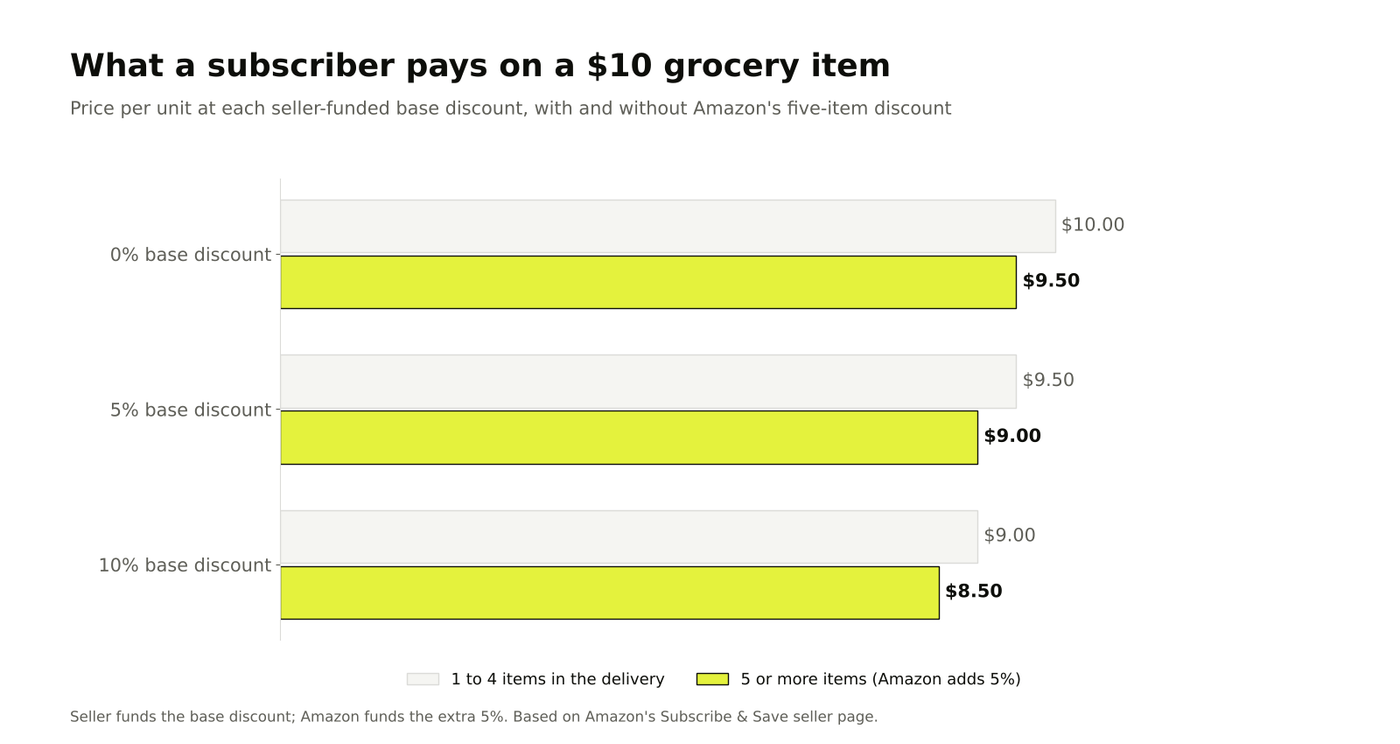
What a shopper pays at each discount level on a $10 item. Source: 9AM, based on Amazon's discount rules.
Subscription Sign-Ups and First Orders
A shopper picks Subscribe & Save on your product page and sets a delivery frequency. That checkout creates the first order, called the initial sign-up order in Amazon's terms. This is the order an ad can most directly cause.
Repeat Delivery Orders
After sign-up, Amazon places replenishment orders on the chosen schedule unless the shopper skips, changes or cancels. Those later orders can occur without another ad interaction, so report them separately from new sign-ups.
Base Discount and the Extra Discount for Five or More Items
The seller (that’s you) chooses a base discount of 0%, 5% or 10%. Amazon funds an additional 5% when a shopper has five or more Subscribe & Save subscription orders scheduled for the same delivery day.
Seller-Funded Discounts and Subscribe & Save Coupons
A Subscribe & Save coupon applies to the first delivery of a new subscription. That gives shoppers an extra reason to sign up without applying the coupon to every repeat delivery.
Discount layer | Who funds it | When it applies |
|---|---|---|
Base discount (0%, 5% or 10%) | Seller | Every subscription order |
Five-item discount (5%) | Amazon | Five or more subscription orders scheduled for the same delivery day |
Subscribe & Save coupon | Seller | First subscription order only |
Subscribe & Save Eligibility Requirements for Grocery Products
To join Subscribe & Save, your product must belong to a brand enrolled in Amazon Brand Registry, and the seller (that’s you again!) needs the Brand Representative role, according to Amazon's seller program page.
Amazon then decides eligibility by category, average selling price, sales performance, fulfillment history and in-stock rate.
Three practical points matter most for food brands:
Fulfillment: FBA products are enrolled automatically; merchant-fulfilled products need a request to Seller Support.
Stock: Amazon lists a product being buyable for at least 85% of the past 30 days among its eligibility criteria.
Category: food and grocery products can be eligible, but individual products must meet Amazon's requirements.
Check enrollment in Seller Central under Growth, Explore Programs, Increase conversion, and Subscribe & Save. If an ASIN is missing, check its eligibility and inventory in Manage Products or ask Seller Support.
Why Food Brands Should Report Subscribe & Save Enrollments, First Orders and Repeat Revenue Separately
Report the three numbers separately because each answers a different question. Ad-attributed subscriptions show how many sign-ups Amazon credits to a campaign. First orders show initial sales. Repeat orders and revenue show whether subscribers keep buying over time.
When the three are blended, two errors creep in:
Ads get credit for reorders. Repeat deliveries from older subscribers inflate the revenue next to this month's campaign.
Discounts get credit for loyalty. Some subscribers may have reordered without a discount, so subscription revenue by itself cannot tell you how much the offer added.
The same problem appears when returning buyers lift reported ROAS while new-customer revenue falls (it happens on Amazon and on other channels).
Separate the two before deciding which campaigns deserve more budget.
How to Build Your Report: Subscribe & Save Metrics in Seller Central
Seller Central provides a Subscribe & Save dashboard and forecasting and performance reports. Use them to review subscription activity, deliveries and stock, then read campaign-attributed sign-ups alongside those figures in Amazon Ads.
Active Subscriptions and New Enrollments
The dashboard shows active subscriptions and customer segments, including shoppers who have never subscribed and those whose subscriptions have lapsed.
Review subscription trends alongside your ad calendar, then use Amazon Ads for campaign-attributed sign-ups.
Subscription Sales Split by First and Recurring Orders
Separate initial orders from repeat deliveries where your reports support the split. This gives you a clearer view of immediate sales and the orders that follow.
Reorder Performance and Cancellations
Amazon reports average reorders for subscribers and non-subscribers. Review retention and missed deliveries alongside reorder performance to see where repeat purchases may be falling.
Subscriber Lifetime Value by Customer Segment
Amazon's dashboard reports subscriber lifetime value by customer segment, including catalog spend from one-time purchases and Subscribe & Save orders over the past 24 months. Use the comparison to understand purchase patterns, but it does not by itself prove that the subscription offer caused the difference. Ad-attributed sales answer another question: which sales Amazon credits to an ad interaction.
Subscribe & Save Forecasting Report
The forecasting report provides an eight-week estimate based on existing subscriptions and sales history. Review the performance report and stock data as well to spot missed deliveries and plan replenishment.
Report | Main metric | Decision it informs |
|---|---|---|
Dashboard: subscriptions | Active subscriptions, new enrollments | Whether ads and offers recruit subscribers |
Dashboard: reorder performance | Repeat orders from subscribed and non-subscribed customers | Whether subscribers buy more often |
Dashboard: customer segments | Lifetime value by segment | Compare spend across customer segments |
Performance report | Units shipped, orders missed out of stock | Inventory and pricing fixes |
Forecasting report | Eight-week scheduled deliveries | How much FBA inventory to send |
How to Advertise Subscribe & Save Products Step by Step
Choose products with a regular purchase cycle, set a discount your margin can support, and review sign-ups alongside repeat sales. The nine steps below take you from product selection to inventory planning.
1. Pick Grocery ASINs with a Regular Repurchase Cycle
Choose products shoppers finish and rebuy on a schedule: coffee, snacks, breakfast items and drinks. Skip seasonal flavors and gift packs. Check which storefront each ASIN sells through, since our comparison of Amazon Fresh and Amazon.com ads shows the two behave differently.
2. Check Margin at the Full Stacked Discount
Calculate margin per order at your base discount plus any coupon, after FBA fees. Amazon funds the five-item discount, so only your own base discount and coupons come out of your margin. Drop any ASIN where the discounted order loses money.
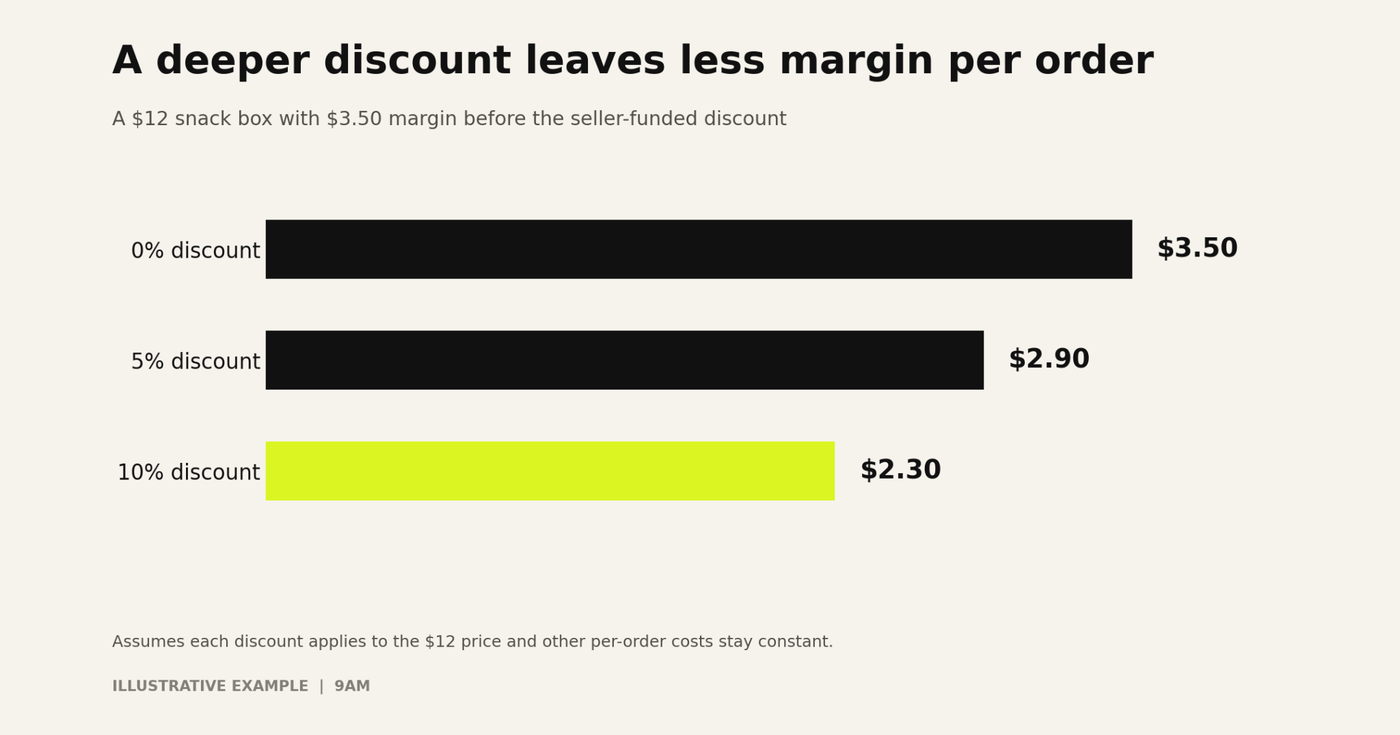
Illustrative margin per order for a $12 snack box at three seller-funded discount levels. Source: 9AM calculation.
3. Set the Subscribe & Save Discount and Any Coupon
Start from Amazon's own data point: a 10% to 15% discount is what it links to higher conversion. To increase conversion on new sign-ups without discounting every repeat order, use a first-order coupon and keep the base discount at 5%. Test one change at a time.
4. Point Sponsored Products and Sponsored Brands at Eligible ASINs
Put subscription-eligible ASINs in their own campaigns, so their results are not averaged with one-off products. Split branded keywords from category keywords: branded searches often reach people who already buy the product, while category searches such as "cold brew concentrate" reach new shoppers.
Amazon Marketing Cloud audiences can raise bids in Sponsored Products and Sponsored Brands, which lets you bid more for shoppers who look like your existing subscribers.
5. Show the Subscription Offer in Ad Creative and on the Detail Page
Name the saving and the convenience in Sponsored Brands headlines, video and images, for example "Save 10% when you subscribe." Make sure the detail page shows the same offer, or the ad promises something the page does not deliver.
6. Report Ad-Driven First Orders and New Enrollments Separately
Track first orders and new subscriptions attributed to each campaign apart from total subscription revenue. Amazon Ads reporting includes a Subscribe & Save subscriptions metric for supported campaign types, counting subscriptions attributed to an ad interaction.
7. Track Cancellations and Skipped Deliveries by Sign-Up Cohort
Group subscribers by the month they signed up and by the campaign that recruited them. Then track how many remain active after one, three and six months. A campaign that recruits subscribers who cancel after one delivery is buying discounted single orders.
A simple cohort table is enough to start. The figures below are illustrative:
Sign-up cohort | Source | New subscribers | Active after 1 month | Active after 3 months | Active after 6 months |
|---|---|---|---|---|---|
March | Sponsored Products, branded | 400 | 88% | 70% | 55% |
March | Sponsored Brands video | 250 | 80% | 58% | 41% |
March | First-order coupon only | 300 | 72% | 45% | 30% |
Read each row from left to right. In this example, the coupon recruited plenty of subscribers and kept the smallest share, so judge it on cost per subscriber still active after six months.
8. Credit Repeat Revenue to the Campaign Cohort That Started It
Assign repeat orders back to the cohort that created them, over a fixed window such as six months. Keep that window the same across campaigns, a point we cover in attribution windows.
This shows each campaign's full value without letting this month's ads claim last year's subscribers.
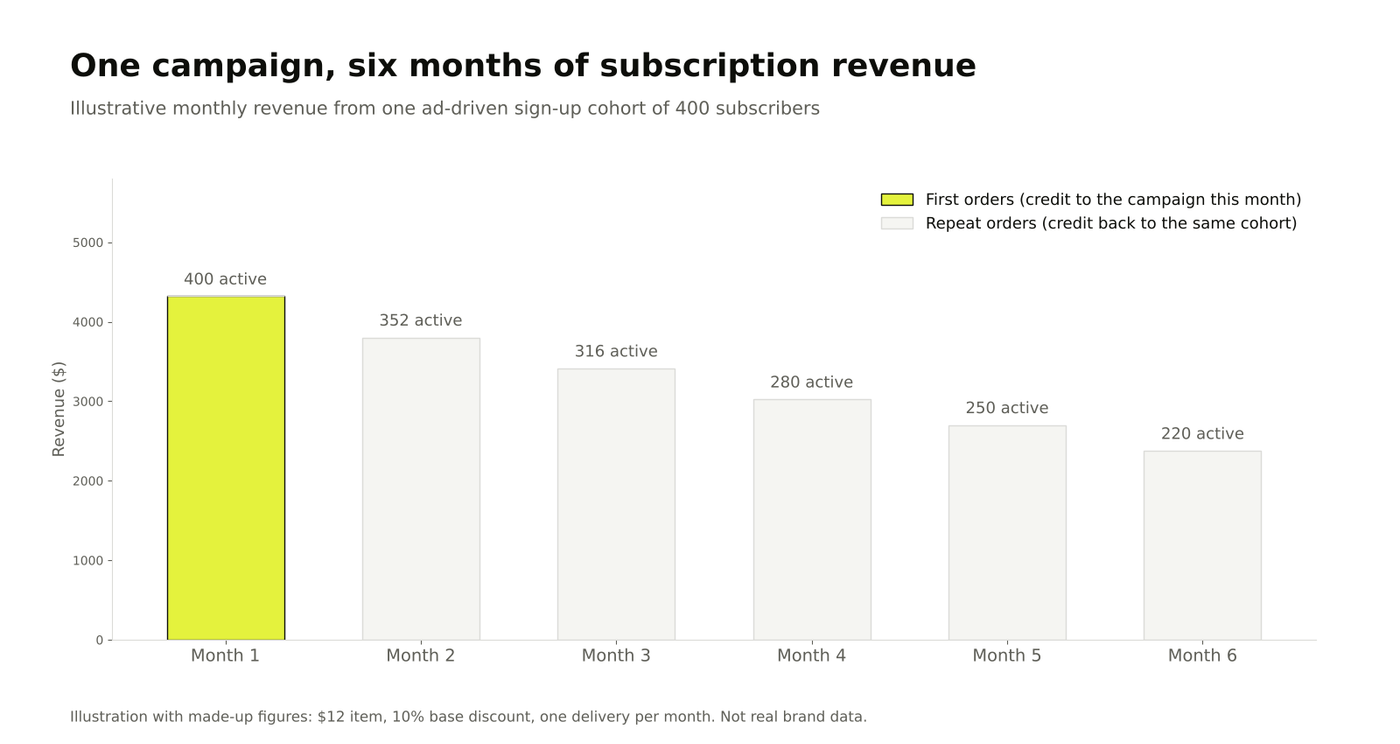
Illustrative monthly revenue from a hypothetical sign-up cohort: first orders in month one, followed by repeat orders over six months. Source: 9AM illustration.
9. Keep FBA Inventory Ahead of Forecasted Subscription Demand
Check projected subscription demand before scaling ads and keep enough inventory for both subscribers and other buyers.
Amazon says that when an offer is unavailable for more than seven days, it may transfer associated subscriptions to an identical, available offer from the same seller under its automatic-enrollment rules.
A stockout can still interrupt deliveries, so build a buffer that fits your lead times and demand.
How to Calculate the Value of a Subscribe & Save Customer
The value of a subscriber is the margin from the first order plus the margin from expected repeat orders, minus what it cost to acquire them:
Subscriber value = (1 + expected repeat orders) × margin per order after discount − ad cost per new subscriber
Let’s take an example with round numbers: a $12 snack box earns $3.50 margin per order before discount. At a 10% base discount, margin drops to $2.30 per order. If the average subscriber takes five repeat deliveries and costs $8 in ads to acquire, the subscriber is worth 6 x $2.30 - $8 = $5.80.

In this illustrative example, the subscriber covers the $8 acquisition cost after three repeat orders. Source: 9AM calculation.
Replace the illustrative inputs with your own: margin from finance, repeat orders from your cohort data, and ad cost per new subscriber from step 6.
Subscribe & Save Programs Beyond Amazon for Food Brands
Amazon is not the only retailer with recurring grocery orders. Walmart's subscriptions let shoppers pick a delivery cadence from one week to six months, and its subscription terms cover fresh grocery, dairy and frozen items with a delivery window.
Brand sites can also sell subscriptions directly, which gives the brand the customer data Amazon keeps. The trade-off is reach and convenience, which we weigh in our piece on food ecommerce ads. Apply the same three-number reporting wherever subscriptions run.
Common Subscribe & Save Advertising Mistakes Food Brands Make
Counting repeat orders as ad revenue. Report this month's ads on new enrollments and first orders only.
Running out of stock. Stockouts skip deliveries and can move subscriptions to another offer. Plan stock against the eight-week forecast.
Discounting everything at 10%. Use a first-order coupon to win sign-ups and keep the base discount lower where margin is thin.
Enrolling slow-moving SKUs. Products bought a few times a year bring few repeats and still carry the discount.
Ignoring cancellations. A rising sign-up count with flat active subscriptions means the program is leaking.
Build Repeat Grocery Revenue on Amazon with Paid Media
Subscribe & Save works best when it is planned as a customer acquisition program with a long payback. Ads recruit subscribers, the discount keeps them, and inventory keeps them from leaving.
Start by splitting your current subscription revenue into enrollments, first orders and repeat orders for the last six months. That one table shows which campaigns built lasting revenue.
At 9AM, we run Amazon Ads for food brands with cohort reporting built in, so budget keeps moving toward the products customers reorder.
Book a strategy call today to plan Amazon Ads, discounts and inventory around subscription cohorts, and keep improving them quarter after quarter.
Frequently Asked Questions
How much does Subscribe & Save cost sellers?
There is no extra program fee; sellers pay standard selling and FBA fees. The real cost is the discount you fund, 0%, 5% or 10% per order, plus any Subscribe & Save coupon. Amazon pays the extra 5% on orders of five or more items.
Does a stockout cancel Subscribe & Save subscriptions?
A stockout can interrupt a scheduled delivery. Amazon says that if an offer is unavailable for more than seven days, associated subscriptions may transfer to an identical, available offer from the same seller under its automatic-enrollment rules. Check inventory and the current program terms to protect scheduled orders.
Can you run coupons on Subscribe & Save products?
Yes. A Subscribe & Save coupon applies to the first subscription order only, so it can lift sign-ups without lowering the price of later deliveries. The product needs an active Subscribe & Save offer first.
How long until repeat Subscribe & Save orders show in reports?
The first repeat order arrives after the interval the shopper picked, often a month or more for pantry items. Judge a campaign's repeat revenue after at least three delivery cycles, and read sign-ups and first orders in the meantime.
About Corentin Grisoni
Corentin Grisoni helps DTC and wellness brands turn paid media into a connected growth system. As Retail Media Lead at inBeat Agency, he works across Amazon, Meta, TikTok, and Google to build omnichannel campaigns that are measurable, scalable, and tied to business outcomes.
His work brings together retail media strategy, paid social and search, attribution modeling, UGC, and performance creative. He focuses on helping retail, technology, and wellness brands understand where their media budget is working and create a system that compounds what performs.
More from Corentin Grisoni